
What Time Should I Post on Instagram: Your Guide to Peak Engagement
Discover what time should i post on instagram for peak reach with data-backed tips and proven posting strategies to boost engagement.
Figuring out the best time to post on Instagram can feel like trying to hit a moving target. But it's not a complete guessing game. Broadly speaking, you'll find the most success on weekdays during the lunch rush (11 AM - 1 PM) and after work (6 PM - 9 PM).
Think of those time slots as a solid starting point. However, the real magic happens when you pinpoint the exact times your unique audience is scrolling.
The Million-Dollar Question of Instagram Timing
You’ve poured your heart into crafting the perfect Reel or carousel, but its success isn’t just about the content. When you hit "Publish" is just as crucial.
Imagine the Instagram algorithm as the audience at a premiere. When your post goes live to a full house—meaning, most of your followers are online—it gets immediate applause in the form of likes, comments, and shares.
This initial wave of interaction, what we call engagement velocity, is a massive signal to Instagram that you've shared something good. The algorithm then rewards you by pushing your post to more of your followers and even giving it a shot at the Explore page. Posting at the wrong time is like performing to an empty theater; even an award-worthy performance can fall flat.
Finding Your Starting Line: General Posting Times
Before you can fine-tune your schedule, you need a baseline. Industry-wide benchmarks are perfect for this. They give you a data-backed starting point so you're not just posting randomly and hoping for the best.
Here’s a quick-reference table of those peak times to get you started. Think of this as your first step before diving into your own account's specific data.
General Best Times to Post on Instagram (Your Local Time)
Day of the Week | High-Engagement Time Slots |
|---|---|
Monday | 11:00 AM - 1:00 PM, 7:00 PM - 9:00 PM |
Tuesday | 10:00 AM - 2:00 PM, 6:00 PM - 9:00 PM |
Wednesday | 9:00 AM - 12:00 PM, 6:00 PM - 8:00 PM |
Thursday | 9:00 AM, 12:00 PM, 7:00 PM |
Friday | 11:00 AM - 1:00 PM, 5:00 PM - 7:00 PM |
Saturday | 10:00 AM - 1:00 PM |
Sunday | 10:00 AM - 2:00 PM, 8:00 PM - 10:00 PM |
These windows are based on massive studies of user behavior, but remember, they are just a launchpad. Your journey to finding the perfect time slot starts here, but it doesn't end here.
The core idea is simple: Align your posting schedule with your audience's daily digital habits. Your goal is to be present when they are most likely to be scrolling, ensuring your content gets the immediate attention it needs to thrive.
Ultimately, strategic timing is all about maximizing your impact. A great way to measure this is to calculate engagement rate, which tells you how well your content is resonating. When you nail both what you post and when you post it, you've found a powerful combination for growth.
Why Your Post's First Hour is Everything
Think of your new Instagram post like a snowball at the top of a hill. The moment you hit "Publish," you're giving it that first push. If you push it when plenty of people are around to give it a little nudge (a like here, a comment there), it picks up speed and grows. That's a perfect analogy for how the Instagram algorithm sees your content.
The first hour your post is live is make-or-break. Instagram is watching closely to see how people react right away. This initial flurry of likes, comments, and shares is what we call engagement velocity. A post that gets a lot of action fast sends a powerful signal to the algorithm: "Hey, people love this!"
And what does Instagram do with content it thinks people love? It rewards it. Your post gets shown to more of your followers, gets a shot at landing on the Explore page, or climbs higher in the Reels feed. A slow start, on the other hand, means your snowball fizzles out. Your post gets buried before most of your own audience even has a chance to see it.
Recency and the Race for Attention
Even though the old-school chronological feed is a thing of the past, recency still matters. A lot. The algorithm has a bias for what's new, assuming it's more relevant to users right now. When your followers open the app, they're far more likely to see content posted in the last few hours than something from yesterday.
This creates a serious race for attention. If you post at 3 AM when your audience is sound asleep, your content is already stale by the time they start their morning scroll. It’s immediately forced to compete with all the fresh content from creators who knew when their audience would be online. Getting the timing right means you show up at the top of the feed, not the bottom.
The Takeaway: Your post’s initial performance pretty much dictates its fate. A strong first hour kicks off a chain reaction: high engagement brings more visibility, which then drives even more engagement.
This is exactly why figuring out your audience’s daily routine isn't just a good idea—it's essential. Of course, perfect timing can't save bad content. It's crucial to pair your scheduling strategy with high-quality posts, and exploring new creative avenues like Instagram-themed AI photography can give you an extra edge.
The Costly Time Zone Trap
One of the most common and damaging mistakes I see is posting based on your local time, completely forgetting about where your followers actually live. Let's walk through a real-world scenario to see how this backfires.
Practical Example: The NYC Creator
The Creator: A fashion blogger living in New York (EST). Her own Instagram Insights tell her that her local followers are most active around 9 PM EST.
The Audience: But here's the catch—a huge chunk of her most engaged followers, about 40%, are in London (GMT).
The Mistake: She religiously posts at her personal peak time of 9 PM EST.
So what's the big deal? Well, when it’s 9 PM in New York, it's a sleepy 2 AM in London. By the time her UK audience wakes up and starts scrolling around 8 AM their time, her post is already six hours old. It's been buried under a mountain of fresh content from European creators who posted when their audience was actually awake.
By ignoring time zones, she's accidentally making her content invisible to almost half of her best followers. The fix is to dive into audience demographics and schedule posts that hit the sweet spot for her largest audience segments—even if it feels like a weird time to post locally. This is where scheduling tools become a total game-changer.
Find Your Best Times in Your Own Instagram Insights
Generic advice on when to post is a great starting point, but it's not the whole story. The real secret to figuring out the best time to post on Instagram is already waiting for you inside your own account’s data. It’s time to stop guessing and start looking at your Instagram Insights.
Think of it this way: general posting times are like a city-wide weather forecast, giving you a broad idea of what to expect. Your Instagram Insights, on the other hand, are like a hyperlocal weather app for your specific neighborhood. It shows you exactly what’s happening with your audience, right now.
This data is the most reliable information you'll find. Your account's analytics will always be more accurate than a broad industry report because they reflect the unique habits of the community you’ve actually built. For a closer look at what these metrics can tell you, check out our guide on what social media analytics can reveal about your audience.
How to Get to Your Audience Activity Chart
Getting to this data is simple, as long as you have a Business or Creator account. If you're still on a personal profile, it's worth making the free switch just to unlock these powerful tools.
Here’s exactly where to find your data:
Head over to your Instagram profile page.
Tap on your Professional Dashboard, which you'll find right under your bio.
Under "Account Insights," tap See all.
Choose Total Followers.
Scroll down to the very bottom to find the Most Active Times chart.
This little chart is where you'll find out the exact days and hours your audience is scrolling through Instagram.
How to Read the Activity Charts
Once you’re in the "Most Active Times" section, you'll see two different bar charts. The first one shows you which days are busiest, and the second breaks it down by the hour. This is where you can start connecting the dots between your followers' behavior and your own posting schedule.
Here’s a look at what the audience activity chart looks like inside the app.
This visual gives you a clear snapshot of when your followers are most often using Instagram.
So, how do you make sense of it? Just look for the tallest blue bars—those are your peak times. For example, your chart might show that activity is consistently high on Wednesdays. If you switch to the hourly view, you might see the bars are tallest between 6 PM and 9 PM.
That’s your golden window. Your own data is telling you that the biggest chunk of your audience is online and ready to see your content during that three-hour slot on Wednesdays. An insight like that is way more powerful than any generic recommendation.
You might also spot other patterns, like Mondays being quiet until the evening or a surprising spike on Saturday mornings. Every peak and valley is a clue. Treat this chart like a treasure map where the highest points mark the best spots for engagement. When you line up your posting schedule with these data-backed peaks, you’re making sure your content gets in front of the most people the moment they’re ready for it. This gives every post a much better shot at success right from the start.
A Simple Experiment to Confirm Your Best Times
Your Instagram Insights data gives you a fantastic head start. Think of it as an educated guess—a solid hypothesis—about when your audience is listening. But to be absolutely sure, you need to turn that guess into a fact.
Running a small experiment is the single best way to lock down your optimal posting times. It pulls you out of the guessing game and gives you hard evidence to build your strategy on. You don't need fancy tools, just a simple plan and a way to track what happens.
This is the path you'll take, right inside the Instagram app, to find the data you need.
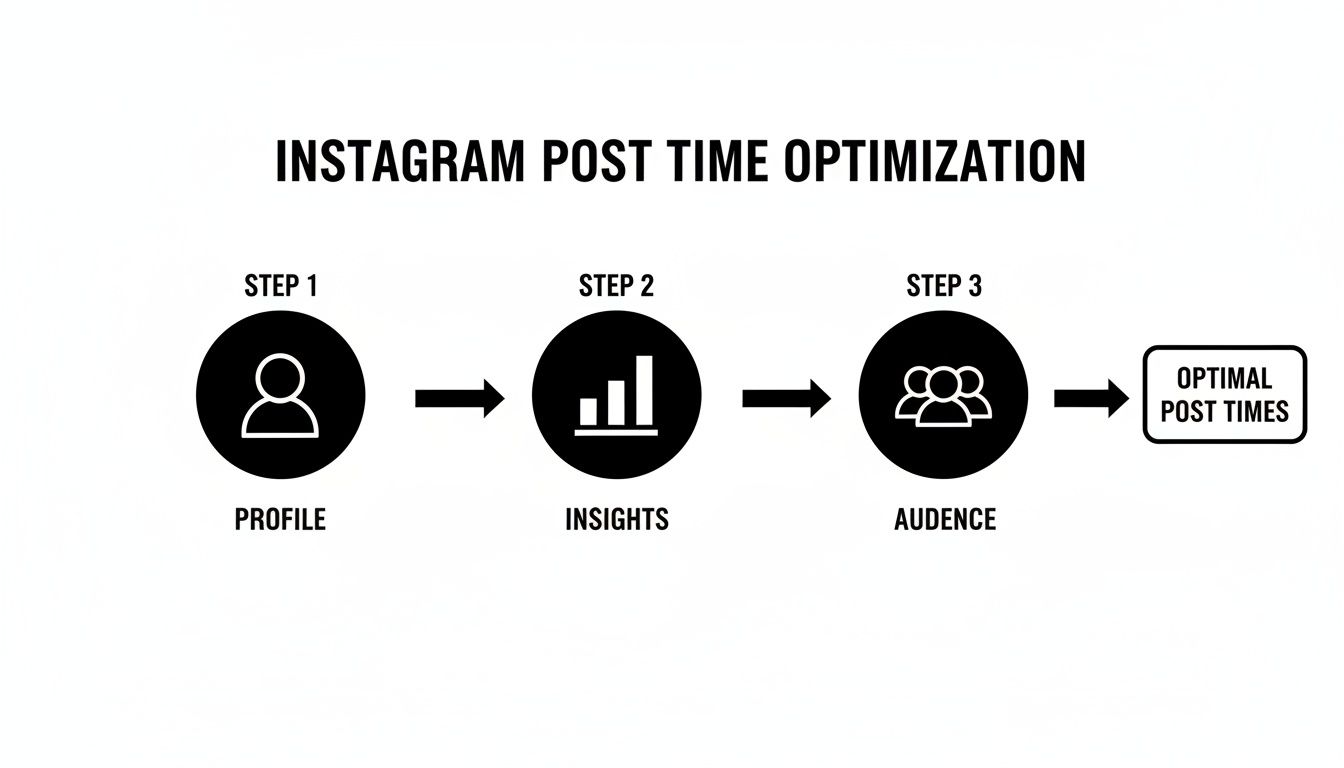
It all starts on your profile. From there, you'll jump into your Insights, then into the Audience tab to see exactly when your followers are most active. This is your starting line.
The Four Steps to A/B Testing Your Post Times
A/B testing sounds technical, but it’s really just comparing two options to see which one works better. Here’s a straightforward way to test your Instagram posting times.
Start with a Question: Look at your Insights and form a specific, testable question. Don't just vaguely say, "I'll try posting in the evening." Get precise. Something like: "I bet my carousel posts will get more saves if I post at 7 PM on Tuesdays instead of my usual 9 AM."
Keep Your Content Consistent: For the test to be fair, you need to compare apples to apples. You can't pit a high-effort Reel against a quick graphic and expect a clean result. Test two similar carousels, two similar Reels, or two similar single-image posts.
Schedule and Go Live: Post your two pieces of content in the same week. Post A goes out at your old time (e.g., Tuesday at 9 AM), and Post B goes out at your new, hypothesized best time (e.g., Tuesday at 7 PM). Keeping it within the same week helps avoid weird variables like holidays or major news events throwing off your results.
Track and Analyze: Give each post 24 to 48 hours to breathe, then check the numbers. Zero in on the metrics that actually matter for your goals—reach, likes, comments, and especially shares and saves. The winning time slot is the one that consistently performs better. If you need a refresher on what to track, you can learn more about how to measure social media ROI and connect your efforts to real business goals.
A/B Test Schedule and Results Tracker
To keep things organized, use this simple tracking template. It'll help you compare post performance at different times and pinpoint your true peak engagement windows without getting lost in spreadsheets.
Post Content | Day/Time Posted | Reach | Likes | Comments | Shares/Saves |
|---|---|---|---|---|---|
Carousel A | Tuesday @ 9 AM | 2,105 | 155 | 12 | 23 |
Carousel B | Tuesday @ 7 PM | 3,450 | 280 | 25 | 48 |
Looking at the example above, the 7 PM slot is the undisputed winner. It drove way more reach and engagement across the board.
This simple test gives you concrete proof of what works. It empowers you to make smarter, data-driven decisions that will consistently boost your performance over the long haul.
Automate Your Schedule for Perfect Timing Every Time
So you’ve done the hard work. You’ve dug through your Instagram Insights, run your A/B tests, and finally figured out those golden hours when your audience is scrolling. But here’s the thing: knowing when to post is only half the battle.
The real challenge is actually hitting those perfect times day in and day out, without being chained to your phone. This is where automation tools come in and change the game.
Think of a scheduling tool as your personal assistant. Its only job is to press "Publish" at the exact right second, whether you’re stuck in a meeting, fast asleep, or unplugging on vacation. This kind of consistency sends a powerful signal to both the Instagram algorithm and your followers.
The Power of Set It and Forget It
The beauty of automation is simple: it lets you batch your content creation and schedule everything in one go. You can block off a few hours once a week to plan, write, and load up all your posts.
Once they're scheduled, the tool takes over. Your content goes live during those peak engagement hours you worked so hard to find, meaning you never miss a chance to connect with your audience when they're most receptive.
By scheduling your posts, you separate the act of creating from the act of publishing. This shift frees up an incredible amount of mental energy and guarantees your content strategy runs like clockwork, no matter what your day looks like.
This approach is an absolute lifesaver for anyone managing an audience scattered across different countries.
Master Multiple Time Zones Effortlessly
What do you do when your Insights show one group of followers in London and another in Los Angeles? Trying to post manually for both peak times is a logistical nightmare. It’s a classic problem, and automation is the perfect solution.
A good scheduling platform can automatically post based on your audience's local time zones. You can schedule one post for 8 PM in London and another for 8 PM in Los Angeles, and the system publishes each one when the clock strikes eight in that specific region.
Here's how a global brand would handle it:
The Challenge: A fashion brand in Paris has a huge following in Europe and North America. Their data shows peak engagement happens at 7 PM CET and 7 PM PST.
The Manual Way: A social media manager would have to log in at 7 PM in Paris, then wake up at 4 AM the next morning to catch the 7 PM Los Angeles slot. It's completely unsustainable.
The Automated Way: The manager simply schedules both posts in their tool, setting one for 7 PM CET and the other for 7 PM PST. The platform does the rest, hitting both peak windows perfectly.
This makes sure every segment of your audience sees fresh content when they’re most likely to engage, maximizing your reach without you lifting a finger. If you want to go deeper, our guide on how to automate social media posts lays out even more advanced strategies.
Why Consistency Wins on Instagram
Beyond just saving you a ton of time, automation builds the kind of consistency the Instagram algorithm loves. When you reliably show up during high-traffic windows, you train both the algorithm and your audience to expect content from you. This predictability is a huge factor in driving long-term engagement.
Posting on Instagram isn't rocket science, but getting the timing right can seriously accelerate your growth. This is especially true on Tuesdays, where aggregated data shows that 9 a.m.–10 a.m., 12 p.m.–2 p.m., and 5 p.m.–7 p.m. have become engagement goldmines. By Tuesday, people are settled into their weekly routines, and their scrolling habits during their morning coffee, lunch break, and evening wind-down become incredibly predictable.
Tools like NicheTrafficKit take this a step further. They don't just schedule your posts; they help you create and optimize the content, too. By combining AI-powered content creation with smart scheduling, you can build a complete system that turns your Instagram strategy into a well-oiled growth machine.
Answering Your Top Questions About Instagram Post Timing
Even with the best data in hand, real-world questions always come up when you're trying to nail down your Instagram schedule. Let's tackle some of the most common ones with straightforward, practical answers to help you post with total confidence.
How Often Should I Post on Instagram?
This is a big one, but the answer is simple: consistency trumps frequency, every time.
Posting three high-quality, engaging pieces of content per week at your proven peak times will do far more for your growth than throwing seven mediocre posts up at random hours. The Instagram algorithm rewards creators who show up predictably.
Actionable Insight: A fitness coach could decide their sustainable schedule is a "Motivation Monday" graphic, a "Workout Wednesday" Reel, and a "Flexible Friday" carousel. They post each one consistently at 7 PM when their audience is home from work. This builds a reliable habit for their followers.
Do Posting Times Differ for Reels, Stories, and Posts?
Absolutely. Think about how people use each format, and it starts to make perfect sense.
Feed Posts & Reels: These are your showstoppers. Their success depends on getting a strong burst of likes, comments, and shares right after you post. Hitting your audience's peak activity hours is non-negotiable if you want the algorithm to show them to more people.
Stories: Stories are more casual and have a 24-hour lifespan, making them great for keeping the conversation going all day. But if you have a really important Story—like a big announcement or a product drop—post it just before your audience's peak time. That way, it’ll be one of the first they see when they open the app.
Practical Example: A local bakery finds its peak time is 12 PM. They post a beautiful Reel of a new cake at exactly 12 PM. But throughout the day, they use Stories to post quick polls ("Which flavor do you want to try?"), behind-the-scenes clips, and reminders, keeping their brand top-of-mind without flooding the main feed.
What if My Audience Is in Multiple Time Zones?
This is a great problem to have—it means you're going global! The first thing you need to do is jump into your Instagram Insights and pinpoint your top two or three audience locations.
Once you know where most of your followers are, you have a couple of smart options:
Split the Difference: Find a posting time that works as a compromise. For example, a time that catches the late-night scrollers in New York and the early-morning commuters in London.
Prioritize and Rotate: Dedicate different days to different time zones. Post during peak evening hours for your US audience on Monday, your European audience on Wednesday, and your Australian audience on Friday. This is where a scheduling tool really shines, managing that complex calendar for you so you don't have to.
How Long Does It Take to Find My Best Posting Time?
You can get a solid, data-backed answer surprisingly quickly—usually within 2 to 4 weeks.
Start with the general best times for the first week. For week two, dig into your own Insights to make some initial adjustments. Then, spend another week or two A/B testing your best guesses to see what the data really says.
Just remember that audience habits change. Make a habit of peeking at your analytics every few months to make sure your schedule is still optimized.
Ready to stop guessing and start growing? NicheTrafficKit uses AI to research, create, and publish your content at the perfect time for every platform, turning hours of weekly work into just minutes. Start your free trial today and see the difference automation makes.
