
Boost: how to get more views on youtube fast
Discover practical strategies to boost your channel: how to get more views on youtube with proven SEO, thumbnails, and engagement tips.
If you want more views on YouTube, you have to stop thinking like a creator and start thinking like a search engine. Your first job is to build a solid foundation so the algorithm knows exactly what your video is about. This means crafting discoverable titles, irresistible thumbnails, and keyword-rich descriptions that give every video a fighting chance.
Get these fundamentals right, and you're no longer just hoping for views—you're engineering them.
Building Your Foundation for YouTube Discovery
Before anyone even thinks about hitting play, your video has to show up. That’s not luck; it's a direct result of how well you set up your content to be understood by YouTube's algorithm. Think of it this way: your channel is a library, and your metadata—titles, descriptions, tags—are the labels on the spine of each book. If they're wrong, nobody finds what they're looking for.
This strategic work starts long before you upload. It's about laying the groundwork with smart keyword research, compelling copy, and visuals that stop someone mid-scroll. Without this foundation, even a masterpiece of a video will just gather digital dust.
This planning phase is where you build the critical elements that help your content get found, get clicked, and ultimately, get watched.
Find Out What People Are Actually Searching For
The fastest way to get views is to answer the questions your audience is already asking. Good keyword research isn't about guessing what's popular; it's about digging into what people are actively typing into the search bar.
Your best friend here is YouTube's own search autocomplete. Start typing a broad topic in your niche—say, "beginner pottery"—and watch what suggestions pop up. These aren't just random phrases; they are real searches from real people. When you see terms like "beginner pottery wheel tips" or "beginner pottery projects without a wheel," you've struck gold. Those are the long-tail keywords you can build entire videos around.
Actionable Insight: Go to an incognito browser window and type in "[Your Niche] for beginners." Note the top 5 autocomplete suggestions. Then, type "[Your Niche] vs" and see what comparisons people are searching for. These are video ideas handed to you on a silver platter.
If you're looking for a more comprehensive approach beyond just SEO, you can find some powerful strategies to grow your YouTube channel fast that work well alongside these foundational steps.
Craft Titles and Thumbnails That Beg to Be Clicked
Your title and thumbnail are a team. They're the one-two punch that has to grab attention in a sea of other videos. Think of them as the billboard for your content—they have to be clear, compelling, and make an instant promise to the viewer.
A killer title mixes searchability with a bit of mystery. It needs to include your main keyword but also spark a "curiosity gap" that makes someone feel like they have to know more.
Weak Title: Pottery Tips
Strong Title: 5 Pottery Mistakes Every Beginner Makes (And How to Fix Them)
See the difference? The second one targets a specific audience, highlights a pain point, and promises a clear solution. It’s not just searchable; it’s magnetic.
The thumbnail’s job is to visually deliver on that promise. It should be bright, high-contrast, and easy to understand even when it's tiny. A human face showing emotion always works well, but a clear shot of the "after" or the final result can be just as powerful. Add a few words of bold, easy-to-read text that echo the title’s core idea.
Pro Tip: Search your target keyword on YouTube and look at the top-ranking thumbnails. What colors do they use? How do they place text? Don't copy them. Your goal is to see what's working and then create something that stands out while still looking like it belongs. For example, if everyone is using blue and white, try a thumbnail with a bold orange or yellow accent to break the pattern.
Write Descriptions That Feed the Algorithm (and Humans)
So many creators treat the video description as an afterthought, but it's a huge missed opportunity. This is prime real estate for feeding the YouTube algorithm crucial information about your content. The first 2-3 sentences are the most important, since they're what viewers see in search results before clicking "show more."
This is where you want to drop your primary keyword naturally and give a quick, punchy summary of the video's value. For that pottery video, you might start with: "Struggling with your first pottery projects? In this tutorial, we're breaking down the 5 biggest pottery mistakes beginners make..."
Below that hook, you can really flesh things out. Add more details, sprinkle in related keywords, create timestamps (chapters) for easy navigation, and include links to your website or other socials. All this extra context helps YouTube categorize your video with pinpoint accuracy.
Here is a simple checklist to run through before you hit publish on any video.
Video Metadata Optimization Checklist
This quick checklist ensures you've covered the essential on-page SEO elements for every video, giving the algorithm everything it needs to promote your content.
Element | Actionable Tip | Why It Matters for Views |
|---|---|---|
Video Title | Include the main keyword upfront. Keep it under 70 characters and make it intriguing. | The title is the strongest signal to the algorithm and the #1 factor for click-through rate. |
Thumbnail | Use a high-contrast, expressive, and clear custom thumbnail. Add minimal, bold text. | A great thumbnail stops the scroll and visually communicates the video's value in milliseconds. |
Description | Write a 200+ word description. Put the main keyword in the first 25 words. | Provides deep context for the algorithm and helps your video rank for secondary keywords. |
Tags | Use 5-10 relevant tags, including your main keyword, variations, and broader topics. | Tags help YouTube understand the nuanced topics in your video and associate it with similar content. |
Chapters | Add timestamps to break the video into logical sections. | Improves user experience, increases watch time, and helps your video appear in Google search results. |
Captions/Subtitles | Upload a custom SRT file for accurate captions. | Makes your content accessible and allows YouTube to index the full transcript, boosting SEO. |
Ticking these boxes for every upload is non-negotiable. With YouTube projected to hit 2.85 billion monthly active users by 2025 and over 14 billion videos already on the platform, you need every advantage you can get to stand out and build a real audience.
Mastering Audience Retention to Boost Watch Time
Getting someone to click is only half the battle. The real challenge—and what tells the YouTube algorithm your content is worth watching—is keeping them around. Watch Time and Audience Retention are the two most powerful metrics you have, directly influencing how often your videos get recommended to new people.
Think of it this way: a high click-through rate proves your title and thumbnail work. But high retention proves your video delivers on that promise. That's the signal that drives long-term growth and gets you more views.
Let's break down exactly how to structure your videos to hook viewers from the jump and keep them glued to the screen until the very end.
Hook Viewers in the First 15 Seconds
You have a tiny window—about 15 seconds—to convince someone they've landed on the right video. This is where most channels see their biggest audience drop-off. Your intro's job is to immediately prove that your title and thumbnail weren't just clickbait.
Forget the long, drawn-out intros with fancy logos. Jump straight into the good stuff. A solid hook must immediately answer the viewer's unspoken question: "What's in it for me?"
Here are a few powerful ways to open your video:
The Problem & Promise: Hit on a pain point your audience knows all too well, then instantly promise the fix. For a video titled "Fix Blurry Photos in 30 Seconds," you could open with: "Tired of getting home and realizing your best shots are slightly blurry? I'm about to show you a simple trick that fixes it in less than 30 seconds."
The Cold Open: Drop the viewer right into the action. If it's a DIY project, show off the incredible final result first. This creates an immediate "wow" factor that makes them stick around to see how you did it.
The Provocative Question: Challenge a common belief to spark curiosity. A productivity video might start with: "What if I told you that 'working harder' is the very reason you're not getting more done?"
The idea is to create an open loop in the viewer's mind. They'll feel compelled to keep watching to find the answer.
Maintain Momentum with Smart Pacing and Editing
Once you've hooked them, you can't let up. Modern attention spans are short, and a video that drags will send viewers packing. You need to maintain momentum with a mix of great content delivery and dynamic visuals.
Your editing is a huge part of this. You don't need wild, over-the-top effects, but you do need to keep things moving.
A great rule of thumb I follow is to change something on screen every 3-5 seconds. This doesn't have to be a major scene change. It can be a subtle zoom, a quick cut to B-roll, a text overlay, or even a simple sound effect.
This technique is often called "pattern interruption." It constantly re-engages the viewer's brain and prevents them from tuning out. If you watch any video from a top creator like MrBeast, you'll see this in practice—every few seconds, a new visual or sound keeps the energy high.
Use Chapters and Playlists to Maximize Watch Time
Keeping people engaged isn't just about one video; it's about maximizing the entire viewing session. Two of the most underrated tools for this are video chapters and playlists.
Video Chapters, which you create by simply adding timestamps to your description (e.g., 00:00 Intro, 01:15 Tip 1), do more than just help viewers find things. They provide a clear roadmap of your content, which can surprisingly increase retention. Someone who might have otherwise clicked away can see a future topic that catches their eye and skip right to it, keeping them on your video longer.
Playlists are your secret weapon for creating a binge-watching experience. When someone finishes a video in a playlist, the next one automatically starts. It’s a seamless way to guide viewers from one video to the next, which can massively increase your channel's total watch time.
Here’s how to put this into practice:
Build logical series: Group your videos into tightly-themed playlists, like "Beginner Guitar Lessons" or "Weekly Marketing Tips."
Order them strategically: Always put your best-performing, highest-retention videos near the start of the playlist to get viewers hooked.
Promote the whole playlist: Use cards and end screens in your individual videos to point people to the start of a relevant playlist, encouraging a longer viewing session.
By focusing on these retention strategies, you turn casual clicks into genuine engagement, sending the best possible signal to YouTube that your channel is worth sharing.
Creating Shareable Content That Connects
Viral videos are rarely happy accidents; they're engineered to be shared. Getting clicks and keeping viewers hooked are big wins, but the real key to explosive growth is making content that people feel an almost instinctual urge to pass along. This kind of content goes beyond simple information and taps directly into powerful human emotions.
The goal here is to shift from merely informing your audience to truly connecting with them. When a video hits an emotional chord—whether it's humor, shock, inspiration, or sheer relatability—your viewers become your best marketers. They share it not just because they enjoyed it, but because it says something about them.
This emotional connection is the secret sauce that transforms a passive viewer into an active promoter, blowing up your reach and bringing in more views.
Decode the Psychology of a Share
People share things for reasons that almost always trace back to self-expression and social currency. Someone might share a funny skit to look witty among their friends, a helpful tutorial to appear resourceful, or a hot take on a controversial topic to signal what they stand for.
To make your content sharable, you have to get inside the head of your viewer and understand the "why" behind the share. Before you even hit record, ask yourself: "What feeling does this video ignite that will make someone want to send it to a friend?"
Funny or Relatable: Does it nail a universal frustration or a genuinely hilarious moment? Example: A video titled "Things Only People Who Work From Home Understand" is instantly relatable and shareable within that community.
Awe-Inspiring or Beautiful: Does it showcase something breathtaking? Example: A time-lapse of a complex painting coming to life or a drone shot of a hidden waterfall. People share these to spread a sense of wonder.
Informative and Useful: Does it solve a real problem, quickly and clearly? Example: A 2-minute video on "How to Perfectly Deseed a Pomegranate" solves a common, annoying problem and provides immediate value worth sharing.
Zero in on one of these core emotional drivers and build your video around it. Make that feeling so strong it's impossible to ignore. For a deeper dive into driving this kind of interaction, our guide on how to increase engagement on social media offers some great complementary tactics.
Learn from the Unstoppable Genres
If you want a masterclass in shareability, just look at the genres that consistently dominate YouTube. It's no coincidence that 8 of the top 10 most-viewed videos of all time are music tracks. 'Baby Shark Dance' has smashed its way to 15.87 billion views. It’s not just music; movie trailers like the one for 'Spider-Man: No Way Home' pulled in 355 million views in a single day. These figures prove that certain content types are experts at building hype and emotional investment. You can find more stats like these at GlobalMediaInsight.com.
These genres are masters of emotional manipulation—in the best way possible. They build insane anticipation, create unforgettable hooks (like a catchy chorus or a shocking plot twist), and deliver a massive emotional payoff in just a few minutes.
You don't need a Hollywood-level budget to put these lessons to work.
A cooking channel can build that same anticipation by showing the stunning, mouth-watering final dish right at the start. A tech reviewer can create a "trailer" for their full review by teasing the most surprising test result. The principle is exactly the same: hook them with an emotional promise and keep them watching for the satisfying payoff.
Tap Into Trends with an Authentic Voice
Jumping on trends is one of the fastest ways to get your videos in front of a whole new audience. YouTube's "Trending" tab and the rising sounds on platforms like TikTok are basically cheat sheets for what people are excited about right now.
But here's the catch: the key is adaptation, not imitation.
Mindlessly copying a trend without adding your own spin makes your content feel hollow and forgettable. The real magic happens when you filter a popular trend through the unique lens of your niche.
Here’s a practical example:
Let's say the "day in the life" video format is trending everywhere.
A Finance Channel could film: "A Day in the Life of a Day Trader."
A DIY Channel could create: "A Day in the Life of a Full-Time Woodworker."
A Gaming Channel might produce: "A Day in the Life of a Pro Esports Athlete."
This strategy lets you ride the wave of a trend's momentum while still delivering the authentic content your subscribers came to you for. It's the perfect way to attract new viewers without alienating your core community.
Let AI and Smart Workflows Scale Your Content
Consistency is the fuel for any successful YouTube channel, but let's be honest—it's also the number one reason creators burn out. Trying to manually research, script, and edit every single video from scratch is a fast track to exhaustion. This is where you can bring in smart workflows and AI tools to completely change the game.
This isn't about letting a robot take over your channel. It’s about delegating the tedious, repetitive work so you can focus on the stuff that actually matters: your unique ideas, your storytelling, and building a real connection with your viewers.
Never Stare at a Blank Page Again
The pressure to come up with one great idea after another is real. Instead of waiting for inspiration to strike, you can build a system that constantly feeds you new, relevant topics. I've found that AI tools are brilliant for this; they can scrape competitor channels, spot emerging trends in your niche, and even spit out a dozen click-worthy titles from a single keyword.
For example, I might prompt an AI assistant with something like: "Give me 20 video ideas for a beginner's sustainable gardening channel. The ideas should focus on common problems and cheap solutions." In seconds, my content calendar is filled with topics I already know people are searching for.
Your job shifts from being an originator to a curator. You get to cherry-pick the best ideas and inject your own personality and expertise into them. To see how this can fit into a larger strategy, our guide on AI for social media marketing breaks down even more ways to use these tools.
Speed Up Your Scripting and Production
Once you've got an idea, scripting can be the next big hurdle. This is another area where AI can give you a massive head start. You can feed it a title and a few bullet points, and it will generate a solid first draft or a detailed outline—complete with a hook, key talking points, and a call-to-action.
And it doesn't stop at scripting. Think about building a whole system around your content. A transcript of your video, for instance, is a goldmine. Using a YouTube video to text converter is a smart, simple workflow that unlocks so much potential. That single transcript can become a blog post, a handful of tweets, or an email newsletter with very little extra work.
Here are a few other ways I’ve seen AI speed up the actual creation process:
Batch Creation: Use AI to generate scripts and outlines for five videos in one go. Then, block out one day for filming and another for editing. Done.
Faceless Videos: There are tools now that can create entire videos for you using stock footage, AI voiceovers, and animated text, all from a simple script.
Metadata Magic: For every video, have an AI generate 5-10 optimized titles, descriptions, and tag sets. This makes it incredibly easy to A/B test and see what your audience actually clicks on.
This systematic way of working is how you go from a chaotic, video-by-video grind to a smooth, sustainable content engine. It helps you publish consistently, which is one of the most powerful signals you can send to the YouTube algorithm.
Master Your Schedule with Content Batching
Batching your content is probably the single biggest productivity hack for any creator. It’s all about separating your creative brain from your logistical brain. Instead of bouncing between writing, filming, and editing for one video, you dedicate entire days to a single task.
A typical batching workflow might look like this:
Idea Day: Spend a morning brainstorming and researching topics for the whole month. Actionable Tip: Use a spreadsheet to list video titles, target keywords, and a one-sentence summary for each.
Scripting Day: Get in the zone and write all your scripts or outlines at once.
Filming Day: Set up your gear once and knock out multiple videos in one session. Change your shirt between videos to give each one a distinct look.
Editing Week: Dedicate a block of time to polish all the raw footage.
Once your videos are edited and ready to go, don't just hit "publish." A smart scheduling tool is your best friend here. Dive into your YouTube Analytics, find out when your viewers are most active, and schedule your uploads to go live during those peak hours. Automating this last step ensures your videos get that crucial initial burst of engagement, giving the algorithm a nice little nudge to show your content to more people.
Don't Just Wait for the Algorithm—Go Find Your Viewers
Relying on YouTube's algorithm to do all the heavy lifting is a surefire way to slow your growth. Think of it this way: you wouldn't open a new store and just hope people wander in, right? You’d put up signs, run ads, and tell everyone you know. The same goes for your videos.
To really get more views, you have to actively drive traffic from outside of YouTube. Your channel shouldn't be an island; it should be the central hub of your entire online presence, with every other platform pointing back to it. This means looking at each new video not as a one-and-done project, but as a treasure trove of content you can chop up and share everywhere.
Turn Your Videos into a Content Goldmine
A single long-form YouTube video is packed with smaller, shareable moments just waiting to be discovered. The trick is to slice it up into bite-sized clips that act like trailers for the main feature. This isn't just about efficiency; it's about meeting people where they are, with the content format they prefer.
Let's be real: someone scrolling through TikTok isn't in the mood for a 15-minute deep dive. They want a quick hit of value or entertainment in under 60 seconds.
Create Highlight Reels: Find the most shocking, hilarious, or valuable 30-60 second nugget from your video. Slap on some captions, and end with a clear call-to-action like, "Full video is live on my YouTube channel—link in bio!"
Make Quote Graphics: Pull a powerful one-liner or a key statistic from your video and turn it into a sharp-looking graphic for Instagram or Pinterest. The caption is your space to add context and point people to the full video for the complete story.
Build "Part 2 on YouTube" Teasers: This one is pure gold. Start a story or pose a fascinating question, then cut the clip right at the climax. This creates an "open loop" in the viewer's mind, making them incredibly curious to head over to your channel and see how it ends.
This whole process is about shifting from a creator mindset to a publisher mindset. You're building a system, not just making a video. This diagram shows exactly how you can structure that workflow.
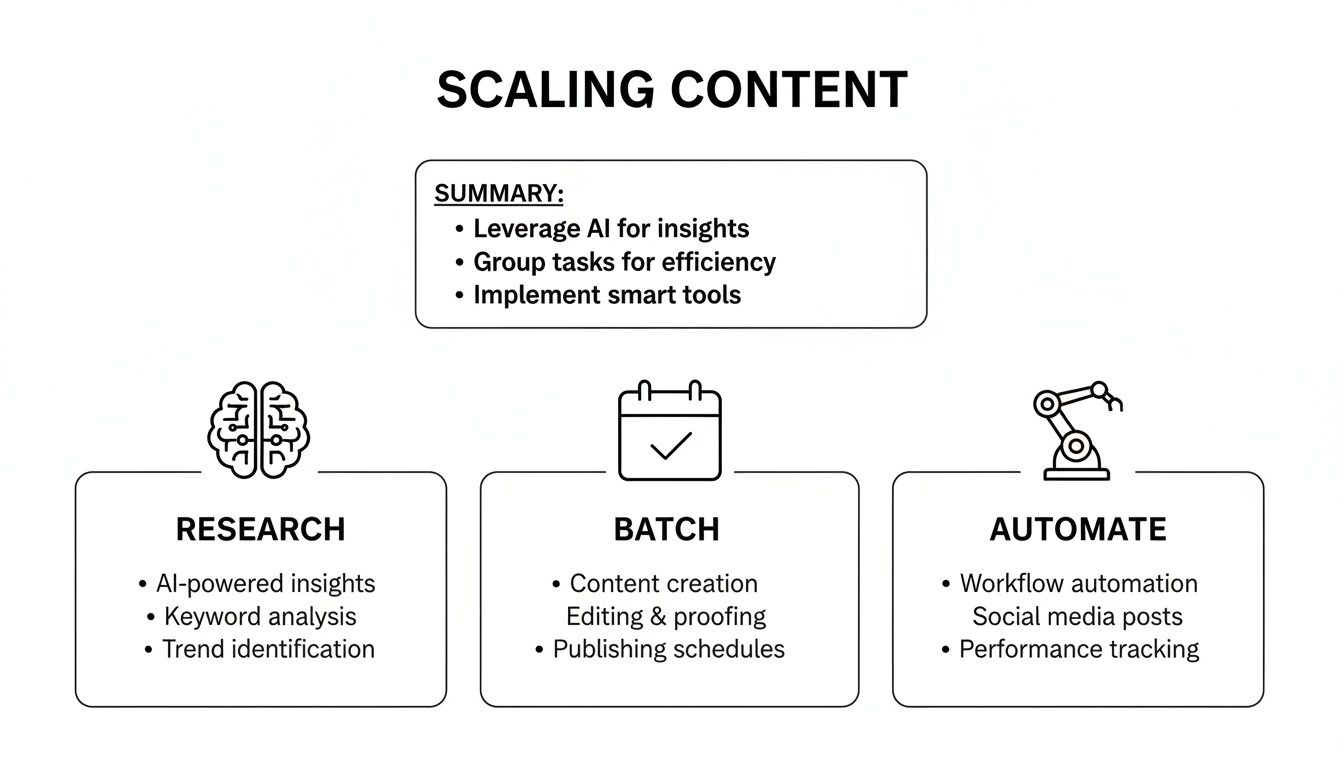
Breaking your process into distinct phases—research, batching, and automation—is how you turn one video into a dozen pieces of micro-content without completely burning out.
A solid repurposing strategy is a game-changer. By tailoring your repurposed clips for each platform, you maximize your reach and create multiple pathways back to your main YouTube content.
Content Repurposing Strategy Matrix
Platform | Repurposed Format | Key Objective |
|---|---|---|
TikTok | 15-60 second vertical video clips (trends, hooks) | Drive curiosity and quick engagement; funnel users to YouTube via bio link. |
Instagram Reels | 30-90 second vertical video highlights with captions | Build brand awareness and community; use "Link in Bio" to direct traffic. |
Vertical "Idea Pins" or static graphics with quotes | Capture search traffic with evergreen tips; link directly to the YouTube video. | |
1-2 minute clip with a professional insight or data point | Establish authority and drive targeted traffic from a professional network. | |
Twitter (X) | Short clip (under 2:20) with a controversial or key point | Spark conversation and generate immediate buzz around the video launch. |
This matrix isn't just a list; it's a blueprint for turning one piece of content into a full-blown marketing campaign.
Tap Into Your Warmest Audience
So many creators forget about the assets they already own: their website, blog, and email list. These are people who already know, like, and trust you. They're your easiest wins.
Embedding your YouTube videos directly into your blog posts is a simple but incredibly effective tactic. When you drop a video into a relevant article, you’re giving your readers another way to absorb the information, which boosts their time on your site. More importantly, you're racking up watch time on your video from an external source.
Remember, a view from your website is just as valuable as a view from within YouTube. It tells the algorithm that your content is engaging enough to hold attention across different platforms, which is a powerful signal for discoverability.
Your email list is even more powerful. It’s a direct line to your biggest fans. Sending out a broadcast the moment a new video goes live is a guaranteed way to kickstart your views. Don't just dump a link and run—tell a quick story about why you made the video and what they'll get out of it. This initial velocity in the first 24-48 hours can make a huge difference in how the algorithm decides to push your video to a wider audience.
Systemize Your Promotional Workflow
Great promotion isn't chaotic. It’s not about scrambling to post everywhere at once. It’s about building a repeatable system that you can execute for every single video without thinking twice.
This is where a content calendar becomes your best friend. Planning your promo activities ahead of time means you never miss a beat. If you're looking for a solid starting point, this guide on how to create a content calendar walks you through the whole process.
Your promo checklist could look something like this:
Publish Day: Blast your email list announcing the new video is live.
Day 1: Post your best teaser clip as an Instagram Reel, TikTok, and YouTube Short, pointing back to the full video.
Day 2: Share a key quote or statistic as a graphic or text post on LinkedIn and Facebook.
Day 3: Find a relevant blog post on your site and embed the full YouTube video.
Day 5: Chop up a different clip from the video and share it to refresh the promotion.
When you have a system like this, promotion stops being a stressful afterthought and becomes a core, predictable part of your strategy. This ensures every video you pour your heart into gets the launch it deserves.
Frequently Asked Questions About Getting More YouTube Views
Even when you've got a solid plan, trying to grow on YouTube can feel like you're constantly second-guessing yourself. Let's tackle some of the most common questions and sticking points that creators run into on their journey to getting more views.
How Long Does It Really Take to Get More Views?
There's no magic formula for this, and anyone who tells you otherwise is selling something. Every channel's journey is unique. But, if you're consistently doing the right things—nailing your SEO, promoting your videos smartly, and making content that people actually stick around to watch—you should start seeing a real uptick in views within 3 to 6 months.
In the beginning, most of your views will trickle in from YouTube search or the "suggested videos" sidebar. As you keep showing up with great content, you'll build a core audience of subscribers who provide a much more stable foundation for long-term growth.
Do Shorts Actually Help My Main Videos Get Views?
Yes, they absolutely do. Think of Shorts as the ultimate discovery tool in your arsenal right now. They're built to reach a massive audience that probably would never have found your channel otherwise.
Use them like mini-commercials for your long-form content. You can either clip a killer highlight from an existing video or create a short teaser for one that's about to drop. This funnels fresh eyes from the Shorts feed directly to your channel, giving all your videos a potential boost.
Actionable Example: Take a 10-minute video on "5 Beginner Investing Mistakes." Pull out the single most surprising mistake, create a 45-second Short explaining just that one point, and end with "I cover four more common mistakes in my full video—link in the comments!"
What Are the Most Important Analytics I Should Be Watching?
If you want more views, you have to know what's working and what isn't. Don't get bogged down in every single metric. Just focus on these three heavy hitters in your YouTube Studio analytics:
Click-Through Rate (CTR): This is simple: out of everyone who saw your video's title and thumbnail, what percentage clicked to watch? If your CTR is low (e.g., below 4%), it's a huge sign that your thumbnail or title needs a rethink.
Average View Duration: This is the ultimate truth-teller. How long are people actually watching your videos on average? If your 10-minute videos are only being watched for 2 minutes, look at your audience retention graph to see where people are dropping off.
Traffic Sources: This report tells you exactly how people are finding you. Is it through YouTube search? Suggested videos? An external site? This is crucial for figuring out which of your promotion strategies are actually delivering results.
When you work on improving these three metrics, you send strong, positive signals to the YouTube algorithm that your content is worth pushing to more people. That leads to more impressions and, you guessed it, more views.
Should I Post More Often or Focus on Higher Quality Videos?
Quality beats quantity, every single time. A single, well-crafted, and properly optimized video will serve you far better in the long run than five videos you rushed out the door. The algorithm—and more importantly, human viewers—reward content that genuinely educates, entertains, or connects.
That said, consistency is still king. The trick is to find a realistic publishing schedule that allows you to create the best possible content you can, whether that's once a week or once a month. This is where creating smart workflows and using automation can be a game-changer, helping you keep up a steady rhythm without sacrificing the quality that gets you views.
Ready to stop the content grind and put your YouTube growth on autopilot? NicheTrafficKit uses AI to research trends, generate platform-specific posts, and publish your content at the perfect time to maximize reach. Reduce your workload from hours to minutes and start scaling your views today. Explore NicheTrafficKit and start your free trial.
