12 Best Social Media Management Tools for Growth in 2025

Discover the 12 best social media management tools for creators, SMBs, and agencies. In-depth reviews, pricing, and actionable advice to boost your ROI.
Navigating the crowded market of social media management tools can feel overwhelming. Every platform promises to save you time and boost your engagement, but the reality is that the best tool is entirely dependent on your specific needs. A solo creator managing three platforms has vastly different requirements than a digital agency juggling twenty client accounts, and a B2B marketer focused on LinkedIn needs a different feature set than an e-commerce brand driving sales on Instagram.
This guide cuts through the noise. We move beyond generic feature lists to provide an in-depth, practical analysis of the top platforms available today. Instead of just telling you what each tool does, we show you how it works for specific use cases. For example, we'll explain how a restaurant can use one tool's visual planner to showcase its daily specials, while a B2B firm can use another's reporting to track which LinkedIn posts generate actual leads. You'll find detailed breakdowns of core features, honest pros and cons, transparent pricing information, and clear verdicts on who each platform is truly built for, from creators and small businesses to large-scale agencies.
Our goal is to equip you with the insights needed to make a confident, informed decision. Each entry includes screenshots for a real look at the user interface and direct links to get started. We’ll compare critical differences in analytics, collaboration workflows, and platform integrations to help you find the one solution that will not just schedule your posts, but actively help you grow. To truly maximize your social media efforts beyond just management, consider exploring other essential tools for content creators that can complement your chosen platform. Let’s find the perfect fit for your workflow.
1. NicheTrafficKit: Best for End-to-End AI-Powered Automation
NicheTrafficKit distinguishes itself from other social media management tools by integrating a powerful, end-to-end AI workflow that goes beyond simple post-scheduling. Its core strength lies in its ability to generate content ideas, create multimedia posts, and automate distribution across multiple platforms based on niche-specific trends and audience behavior. This makes it an invaluable asset for teams looking to maintain a high-volume, high-quality content calendar without a proportional increase in manual effort.
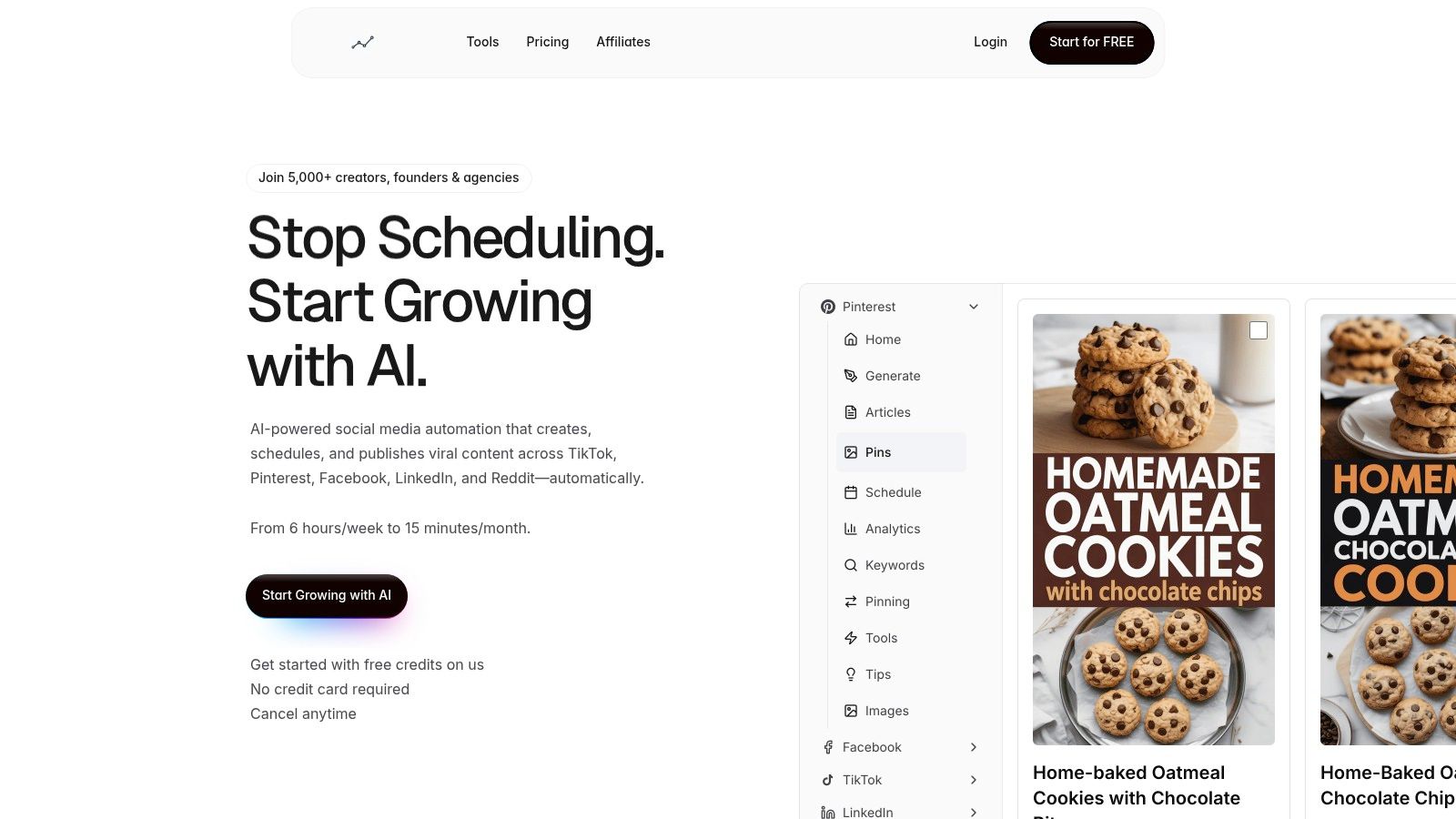
The platform's AI not only suggests what to post but also generates draft captions, suggests relevant hashtags, and can even create basic video clips or image carousels from text prompts. For instance, a real estate agent could input "new listing in downtown Austin" and receive a ready-to-publish Instagram Reel script, a LinkedIn post draft, and a carousel of images with AI-generated captions, all optimized for each platform's audience. For creators specifically focused on video content, exploring resources like the top YouTube automation tools can further enhance efficiency and growth.
Key Features & Verdict
NicheTrafficKit's user interface is clean and workflow-oriented, guiding users from idea to publication seamlessly. While its analytics are solid, they are not as granular as some dedicated analytics platforms. However, its automation capabilities more than compensate for this, making it a top choice for efficiency-focused teams.
Best For: Small to medium-sized businesses (SMBs) and agencies aiming to scale content production without hiring more staff.
Pros: Advanced AI content creation, trend-based scheduling, streamlined multi-platform workflow.
Cons: Analytics could be more in-depth; the AI requires some initial training to perfectly match brand voice.
Pricing: Starts at $49/month for the Starter plan, with Pro and Agency tiers available.
Website: niche-traffic-kit.com
2. Hootsuite: Best All-in-One Suite for Established Teams
Hootsuite is one of the most established and comprehensive social media management tools available, functioning as a true all-in-one command center. Its primary advantage is its mature, robust platform that centralizes scheduling, engagement, and analytics across a vast range of social networks. For teams managing numerous client or brand profiles, Hootsuite’s unified inbox and calendar provide a bird's-eye view, preventing missed messages and ensuring a consistent posting cadence.
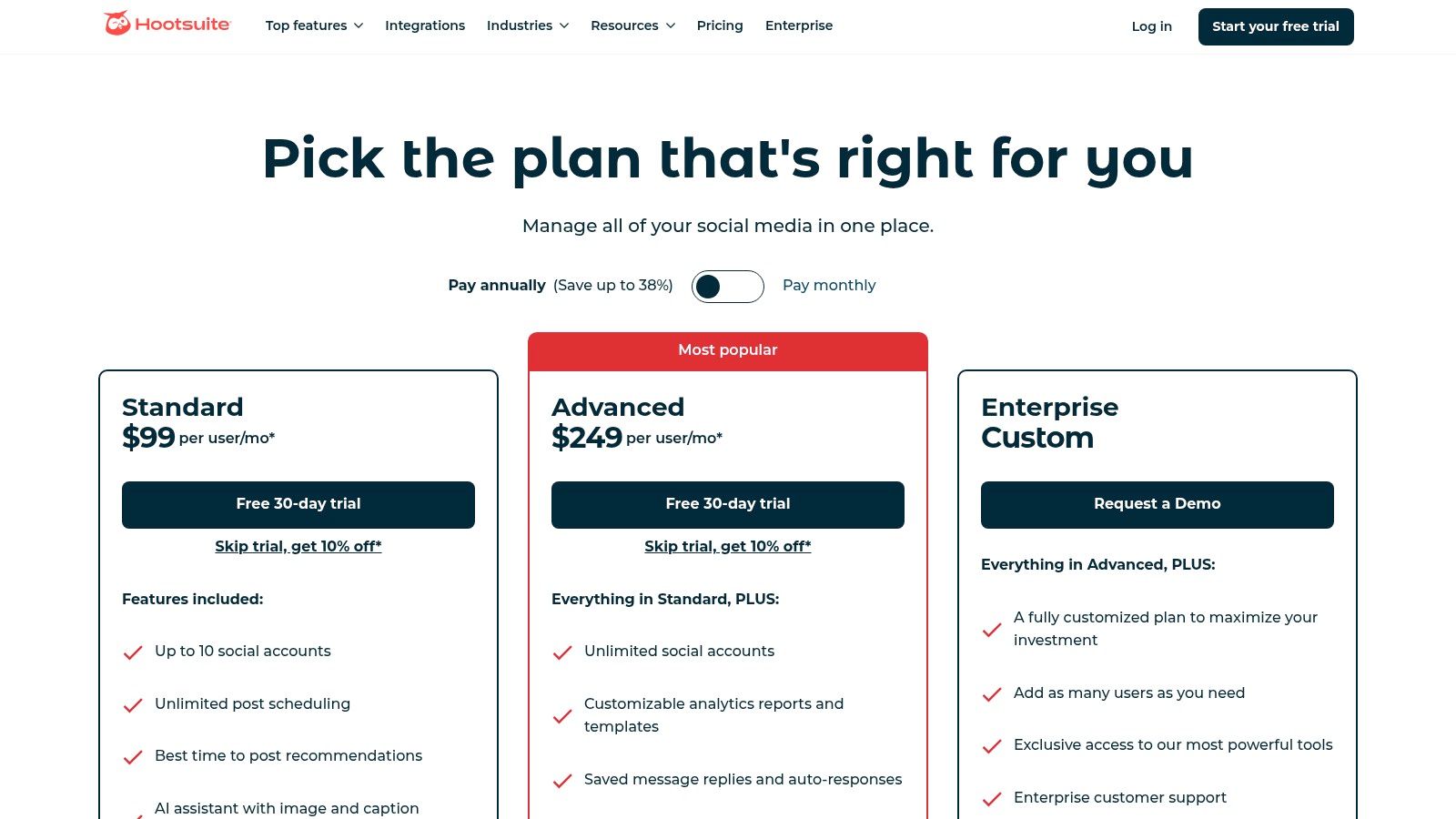
The platform integrates practical AI assistance, such as a caption generator and best-time-to-post recommendations, which helps streamline content creation without replacing strategic oversight. An actionable example is using its "OwlyWriter AI" to create five different caption variations for a single product launch image, then scheduling them to post at optimal times suggested by the platform's analytics. Its extensive app marketplace, featuring integrations like Canva and Adobe Express, allows users to build a customized workflow tailored to their specific needs, making it a highly adaptable solution.
Key Features & Verdict
Hootsuite shines with its predictable, plan-based structure and a feature set that supports both small teams and large agencies. While its interface can feel extensive for a solo creator, its power lies in its scalability and collaborative tools. The analytics provide solid competitor benchmarking, though deeper social listening often requires more expensive plans or add-ons.
Best For: Marketing agencies and in-house teams managing multiple social profiles that need a reliable, feature-rich, and highly integrated platform.
Pros: Mature and extensive feature set, large integration marketplace for custom workflows, generous 30-day free trial.
Cons: Advanced reporting and listening features can require expensive add-ons; the interface can feel complex for beginners.
Pricing: Starts at $99/month for the Professional plan, with Team and Enterprise tiers available.
Website: hootsuite.com
3. Sprout Social: Best for Enterprise-Grade Analytics and Reporting
Sprout Social positions itself as a premium, all-in-one platform designed for organizations that require deep analytics, robust governance, and comprehensive customer care features. Its primary strength lies in transforming raw social data into stakeholder-ready reports, covering everything from paid and organic performance to detailed competitor analysis. This makes it one of the best social media management tools for teams that need to prove ROI and make data-driven decisions.
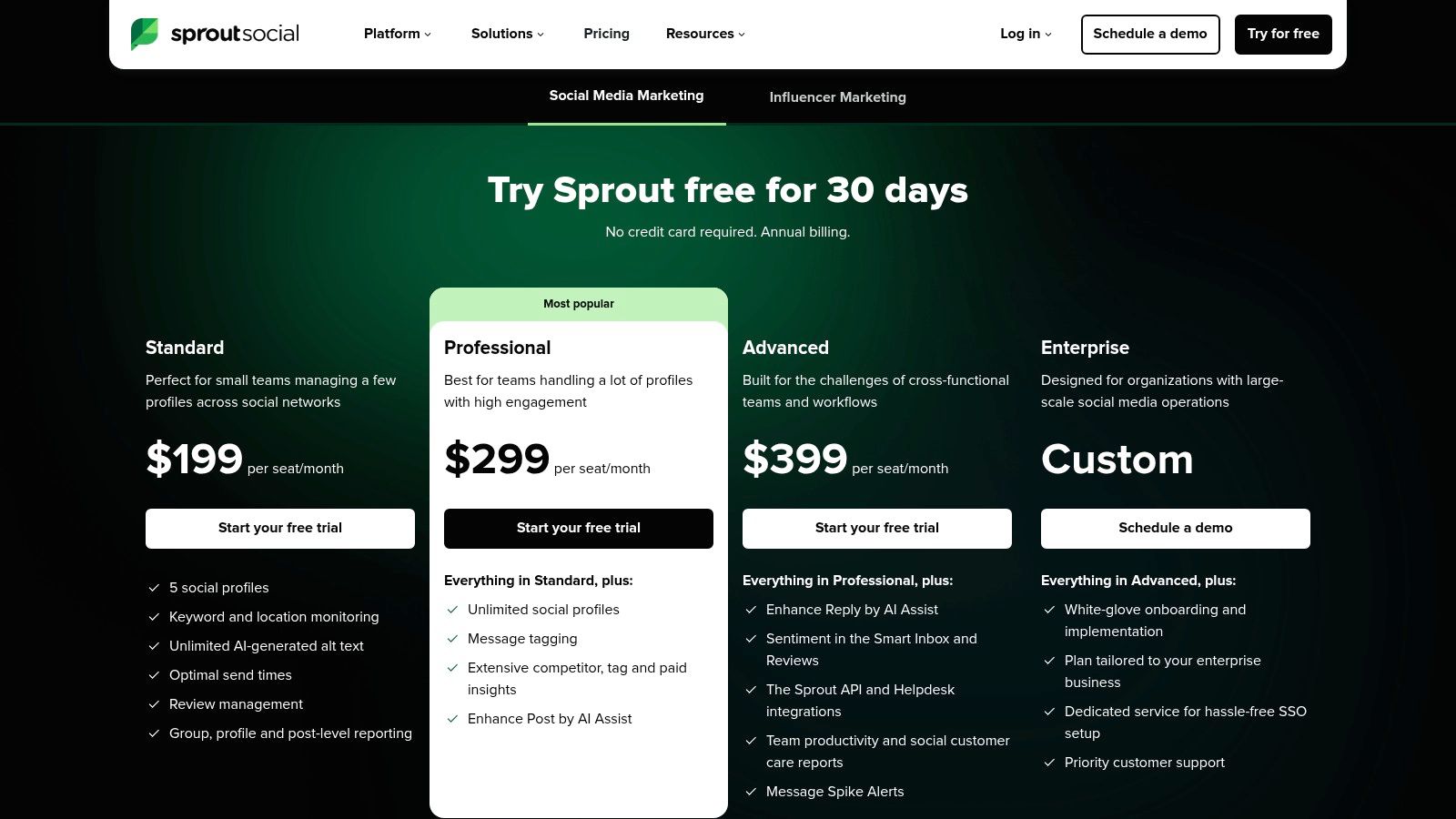
The platform’s Unified Smart Inbox is a standout, allowing teams to tag, filter, and assign incoming messages with custom workflows, ensuring no customer interaction is missed. For example, a support team can create a rule that automatically tags any tweet containing "broken" or "can't log in" and assigns it to a customer support agent for immediate follow-up. For agencies and large marketing departments, this level of organization is crucial, and you can explore more strategies to manage multiple social media accounts effectively. Sprout's AI Assist also helps teams refine their writing and respond more efficiently.
Key Features & Verdict
Sprout Social's interface is polished and professional, reflecting its enterprise focus. The platform excels at providing clarity through its powerful reporting engine, which is arguably its biggest differentiator. While the per-seat pricing model can become costly for growing teams, the investment pays off in governance, security, and analytical depth that few competitors can match.
Best For: Medium to large organizations, B2B companies, and agencies that require sophisticated analytics, team collaboration workflows, and detailed reporting.
Pros: Best-in-class reporting and analytics depth, scales cleanly with roles and permissions, excellent unified inbox for engagement.
Cons: Per-seat pricing adds up quickly for larger teams; advanced features like listening are often costly add-ons.
Pricing: Starts at $249/month for the Standard plan (includes one user), with Professional, Advanced, and Enterprise tiers available.
Website: https://sproutsocial.com/pricing/?utm_source=openai
4. Buffer: Best for Simplicity and Affordability
Buffer has long been a favorite among creators and small businesses for its clean, intuitive interface and straightforward approach to social media management. Its core value lies in its simplicity and affordability, offering a robust free plan and a unique channel-based pricing model that lets users pay only for the accounts they need. This makes it one of the most accessible and best social media management tools for those just starting out or managing a smaller portfolio of social profiles.
The platform excels at core scheduling functionalities, including a first-comment feature for Instagram (perfect for adding hashtags without cluttering the caption) and a simple hashtag manager. Its built-in AI Assistant helps users quickly rephrase copy, generate post ideas, and expand on simple thoughts, streamlining the content creation process. A practical use case is a busy cafe owner who can use the AI to turn a simple phrase like "new latte special" into three distinct, engaging Instagram captions in seconds. For teams looking to explore more advanced automation workflows, understanding the landscape of social media automation tools can provide valuable context for scaling their efforts.
Key Features & Verdict
Buffer’s user experience is famously easy, allowing for rapid onboarding with almost no learning curve. While it lacks the deep, enterprise-level collaboration and approval workflows of more expensive platforms, its combination of a social inbox, clear analytics, and a powerful scheduler provides immense value. This makes it the ideal choice for teams prioritizing ease of use and budget-friendliness.
Best For: Individual creators, startups, and small businesses seeking an affordable, no-frills tool to manage a handful of social channels effectively.
Pros: Generous free plan for up to 3 channels, exceptionally simple UI and fast onboarding, flexible channel-based pricing.
Cons: Collaboration and governance features are lighter than enterprise-focused tools; some advanced analytics require higher-tier plans.
Pricing: A free plan is available. Paid plans start at $6/month per channel.
Website: buffer.com
5. Later: Best for Instagram-First Visual Planning
Later has cemented its position as one of the best social media management tools by focusing on a visually driven workflow, making it a favorite for brands where aesthetics are paramount, particularly on Instagram and TikTok. Its core strength is the visual planner, which allows users to drag and drop media to see exactly how their grid will look, ensuring a cohesive and on-brand feed. This visual-first approach extends to scheduling for other major networks, but its heart remains with image and video-centric platforms.
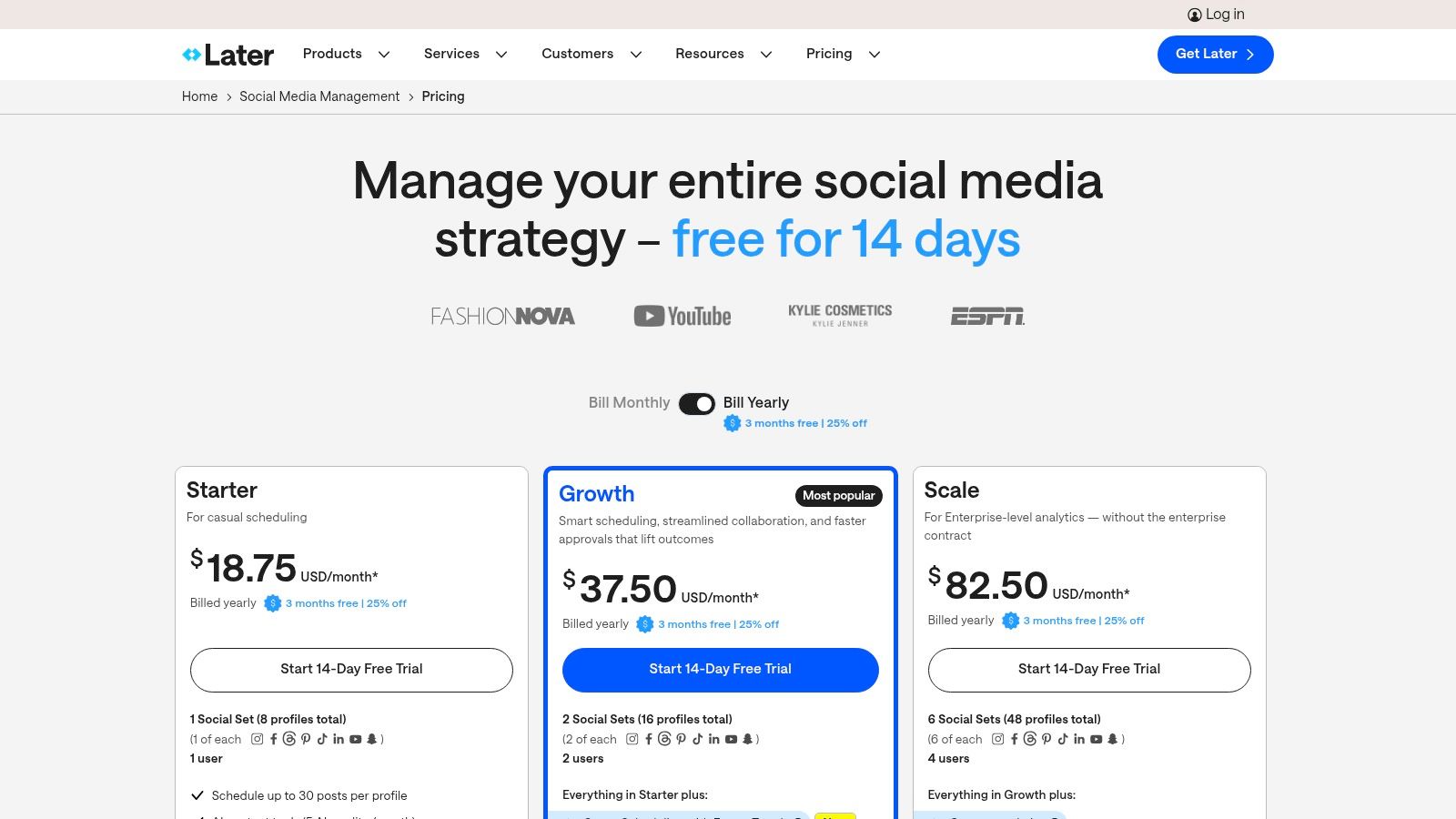
The platform integrates essential features for modern creators and e-commerce brands, including a customizable Link in Bio tool, Instagram product tagging, and a unified inbox for Instagram and Facebook comments. A fashion blogger, for instance, can plan a week's worth of outfits on the visual grid, tag each product directly in the images for shopping, and schedule all posts to go live automatically. While an AI content assistant is available on paid plans, the tool is more about refining a visually planned strategy than end-to-end AI automation.
Key Features & Verdict
Later's interface is clean, intuitive, and built around its calendar, making it easy for solopreneurs and small teams to get started quickly. The "Social Sets" concept (a bundle of social profiles) and clear post-count limits on each plan make it simple to choose the right tier. While its analytics are sufficient for most users, they lack the deep, granular data found in enterprise-level suites.
Best For: E-commerce brands, influencers, and creators who prioritize visual feed planning, especially on Instagram and TikTok.
Pros: Strong Instagram/TikTok workflow and visual planning, good value at Growth/Advanced tiers for multi-profile setups, user-friendly interface.
Cons: Starter plan has restrictive post limits per profile; advanced features like team approvals are locked behind higher-tier plans.
Pricing: Offers a free plan for individuals. Paid plans start at $25/month for the Starter plan, with Growth and Advanced tiers available.
Website: https://later.com
6. Loomly: Best for Structured Team Collaboration & Approvals
Loomly carves out its space among the best social media management tools by focusing intensely on the human element of content creation: collaboration and approval. It provides a highly structured, calendar-centric workflow that guides teams from a post idea to final publication with clarity and control. Its core value is in preventing miscommunication and ensuring brand consistency, making it ideal for agencies and marketing teams where multiple stakeholders must review content before it goes live.
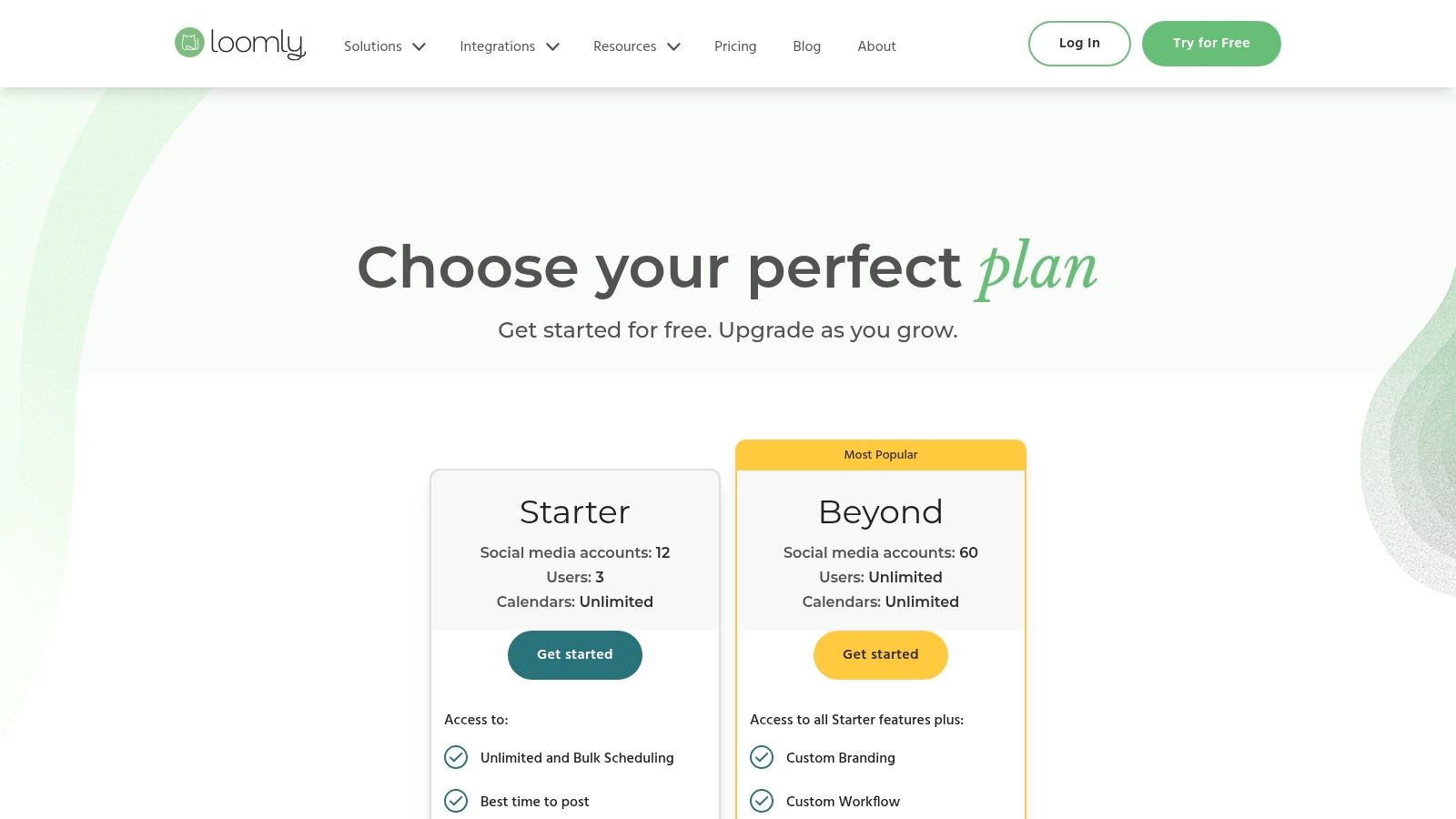
The platform offers a central asset library, post ideas, and mockups that show exactly how content will appear on each network. For example, a social media manager can draft a post, which then automatically moves to an editor for review, and finally to a client for ultimate approval, with every step logged. This systematic process eliminates messy email chains and ensures accountability. This is perfect for regulated industries like finance or healthcare, where legal review is a mandatory step before any content is published.
Key Features & Verdict
Loomly's interface is clean and built around a shared content calendar, making it intuitive for teams to adopt. While it lacks the advanced AI generation or deep social listening of some enterprise-level competitors, its strength lies in its orderly, approval-based system. The platform also offers a remarkable 50% lifetime discount for nonprofit organizations, making it a standout choice for the sector.
Best For: Marketing agencies, in-house brand teams, and nonprofits that require a clear, multi-step approval process for social media content.
Pros: Excellent collaboration and approval workflows, intuitive calendar interface, generous 50% lifetime discount for nonprofits.
Cons: Not as feature-rich in AI or social listening as top-tier tools; pricing plans can be subject to change and are best viewed in-app.
Pricing: Plans are available on monthly or yearly subscriptions (with a 25% discount for annual billing).
Website: loomly.com
7. SocialBee: Best for Evergreen Content Recycling and Affordability
SocialBee carves out its niche by focusing on efficient, category-based scheduling and evergreen content recycling at a highly competitive price point. Its standout feature is the ability to create content categories, such as "Blog Posts," "Promotions," or "Curated Content," and then set a schedule for when each category should post. This system ensures a balanced content mix and allows for posts to be automatically re-queued and shared again after a set period, making it one of the best social media management tools for maintaining an active presence with minimal ongoing effort.

This "set it and forget it" approach is ideal for teams that rely on a core library of valuable content. For instance, a SaaS company can create a "Case Studies" category and set it to post once every Tuesday, automatically cycling through all their success stories without anyone having to manually reschedule them each week. The platform also offers concierge services for teams that need hands-on help with their social media strategy and execution.
Key Features & Verdict
SocialBee's user experience is functional and utility-focused rather than overly polished, prioritizing powerful scheduling workflows over a sleek design. Its multi-workspace setup is excellent for agencies managing multiple clients, allowing for separate content libraries, schedules, and analytics for each brand. While its social listening and in-depth engagement features are more basic compared to enterprise-level platforms, its value proposition for scheduling and content management is undeniable.
Best For: Solopreneurs, small businesses, and agencies looking for a powerful, budget-friendly scheduler with best-in-class evergreen content features.
Pros: Advanced category-based queues and content recycling, highly competitive pricing, flexible add-ons for users and profiles.
Cons: User interface is more utilitarian than modern; social listening and engagement tools are not as robust as competitors.
Pricing: Plans start at $29/month for the Bootstrap plan, with Pro and Agency plans available that scale workspaces and profiles.
Website: https://socialbee.com
8. Sendible: Best for Digital Marketing Agencies
Sendible is purpose-built for the unique demands of digital agencies managing multiple client accounts. Its core advantage lies in how its plans are structured, bundling users and social profiles together, which simplifies scaling and cost prediction. This platform excels at providing client-facing features like custom-branded reports, dedicated client dashboards, and content approval workflows, making it one of the best social media management tools for demonstrating value and maintaining transparency.
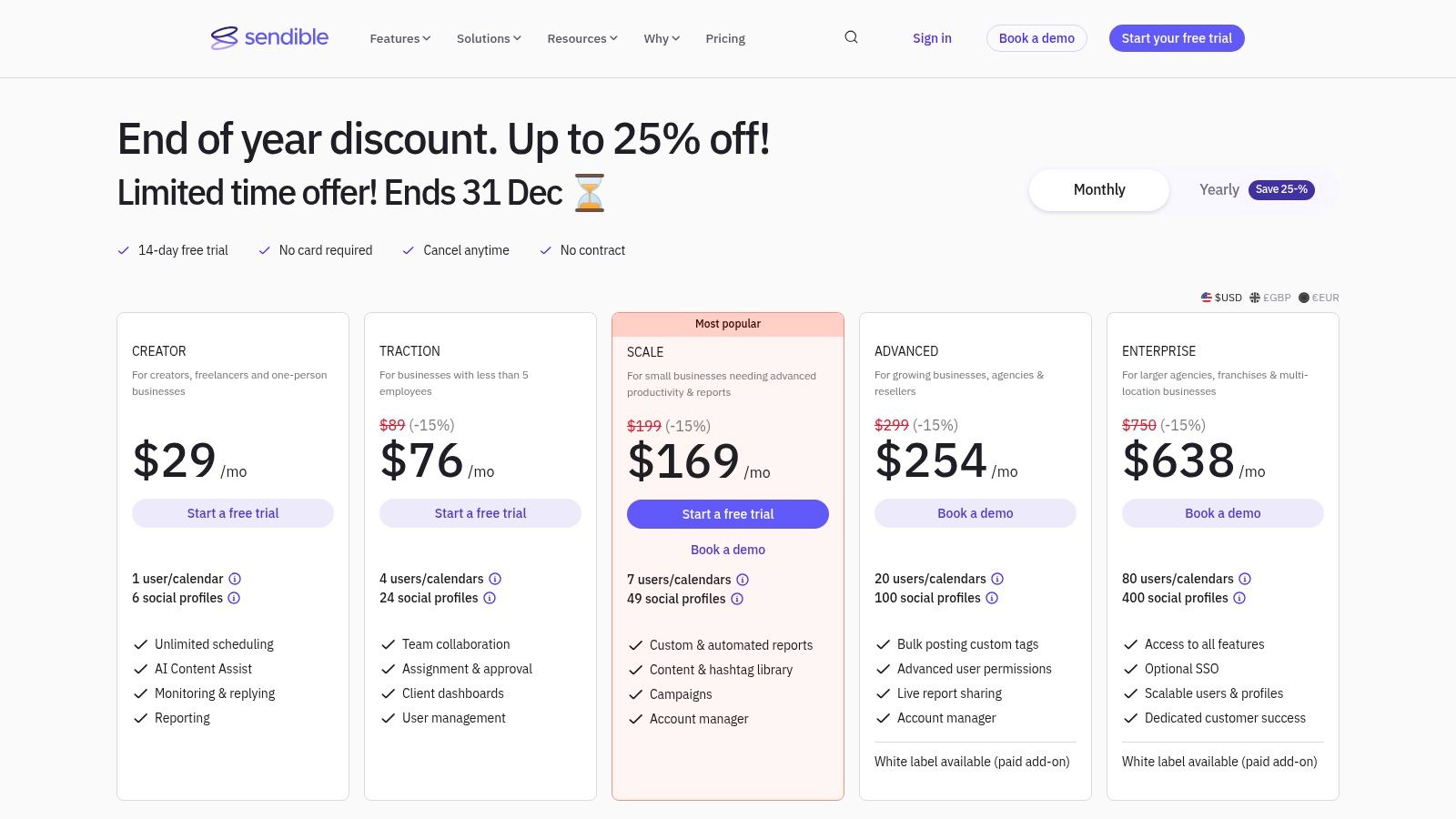
The platform supports a broad range of networks, including TikTok, YouTube, and Google Business Profile, ensuring comprehensive coverage for diverse client needs. Features like Canva integration, an AI Assistant for captions, and RSS auto-posting streamline content creation, while the bulk scheduler and smart queues automate distribution. For an agency juggling ten clients, this means you can set up a month's worth of content for everyone in a single afternoon using the bulk CSV upload feature, then send each client a link to their unique calendar for approval.
Key Features & Verdict
Sendible's user interface is practical and centered on efficiency, with clear separation between different client workspaces. While its live support hours are optimized for UK business time, the platform's robust feature set, particularly the white-label options on higher tiers, makes it a top-tier choice for agencies focused on delivering professional, branded social media services.
Best For: Digital marketing agencies and social media managers who handle a portfolio of client accounts and require strong reporting and collaboration tools.
Pros: Plans are ideally sized for agencies (users and profiles scale together), practical reporting with client-friendly sharing, extensive platform integrations.
Cons: Live support hours are centered on UK business time, which may be inconvenient for other regions; white-labeling is a paid add-on or available only on higher-tier plans.
Pricing: Plans start at $29/month for the Creator plan, with agency-focused plans starting at $89/month.
Website: https://www.sendible.com/
9. CoSchedule Social Calendar: Best for Content-Driven Marketers
CoSchedule Social Calendar stands out by focusing on the calendar as the central hub of social media strategy, making it ideal for teams who plan their marketing around content themes and campaigns. Unlike tools that prioritize inbox management or analytics, CoSchedule is built for schedulers and content creators first. Its strength lies in visualizing your entire social pipeline, automating evergreen content with its ReQueue feature, and using AI templates to jumpstart post creation.
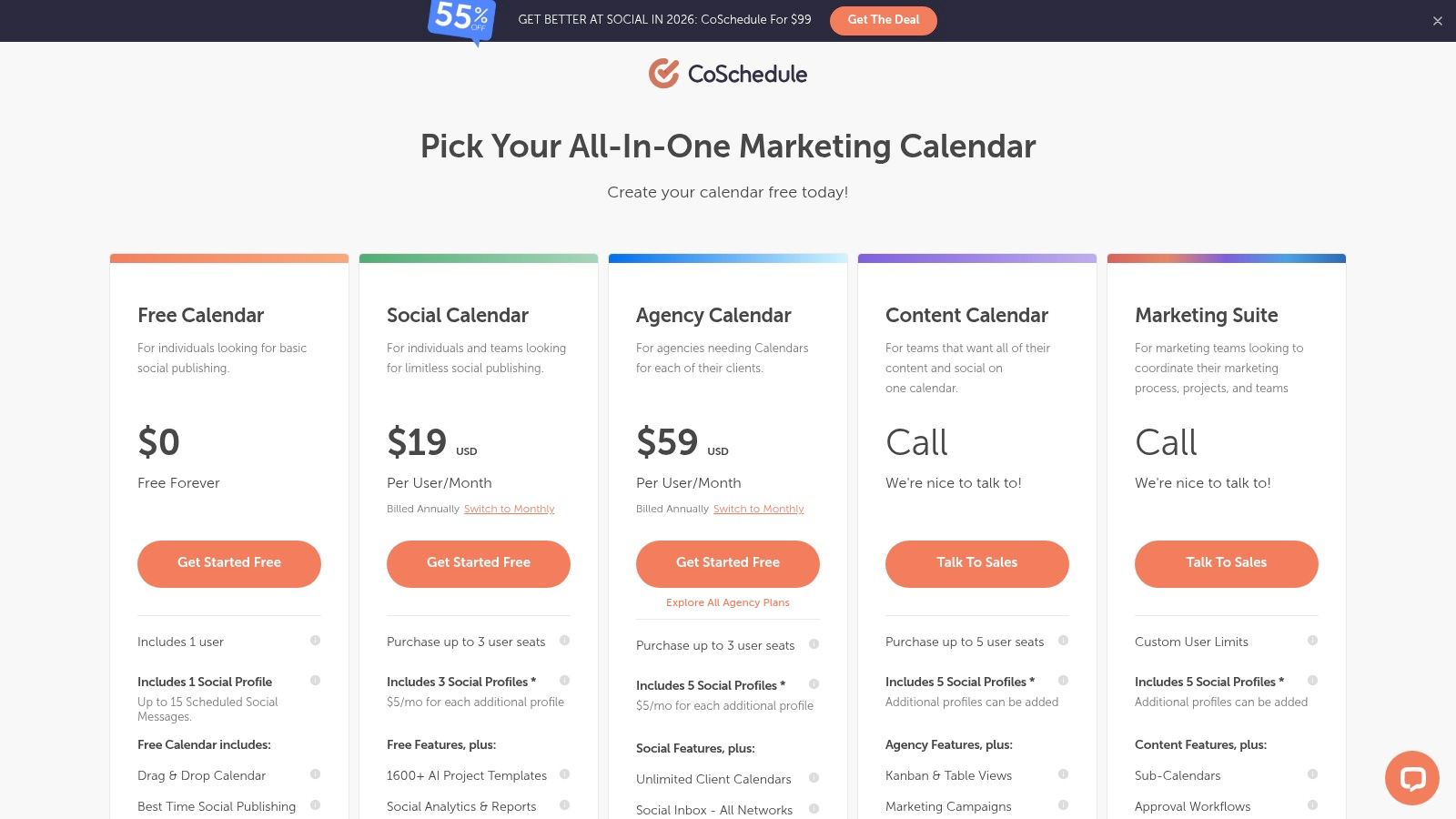
The platform’s AI-powered Best Time Scheduling analyzes past engagement to suggest optimal posting times, removing guesswork from your strategy. For marketers who want to master this planning process, learning how to create a content calendar is a foundational step that CoSchedule’s interface supports perfectly. For example, a blogger can plan a "Productivity Week" campaign, schedule five related blog posts, and then use CoSchedule to automatically create and schedule 20 promotional social posts across all channels, all linked back to that single campaign theme in the calendar. Its bulk import and automation queues are designed to help you fill this calendar efficiently, keeping your profiles active with minimal daily effort.
Key Features & Verdict
CoSchedule’s user experience is clean, intuitive, and visually oriented, making it one of the best social media management tools for planning and organization. While the free plan is a great entry point, key features like the powerful ReQueue automation and expanded analytics are reserved for paid tiers. The separate billing for X/Twitter profiles in the Social Calendar plans can also be a drawback for teams heavily reliant on that platform.
Best For: Solo creators, bloggers, and small marketing teams who prioritize content planning and scheduling automation over advanced analytics or team collaboration features.
Pros: Excellent calendar-first user experience, powerful evergreen content automation (ReQueue), generous free plan for beginners.
Cons: X/Twitter profiles are billed separately on lower-tier plans, inbox management is limited to Facebook and Instagram.
Pricing: A free plan is available. Paid plans start at $29 per user/month for the Social Calendar.
Website: coschedule.com
10. Agorapulse: Best for Team Collaboration and Inbox Management
Agorapulse excels as a comprehensive suite designed for teams that prioritize efficient community management and streamlined workflows. Its core strength is a powerful unified social inbox that goes beyond simple message aggregation. With features like automated moderation rules, saved replies, and one-click translations, it allows teams to manage high volumes of comments, DMs, and mentions without missing crucial conversations or ad comments. This makes it one of the best social media management tools for customer-centric brands.
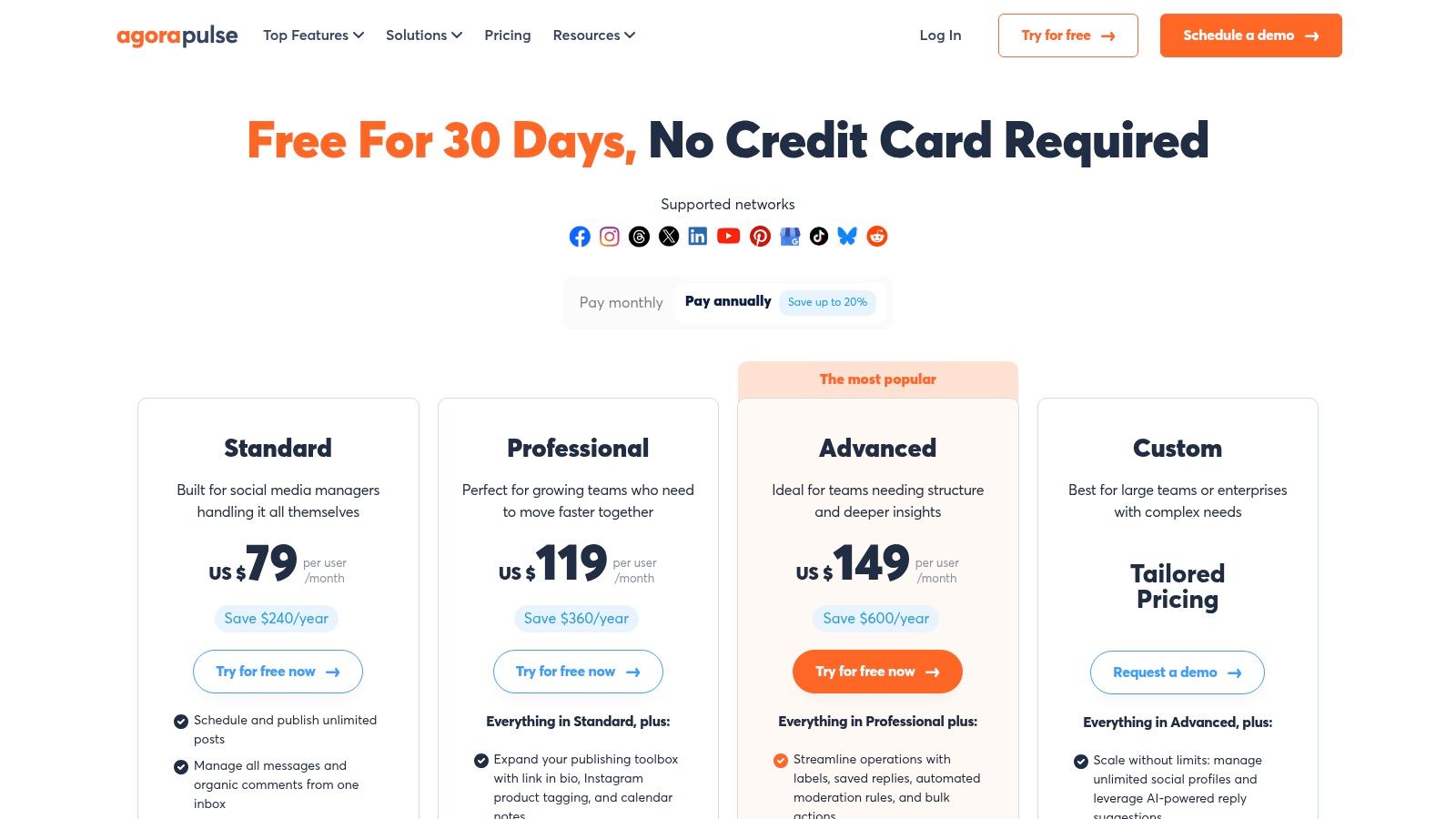
The platform supports this with robust publishing and reporting tools. Its shared calendars, content queues, and team approval workflows ensure brand consistency and prevent errors. For example, a junior manager can draft posts, which are then automatically sent to a director for approval before going live. A practical insight is setting up an inbox automation rule to automatically hide any comments containing profanity on Facebook ads, saving the community manager significant time and protecting the brand's image. This structured collaboration is a key differentiator.
Key Features & Verdict
Agorapulse provides an all-in-one solution that feels polished and reliable, backed by highly-rated customer support. While its per-user pricing can become a significant investment for larger teams, its feature depth in inbox management and team collaboration provides clear ROI for agencies and growing businesses focused on engagement.
Best For: Agencies and mid-sized businesses that manage multiple clients or have dedicated social media teams requiring clear approval processes and robust inbox tools.
Pros: Advanced unified inbox with automation, strong team collaboration features, excellent customer support, and a nonprofit discount.
Cons: Per-user pricing model can get expensive as the team grows; the base plan's 10-profile limit may necessitate add-ons.
Pricing: Starts at $49 per user/month (billed annually) for the Standard plan.
Website: https://www.agorapulse.com
11. HubSpot Marketing Hub: Best for Tying Social Media to Business ROI
HubSpot's social media tools, embedded within its Marketing Hub, offer a unique value proposition: connecting social media activity directly to leads, customers, and revenue. Instead of being a standalone scheduler, it integrates publishing, monitoring, and reporting into a comprehensive CRM platform. This is a game-changer for B2B marketers who need to demonstrate how a tweet or LinkedIn post contributes to a closed deal, making it one of the best social media management tools for proving ROI.
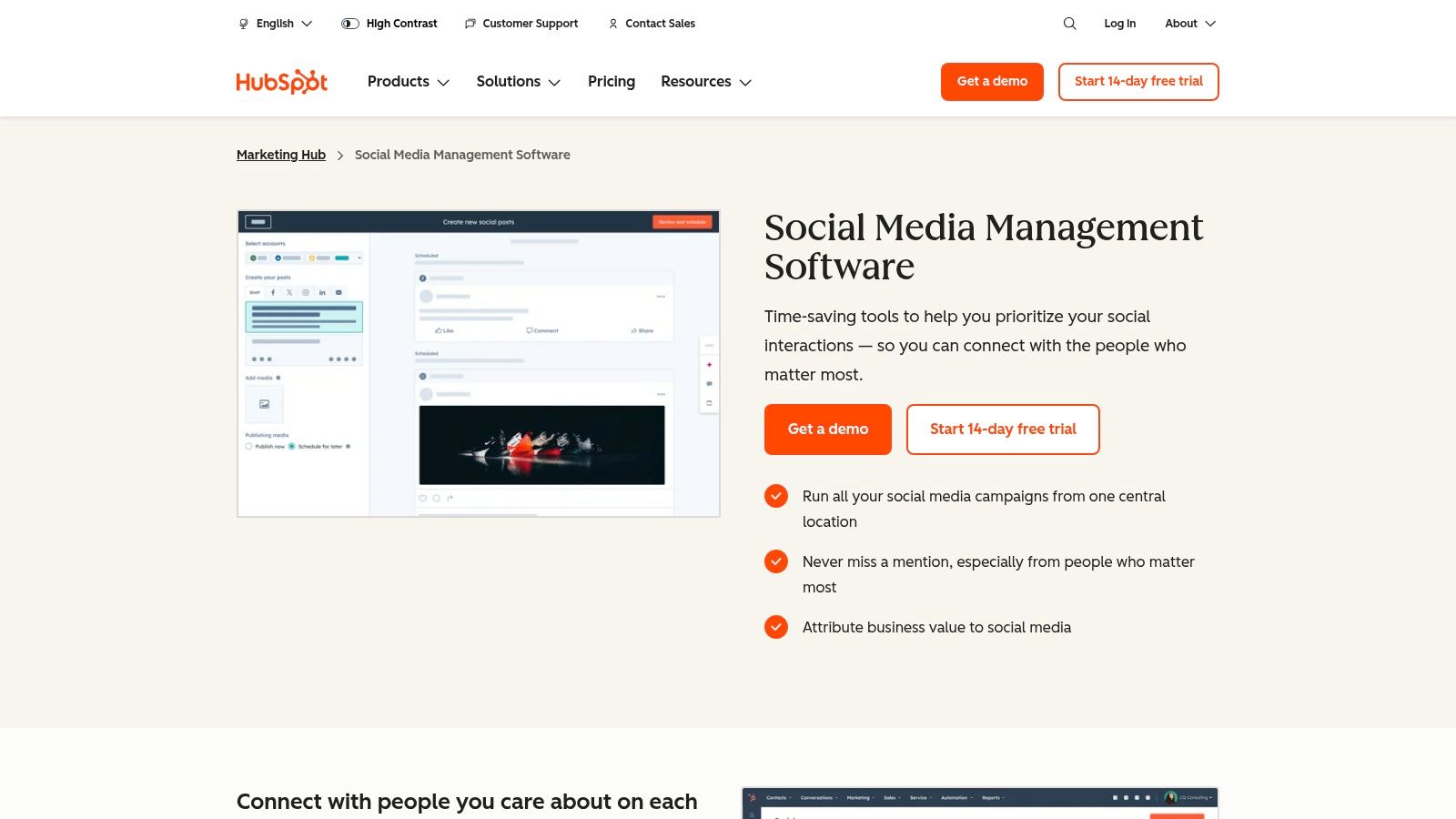
The platform allows you to associate every social post with a specific marketing campaign, tracking its influence on website traffic, lead generation, and customer conversions. An actionable example: a sales team can see that a new lead originally came from a specific LinkedIn post, clicked a link to a whitepaper, and is now in the sales pipeline. You can also monitor brand mentions and keywords, then immediately see the commenter's full history as a contact in your CRM. This context allows for highly personalized and effective engagement, turning a simple social interaction into a meaningful sales or support opportunity.
Key Features & Verdict
HubSpot’s strength isn't just in scheduling but in its full-funnel visibility. While its social tools may not have the niche features of dedicated platforms, their native integration with email marketing, landing pages, and sales automation is unparalleled. The mandatory onboarding fees for higher tiers are a significant upfront cost, but the investment pays off for teams committed to consolidating their marketing stack.
Best For: B2B companies and businesses already invested in the HubSpot ecosystem that need to attribute tangible business results to their social media efforts.
Pros: Native CRM integration provides powerful ROI and lead attribution, consolidates the entire marketing stack, excellent for campaign-level tracking.
Cons: Key social tools are only available on more expensive Pro/Enterprise tiers; mandatory onboarding fees increase the initial cost significantly.
Pricing: Social tools are included in Marketing Hub, which starts at $18/month (very limited), but robust features require the Professional plan at $800/month.
Website: hubspot.com
12. Meta Business Suite: Best Free Tool for Facebook & Instagram Management
For businesses and creators whose social media presence is heavily concentrated on Facebook and Instagram, Meta Business Suite is an essential, first-party tool. It provides the core functionalities of scheduling, content planning, and community management directly from the source, eliminating the need for a paid third-party tool if your focus remains within the Meta ecosystem. Its primary advantage is its seamless, native integration and completely free access.
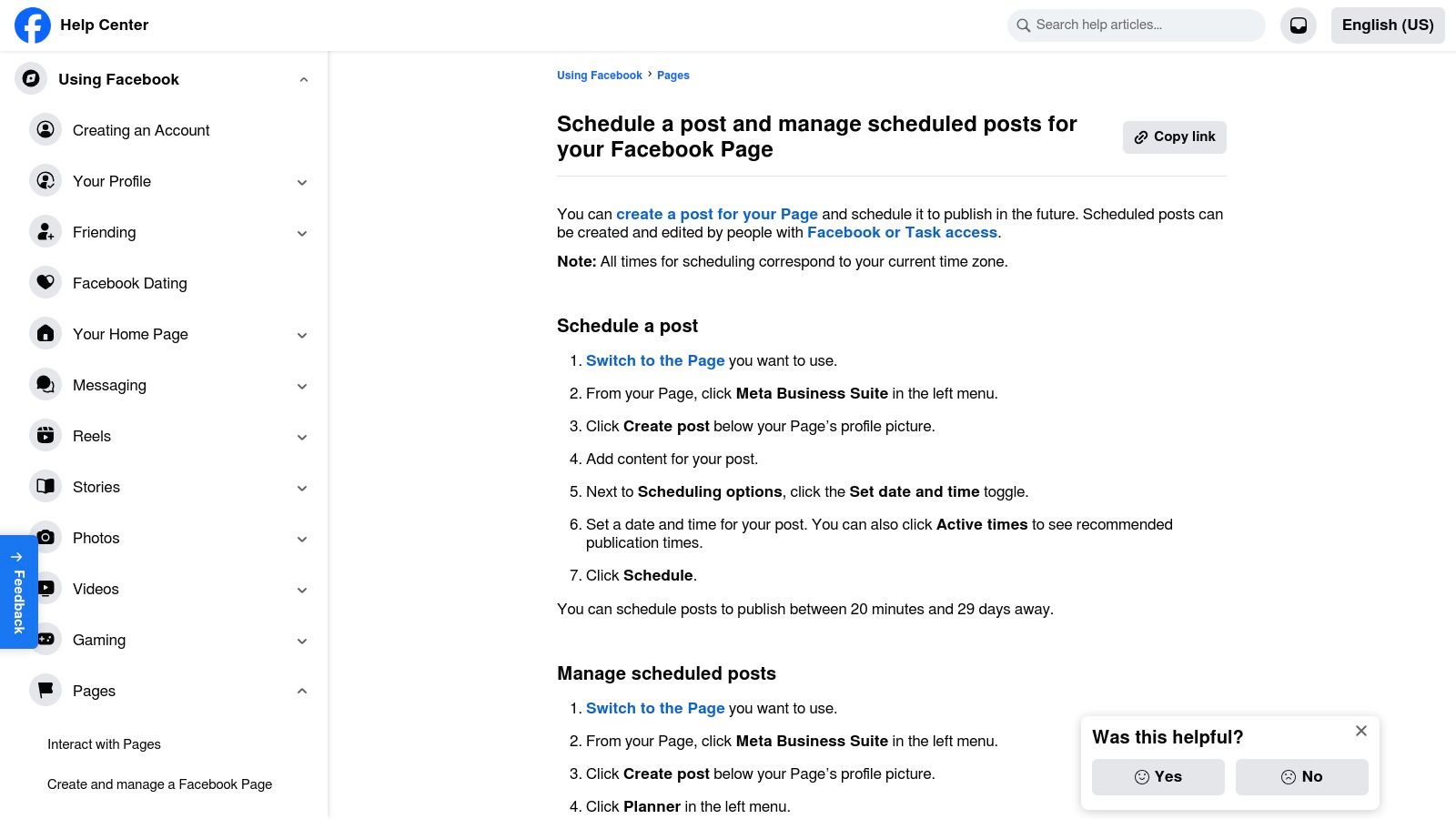
The platform consolidates your Facebook Page and Instagram profile into a single dashboard. From here, you can use the Planner to schedule posts and Stories, get AI-powered suggestions for optimal posting times based on your audience activity, and manage all your DMs and comments from a unified Inbox. A practical insight is to use the A/B testing feature for Facebook posts; you can create up to four versions of a single post to see which headline or image resonates most with your audience before committing to a larger ad spend. This makes it an incredibly efficient starting point for those new to social media management.
Key Features & Verdict
While its feature set is basic compared to comprehensive suites, Meta Business Suite excels at its intended purpose. The analytics provide solid, need-to-know metrics about reach and engagement directly from the platform data. However, its biggest limitation is its inability to manage any other social network, making it a supplementary tool rather than a central hub for multi-channel strategies. Community feedback often points to intermittent bugs, but its reliability as a free, native scheduler is undeniable.
Best For: Small businesses, solopreneurs, and creators who are exclusively focused on building their audience on Facebook and Instagram.
Pros: Completely free to use, direct first-party integration offers high reliability, unified inbox for all Meta messages.
Cons: Strictly limited to Meta platforms (Facebook, Instagram, Messenger), some users report occasional scheduling glitches.
Pricing: Free.
Website: business.facebook.com
Top 12 Social Media Management Tools — Feature Comparison
Product | Core features | UX / Quality (rating) | Pricing & Value | Best for | Unique selling points |
|---|---|---|---|---|---|
NicheTrafficKit 🏆 | End‑to‑end AI: research, platform‑specific content, auto‑publish, analytics (TikTok, Pinterest, IG, LinkedIn, Reddit, YouTube) | ★★★★★ (4.9/5) | 💰 Creator $39/mo · Pro $89 · Ultimate $499 · token-based + free trial | 👥 Creators, SMBs, agencies | ✨ True end‑to‑end AI workflow; auto‑resurfaces winners & peak-time auto‑publishing |
Hootsuite | Unified calendar & Inbox, AI caption/image assist, integrations | ★★★★☆ | 💰 Plan-based pricing · 30‑day free trial | 👥 Teams managing many profiles | ✨ Large app ecosystem; best‑time & competitor benchmarking |
Sprout Social | Enterprise publishing, engagement, advanced analytics, listening | ★★★★☆ | 💰 Per‑seat enterprise pricing (add‑ons) | 👥 Mid‑large orgs & stakeholder reporting | ✨ Deep reporting, governance & role controls |
Buffer | Lightweight scheduler, AI assistant, first‑comment & hashtag manager | ★★★☆☆ | 💰 Free plan (3 channels) · channel‑based pricing | 👥 Creators & small businesses | ✨ Simple UI; low entry barrier |
Later | Visual planner, auto‑publish for IG/TikTok, link‑in‑bio & product tagging | ★★★★☆ | 💰 Tiered plans with post limits · AI credits on paid tiers | 👥 Instagram/TikTok‑first brands | ✨ Visual planning + commerce features |
Loomly | Collaboration calendar, approvals, content ideas & asset library | ★★★★ | 💰 Monthly/yr (25% off yearly) · nonprofit discount | 👥 Teams & client workflows | ✨ Approval workflows & brand asset management |
SocialBee | Category queues, evergreen recycling, multi‑workspace & add‑ons | ★★★☆☆ | 💰 Competitive agency pricing · flexible add‑ons | 👥 Agencies, SMBs, creators | ✨ Category‑based recycling & concierge services |
Sendible | Agency dashboards, white‑label, bulk scheduler, client reports | ★★★★ | 💰 Agency‑sized plans · white‑label add‑on | 👥 Agencies & consultants | ✨ White‑label + client‑facing dashboards |
CoSchedule Social Calendar | Calendar‑first UX, ReQueue automation, AI templates, bulk import | ★★★☆☆ | 💰 Free/basic tier · upgrades for agency features | 👥 Content‑driven teams | ✨ ReQueue automation & calendar focus |
Agorapulse | Unified Inbox, automated rules, publishing, ad comment monitoring | ★★★★ | 💰 Per‑user pricing · nonprofit discount | 👥 Growing teams & agencies | ✨ Automated inbox rules, translations & ad comment monitoring |
HubSpot Marketing Hub (Social) | Multi‑channel publishing + CRM attribution, monitoring | ★★★★ | 💰 Social tools on Pro/Enterprise · onboarding fees | 👥 B2B marketers wanting attribution | ✨ Native CRM attribution & full‑funnel reporting |
Meta Business Suite | Planner & scheduler, unified FB/IG Inbox, page insights | ★★★☆☆ | 💰 Free | 👥 Brands focused on Facebook & Instagram | ✨ First‑party FB/IG integration; no seat limits |
How to Choose the Right Tool for Your Social Media Strategy
Navigating the crowded landscape of social media management tools can feel overwhelming. After exploring the detailed features, pricing structures, and ideal use cases of platforms from comprehensive solutions like Hootsuite and Sprout Social to niche specialists like Later and SocialBee, the most critical takeaway is this: there is no single "best" tool for everyone. The right choice is deeply personal and depends entirely on your unique goals, team size, budget, and the specific social media channels you prioritize.
The journey to finding your perfect platform begins not with a feature comparison chart, but with an internal audit of your own strategy. Before you even start a free trial, you must have a clear, documented answer to fundamental questions. What are you trying to achieve? Is your primary goal e-commerce sales, B2B lead generation, brand awareness, or community engagement? Your answer will immediately help you filter the list.
A Practical Framework for Your Final Decision
To move from analysis to action, use this simple framework. Think of it as your final checklist before committing to a subscription. This process ensures you're selecting a partner for your strategy, not just a piece of software.
Define Your Must-Have Features: Go beyond the basics like scheduling. Do you absolutely need advanced approval workflows like those in Loomly or Agorapulse to manage a team? Is a visual-first planner like Later’s non-negotiable for your Instagram-heavy brand? Make a list of 3-5 features that would be deal-breakers if absent. For example: "Must have a shared inbox that includes Instagram DMs and Facebook ad comments."
Align with Your Core Platforms: Don't pay for what you don't use. If your audience lives exclusively on LinkedIn and Twitter, a tool with premium TikTok and Pinterest features is unnecessary. A B2B marketer, for example, would benefit more from Sendible's robust LinkedIn integration and CRM features than a creator-focused tool. Actionable insight: List your top two platforms and only trial tools that have excellent, native support for both.
Evaluate Your Analytics Needs: The depth of reporting varies dramatically. Basic tools like Buffer provide clean, straightforward metrics perfect for a solopreneur. In contrast, an agency managing client accounts needs the granular, presentation-ready reports offered by Sprout Social or the comprehensive dashboard of HubSpot to prove ROI. Be honest about the level of data you will actually use to make decisions. Will you really export CSVs of follower demographics, or do you just need to know which posts got the most clicks?
Consider Your Team's Workflow: How will this tool fit into your daily operations? A small business owner might love the simplicity and all-in-one content calendar of CoSchedule. A larger team or agency, however, will require the sophisticated collaboration, task assignment, and client management features found in platforms like Sendible or Agorapulse. Map out your current content process, from idea to published post, and see which tool's features best match or improve that flow.
Set a Realistic Budget: Price is more than the monthly fee; it's about value. A "cheap" tool that requires constant manual workarounds is more expensive in the long run than a pricier platform that automates those tasks. Determine your budget based on the time and resources the tool will save you, not just the sticker price. Calculate the hourly cost of your social media tasks and see if the tool's fee is less than the time it saves.
Your Next Steps: From Reading to Doing
Choosing from the best social media management tools is a strategic decision that will shape your brand's digital presence for months, if not years, to come. The right platform will feel less like a taskmaster and more like a valuable team member, automating the mundane so you can focus on creating authentic connections with your audience.
Use the insights from this guide to shortlist two or three top contenders that align with your specific needs. Sign up for their free trials and actively use them for a week. Schedule real posts, pull a report, and test the features you identified as "must-haves." This hands-on experience is the final, crucial step in making an informed, confident choice that will empower your social media strategy and drive measurable results.
Ready to not just manage your social media, but to strategically grow your audience with content they’ll love? The first step is understanding your niche inside and out. NicheTrafficKit provides the deep-dive analytics and content intelligence you need to inform the strategy you execute with these tools. Discover the exact topics and formats your audience is craving at NicheTrafficKit.
