
Manage Multiple Social Media Accounts Without Burnout
Struggling to manage multiple social media accounts? Our guide offers proven workflows, smart tools, and repurposing tactics to reclaim your time.
If you're trying to manage multiple social media accounts, the real secret isn't working harder—it's working smarter. The key is to stop posting on the fly and start building a real, system-driven strategy. This means creating a central hub for your content, getting clever with repurposing, and using the right tools to put scheduling on autopilot. When you build a repeatable system, the daily chaos gets replaced by predictable, manageable growth.
The Reality of a Multi-Platform Digital Presence
Let’s be honest: having a presence on just one platform is no longer an option. The modern audience is spread out across a whole menu of networks, from professional hubs like LinkedIn to visual-first apps like Instagram and TikTok. For businesses, agencies, and even solo creators, this creates a ton of pressure to be everywhere at once.
The natural instinct is to just grind it out—post more, react faster, and stretch yourself thin. But that's a one-way ticket to burnout. The real solution isn’t about more effort; it’s about having a better system. This playbook is designed to help you turn that scattered digital footprint into a cohesive, powerful advantage.
Why a Multi-Channel Strategy Is Non-Negotiable
Putting all your eggs in one social media basket is a massive gamble. One algorithm change can tank your reach overnight, and platforms rise and fall in popularity. A multi-channel presence is your safety net; it builds resilience. If engagement dips on one network, your others can keep the momentum going.
This is all driven by how people actually use social media. The average person bounces between 6.83 different social networks every single month. With over 5.42 billion users out there, this fragmentation is just the new reality. We have to adapt. For a deeper dive, it's worth exploring the latest social media trends to see the full picture.
Think of your multi-platform strategy like a good investment portfolio. By diversifying your presence, you hedge against the volatility of any single platform and maximize your chances for growth across the board.
Before we dive into the step-by-step process, let's zoom out. The entire system for managing multiple accounts successfully rests on a few key pillars. Understanding these concepts first will make the actionable steps in this guide much more effective.
Core Pillars of Effective Multi-Account Management
Pillar | Core Principle | Key Benefit |
|---|---|---|
Centralized Workflow | Create a single source of truth for all content planning, creation, and approval. | Eliminates confusion, prevents duplicate work, and ensures brand consistency. |
Smart Repurposing | Adapt one core content idea for the unique format and audience of each platform. | Saves massive amounts of time and maximizes the ROI of your creative efforts. |
Strategic Automation | Use tools to handle repetitive tasks like scheduling and basic analytics reporting. | Frees up your time and mental energy for strategy, engagement, and creative work. |
Data-Driven Optimization | Regularly review performance data to see what’s working (and what isn’t) on each channel. | Allows you to double down on effective tactics and stop wasting resources on what fails. |
By building your strategy on these foundations, you'll move from a reactive scramble to a streamlined operation that actually works for you. This approach is what allows you to scale your presence without having to scale your workload at the same frantic pace.
Building Your Centralized Content Workflow
If you're managing multiple social media accounts, you have to stop firefighting. Constantly reacting to the daily grind is a recipe for burnout and missed opportunities. The only way to get ahead is to start architecting a real system.
The foundation of it all is a centralized workflow. Think of it as a single source of truth that dictates what gets posted, where, and when. Without it, your ideas are scattered in random notes, your assets are buried in different folders, and you're always playing catch-up. Building a content engine that operates predictably is what frees you up for the work that really matters—like engaging with your community and digging into what’s actually working.
Establish Your Master Content Calendar
First things first: build a master content calendar. This isn't just a schedule; it's your strategic command center. It gives you that crucial bird's-eye view of your entire content ecosystem, all in one place.
A truly effective calendar goes way beyond just dates and topics. You need to get granular. At a minimum, it should track:
Platform: Where is this going? (e.g., Instagram, LinkedIn)
Content Pillar: What core theme does this post support? (e.g., Customer Success, Industry Education)
Format: Is it a video, carousel, single image, or just text?
Status: Where is it in the pipeline? (e.g., Idea, In Progress, Ready for Review, Scheduled)
Asset Links: A direct link to the final visuals, copy docs, and any source materials.
When you add this level of detail, your calendar transforms from a simple schedule into a dynamic workflow tool. Anyone on your team can see exactly what’s happening without having to ask a single question, which is absolutely critical for scaling your efforts.
The Power of Content Batching in Action
With your calendar in place, it’s time to embrace content batching. This is a game-changer. The idea is simple: you dedicate specific blocks of time to a single type of task. Instead of trying to create, schedule, and engage all at once every single day, you group similar activities together. Research has shown this approach boosts efficiency by cutting down on the mental friction of constantly switching gears.
Let’s walk through a real-world example. Imagine you want to launch a weekly "Product Feature Friday" series to highlight what your software can do.
The Old, Chaotic Way: It’s Thursday afternoon, and panic sets in. You scramble to pick a feature, bug a designer for a last-minute graphic, and then quickly write some copy. Then you have to tweak that copy for LinkedIn, Instagram, and X before finally scheduling it. The result is almost always rushed, inconsistent, and incredibly stressful.
By dedicating specific blocks of time to similar tasks—like writing all your captions for the week in one go—you get into a state of flow. You produce higher-quality work in a fraction of the time. This is the simple secret that makes batching so powerful.
The New, Batched Way: On the first Monday of the month, you block out four hours on your calendar. This time is dedicated solely to "Product Feature Friday." Nothing else.
Ideation (30 mins): You brainstorm and lock in the four features you'll highlight for the entire month. You plug each one into its designated Friday on the content calendar.
Visual Creation (90 mins): Next, you create all four corresponding visuals at once. Maybe you’re designing carousels, recording quick demo videos, or mocking up branded graphics. Because you're in "design mode," your work is faster and the visual style stays consistent.
Copywriting (90 mins): With the visuals done, you move on to writing the copy for all four posts. You start with a primary version, then adapt it to each platform’s unique vibe—a bit more professional for LinkedIn, short and punchy for X, and conversational for Instagram.
Scheduling (30 mins): The final step. You upload everything into your social media management tool, like Buffer or Sprout Social, and schedule the posts for the entire month.
In just four hours, you've knocked out what used to be a weekly source of stress. You've created a repeatable system that eliminates daily decision fatigue and guarantees a consistent, high-quality presence across all your channels. That's how you manage multiple social accounts without letting them manage you.
Mastering Smart Content Repurposing
If you’re trying to create completely original content for every single social media platform, you’re on the fast track to burnout. I’ve seen it happen time and time again. The real secret to showing up everywhere consistently isn’t about working harder—it’s about making your best ideas work harder for you. This is the art of smart content repurposing.
When you're juggling multiple social accounts, this mindset shift is your single biggest time-saver. It lets you get the maximum return on your creative energy while keeping your brand voice consistent across every channel. You can maintain a steady stream of high-quality posts without that constant pressure to reinvent the wheel every single day.
The whole strategy hinges on what’s often called the Content Pillar Method. You start with one meaty, high-value piece of content—your pillar—and then you strategically slice and dice it into smaller, platform-specific assets. A single pillar can literally fuel your content calendar for weeks.
From One Big Idea to Many Powerful Posts
Let's walk through how this works in the real world. Imagine your pillar content is a detailed client case study you just published as a blog post. That one article is a goldmine.
Instead of just dropping the link everywhere and calling it a day, you deconstruct it. Break it down into different formats that are tailor-made for the audiences on each platform. This ensures your core message actually reaches people in the way they prefer to consume it.
Here’s how that one case study can be spun into gold:
LinkedIn Article: Take the full case study and polish it up as a native LinkedIn article. This is the place to go deep—talk about the client's challenges, the solution you implemented, and the specific, data-backed results.
Instagram Carousel: Boil down the case study’s highlights into a slick, 5-7 slide carousel. Use punchy headlines, bold numbers (like a 300% increase in leads), and a clear call-to-action on that final slide.
TikTok & Instagram Reels: Pull a powerful quote from the client’s testimonial and turn it into a short, snappy video. Layer on some trending audio and on-screen text to make the results pop in a fast-moving feed.
X (formerly Twitter) Thread: Unpack the case study into a multi-tweet thread. Each tweet can tell one part of the story: the initial problem, the strategy, a key metric, and the final outcome.
Quote Graphics: Lift several of the most compelling stats or quotes from the case study and design simple, branded graphics. These are perfect for sharing on X, Facebook, or even in your Instagram Stories.
This whole system is about creating a streamlined workflow, moving from your central calendar through a batching process to your target platforms.
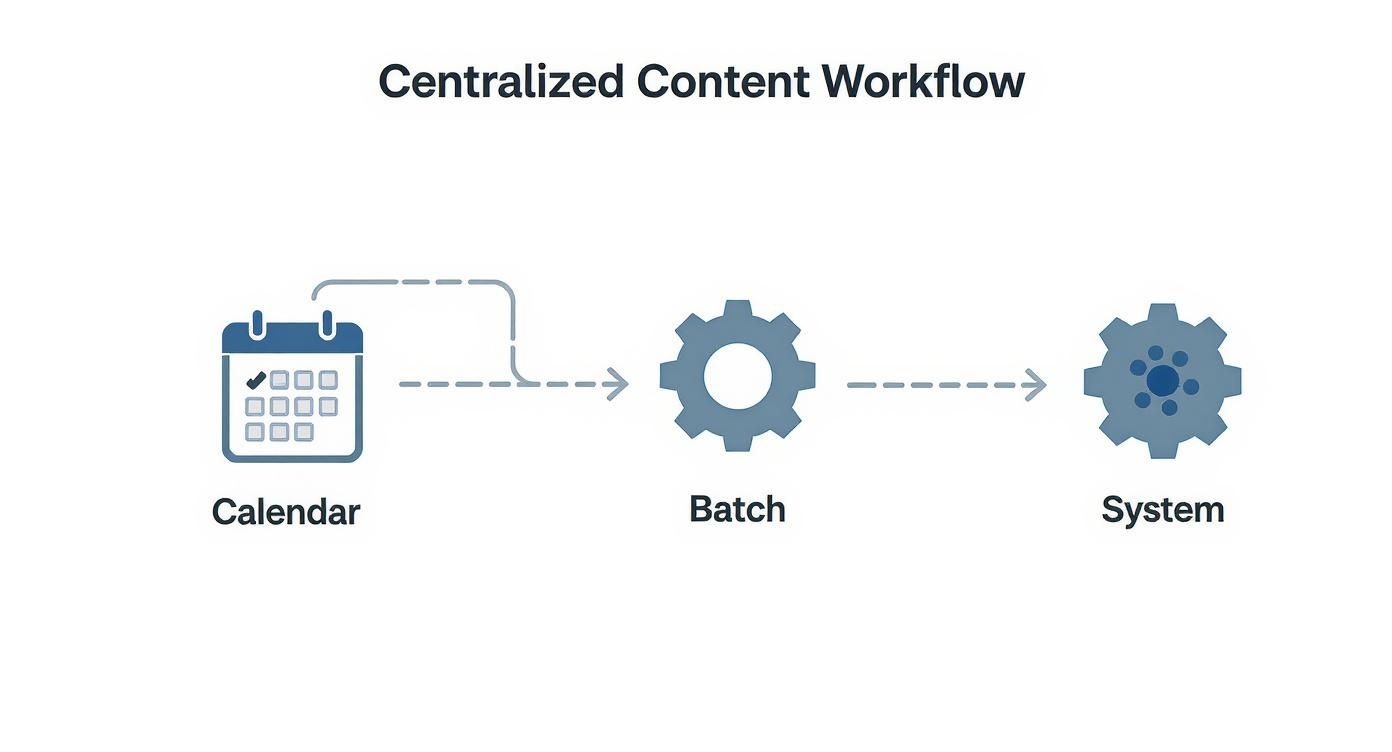
As you can see, successful repurposing isn’t random. It’s a deliberate system that starts with good planning and ends with efficient execution.
Adapting Content for Each Platform's Vibe
Smart repurposing is much more than just copy-pasting. Every platform has its own unwritten rules, audience expectations, and best-performing formats. True success comes from adapting your pillar content so it feels native to each environment.
The professional, data-driven language you use on LinkedIn isn't going to fly on Instagram, where a more conversational, emoji-friendly tone works better. Likewise, a 10-minute YouTube video needs to be re-edited into a much shorter, punchier vertical clip to stand a chance on TikTok.
A common mistake is treating all social channels as one giant megaphone. To truly connect, you must speak the native language of each platform. Tailor your repurposed content to match the context, and your audience will be far more receptive.
Take Reddit, for example. You can’t just drop a link to your blog post and expect upvotes. That community values genuine contribution. You’d need to write a thoughtful text post summarizing the key points and then actually stick around to engage in the comments. For anyone who posts there often, using a specialized tool can be a lifesaver. You can see how to properly format your content with this Reddit content reformatter. It’s a small adjustment, but it makes a huge difference in how your content is received.
By truly embracing the Content Pillar Method, you stop being a content creator who’s always scrambling and become a strategic publisher who’s always prepared. This system is absolutely fundamental to managing multiple social media accounts effectively for the long haul.
Picking the Right Social Media Management Toolkit
Once you've got a solid content workflow, the right tech can feel like a superpower. Think of a social media management tool as your command center—it’s the one place where you can bring your entire operation together. Picking the right platform is absolutely essential if you want to manage multiple social accounts without pulling your hair out.
But let's be real for a second. The goal isn't to find a tool with a million features you'll never touch. The best tool is the one that actually solves your problems, fits your budget, and can grow with you. What works for a massive agency is often just expensive, frustrating overkill for a solo creator.
What to Look for When Evaluating Tools
When you start comparing options, you need to cut through the marketing noise and focus on what will genuinely make your day-to-day work easier. From my experience, the most valuable tools nail three things: scheduling, engagement, and analytics.
Scheduling and Automation
This is the bread and butter. At a minimum, a good scheduler lets you plan content weeks out, see your entire calendar at a glance, and just works. But the really smart tools have AI features that suggest the best times to post based on when your specific audience is most active. That little trick alone can give your reach a serious boost.
Some platforms take it even further by connecting with other apps to create automated workflows. For a practical look at this, you can check out how ZapLinker integrates with your tools to get an idea of how much time this can save.
Unified Social Inbox
Jumping between five different apps to reply to DMs and comments is a recipe for burnout. A unified inbox is a game-changer. It pulls all your messages—from Facebook comments to Instagram DMs—into one single, manageable feed. This feature alone can easily save you hours every week and makes it almost impossible to let an important customer interaction slip through the cracks.
Actionable Analytics
You can't grow what you don't measure. A solid analytics dashboard needs to go way beyond vanity metrics like follower count. Look for tools that track the stuff that actually matters, like platform-specific engagement rates, audience growth trends over time, and click-through rates on your links. The best platforms also let you build custom reports, which are perfect for showing clients or your boss the real value of your work.
The right tool shouldn't add complexity; it should remove it. If a platform feels clunky or just doesn't vibe with the workflow you've already built, it's going to be more of a roadblock than a help. Always, always take advantage of the free trial period to really kick the tires before you commit.
Social Media Management Tool Comparison
Social media management platforms generally fall into a few different buckets, depending on who they're built for. Knowing which category you're in will help you narrow down the options fast.
Here’s a quick breakdown I've put together of some of the most popular tools and who they tend to work best for.
Tool | Best For | Key Features | Typical User |
|---|---|---|---|
Straightforward Scheduling | Clean interface, "link in bio" page builder, basic team collaboration, affordable per-channel pricing. | Solopreneurs, small businesses, and those new to social media management. | |
All-in-One Management & Analytics | Advanced analytics, social listening, comprehensive reporting, CRM integrations, robust team workflows. | Medium-to-large businesses, agencies, and teams that need deep data insights. | |
Comprehensive Platform Integration | Wide range of supported platforms, detailed scheduling options, unified inbox, and performance benchmarking. | Experienced social media managers and agencies managing a high volume of client accounts. | |
Team Collaboration & Engagement | Excellent unified inbox, social listening, easy-to-use reporting, clear team roles and permissions. | Marketing teams and agencies focused heavily on community management and customer service. |
The Buffer dashboard, for example, is famous for its super clean and intuitive design, focusing on making scheduling as simple as possible.
This minimalist approach makes it a fantastic starting point if you just need reliable automation without a massive learning curve.
Ultimately, choosing your toolkit is a foundational step. By zeroing in on your specific needs—whether that’s simple scheduling, deep-dive analytics, or seamless team collaboration—you can find a platform that truly supports your strategy. This investment will pay for itself over and over by saving you time, cutting down on stress, and giving you the hard data you need to grow.
Letting the Data Drive Your Strategy

Getting your content created and scheduled is a huge part of the job, but it's really just the beginning. The real magic—and the real growth—happens when you stop just posting and start strategically improving. This means learning to ignore the vanity metrics that feel good and, instead, digging into the numbers that actually move the needle.
We all love seeing follower counts go up, but they don't tell the whole story. An account with 100,000 followers and a dismal 0.1% engagement rate is dead in the water compared to one with 10,000 loyal fans and a 5% engagement rate. That smaller, fired-up audience is the one that actually clicks, converts, and champions your brand.
Look Past the Follower Count
To really sharpen your strategy, you have to track the metrics that reveal what your audience truly wants. This data is your road map. It shows you exactly which content hits the mark so you can create more of it and stop wasting time on posts that fall flat.
It's about understanding the story behind the numbers.
Here are the metrics that genuinely matter:
Engagement Rate: This is your north star. It’s the combination of likes, comments, shares, and saves, measured against your followers or reach. High engagement means you’ve struck a chord.
Click-Through Rate (CTR): If you're trying to drive traffic to a website or landing page, this is everything. It tells you what percentage of people who saw your post actually cared enough to click the link. A low CTR is a huge red flag that your call-to-action isn't working.
Audience Growth Rate: Forget staring at the total follower count. Track your growth rate month over month. This shows if your strategy is consistently bringing new, relevant people into your orbit.
Video View Duration: For video-heavy platforms like YouTube or TikTok, view count is almost meaningless. What really matters is how long people are watching. A high average view duration is a sign of truly captivating content.
Analytics aren't just for looking backward. Their true purpose is to inform what you do next. Every piece of data should spark a question: "Why did that work so well?" or "What can we learn from this flop?"
For example, if you run a subreddit for your community, the raw subscriber number is just surface-level. You'll learn so much more by digging into comment velocity and upvote ratios. In fact, you can get https://nichetraffickit.com/tools/free-reddit-analytics-get-detailed-insights-for-your-subreddit to see which topics are genuinely sparking conversations.
Get into a Simple Monthly Reporting Rhythm
You don't need to get lost in a 50-page spreadsheet. The key is to build a simple, repeatable habit of pulling out the most important insights. A quick monthly review is usually all it takes to start making smarter decisions.
This rhythm helps you spot trends before they become obvious. You might notice that Instagram carousels always outperform your single-image posts, or that articles you post on LinkedIn on Tuesday mornings get way more clicks. Over time, these small observations compound into a much stronger strategy.
A solid monthly check-in just needs to answer three questions:
What Worked? Find your top 3-5 posts across all platforms, based on the metrics you care about.
What Didn't? Identify the duds. Was it the format? The topic? The timing? Be honest.
What Will We Do Differently? Turn your findings into 1-2 concrete actions for the next month. For example, "Create two more carousel-style posts" or "Test an 8 AM LinkedIn posting time."
This simple loop turns abstract data into a clear plan, which is absolutely vital when you're trying to make steady progress across multiple accounts.
Have a Plan for When Things Go Wrong
While we all aim for positive engagement, managing a public presence means you have to be ready for the negative, too. A crisis plan isn't optional; it's essential. When a PR fire starts or negative feedback explodes, you won't have time to strategize—you'll need to act fast.
Having a checklist ready helps you respond with a cool head instead of pure emotion. It’s your playbook for navigating a stressful situation without making things worse.
Your crisis checklist should include these essentials:
Hit Pause on All Scheduled Posts: This is the first and most critical step. Immediately stop all automated content from going out. Nothing fuels a fire like a cheerful, tone-deaf post appearing in the middle of a crisis.
Acknowledge the Issue Quickly: Silence looks like guilt. A simple, public "We're aware of this and are looking into it immediately" can buy you valuable time while showing you're not ignoring the problem.
Get the Right People in a Room: Gather your key decision-makers to assess the situation and agree on a single, unified response.
Write a Human Response: Ditch the corporate jargon. Be direct, empathetic, and clear. If you messed up, own it and explain what you're doing to make it right.
Monitor the Conversation Relentlessly: Use social listening tools to keep a pulse on public sentiment. See how your response is landing and be ready to follow up.
Sticking Points: Your Top Social Media Management Questions Answered
Even with the slickest workflow, you're going to hit a few snags managing multiple social accounts. It just comes with the territory. Let's tackle some of the most common questions I hear from people in the trenches, with real-world advice you can actually use.
How Do I Keep Different Brand Voices Straight?
This is a huge one, especially if you're an agency or a freelancer juggling a B2B tech client and a quirky CPG brand. The secret isn't some complex brand bible; it's a dead-simple, one-page "voice guide" for each client.
Think of it as a pre-flight checklist. Before you even think about writing a caption, spend 30 seconds scanning that guide. This tiny habit is a lifesaver—it stops the brand voices from bleeding into each other, so you don't accidentally drop a string of emojis into a post for your serious, corporate client.
Your one-pager should have just a few essentials:
Three "Personality" Words: Is the brand knowledgeable, approachable, and witty? Or maybe authoritative, professional, and concise?
The Emoji Rule: A hard yes, a definite no, or only specific ones?
Words to Use & Lose: Are there taglines you need to hit or industry jargon you absolutely have to avoid?
This quick mental reset gets you in the right headspace every single time, ensuring you're speaking the right language for the right audience.
When Is It Time to Ditch a Social Media Platform?
It's so easy to fall into the "just in case" trap, clinging to a platform that's giving you nothing back. But spreading yourself too thin is one of the fastest ways to burn out. You should seriously consider walking away from a platform if it ticks two or more of these boxes:
It's a Ghost Town: You've been posting consistently for a full quarter, trying different content types, and your engagement rate is still stubbornly below 1%.
It's Not Sending Anyone Home: You check your web analytics, and the platform sends virtually zero referral traffic to your website, blog, or landing pages.
The Wrong Crowd: You've realized your ideal customer just doesn't hang out there. You’re shouting into an empty room.
Quitting a platform isn't a failure. It’s a smart business decision. You’re strategically reallocating your most valuable resources—time and energy—to the channels that are actually moving the needle.
Don't just ghost the account. Post a simple, clean graphic letting any remaining followers know where else they can find you. It's a classy move that redirects your true fans.
What's the Right Way to Handle Negative Comments?
Whatever you do, don't just ignore negative feedback. That's like pouring gasoline on a fire. A quick, calm response can often diffuse the situation and even win you points with everyone else watching. The game plan is simple: acknowledge, empathize, and take it private.
Here’s a three-step play that works every time:
Acknowledge Publicly: Jump right on the comment with a simple, "We're really sorry to hear you had this experience." This shows the public you’re listening.
Offer to Help Privately: Your very next move should be, "Could you please send us a DM with the details? We want to look into this and make it right."
Never, Ever Argue: Don't get dragged into a public debate. It makes your brand look petty and defensive, and you will not win.
This approach immediately de-escalates the tension and shows your entire audience that you care about customer service. Nail these tactics, and you'll be able to handle pretty much anything that comes your way while managing your accounts.
Ready to stop the daily social media scramble and put your growth on autopilot? NicheTrafficKit uses AI to handle everything from content creation and trend research to scheduling and analytics, freeing you up to focus on your business. Start your free trial and see the difference.
