
How to Share Someone's Story on Instagram A Complete Guide
Learn how to share someone's story on Instagram, whether you're tagged or not. Our step-by-step guide covers every method, plus etiquette and pro tips.
Ever see an Instagram Story so good you just have to share it? We’ve all been there. The quickest way, by far, is when you're tagged. Instagram makes it incredibly simple with a direct "Add to your story" button that pops up in your DMs. For example, if a friend posts a funny video of you at a concert and tags your @username, you'll get a notification, allowing you to share that moment with your own followers in just two taps.
But what if you're not tagged? Your options get a bit more creative. While you can't directly reshare their Story to your own, you can still share public feed posts or send someone's Story to a friend through a direct message.
Your Quick Guide to Sharing Instagram Stories
Figuring out how to share someone's Story is a fundamental skill for anyone using the platform. It's not just about resharing a funny meme; it's about engagement, connection, and building community. With over 500 million people using Stories every single day, it’s become the go-to place for real-time content.
In fact, a staggering 86.6% of Instagram's users post Stories, making it a massive part of the platform's daily life. For a deeper dive, check out these insightful Instagram Stories statistics and trends.
This guide will walk you through every single option, step by step. We'll cover the official methods, from the easy two-tap reshare when you're mentioned to the workarounds for when you aren't. This simple flowchart breaks down the basic decision.
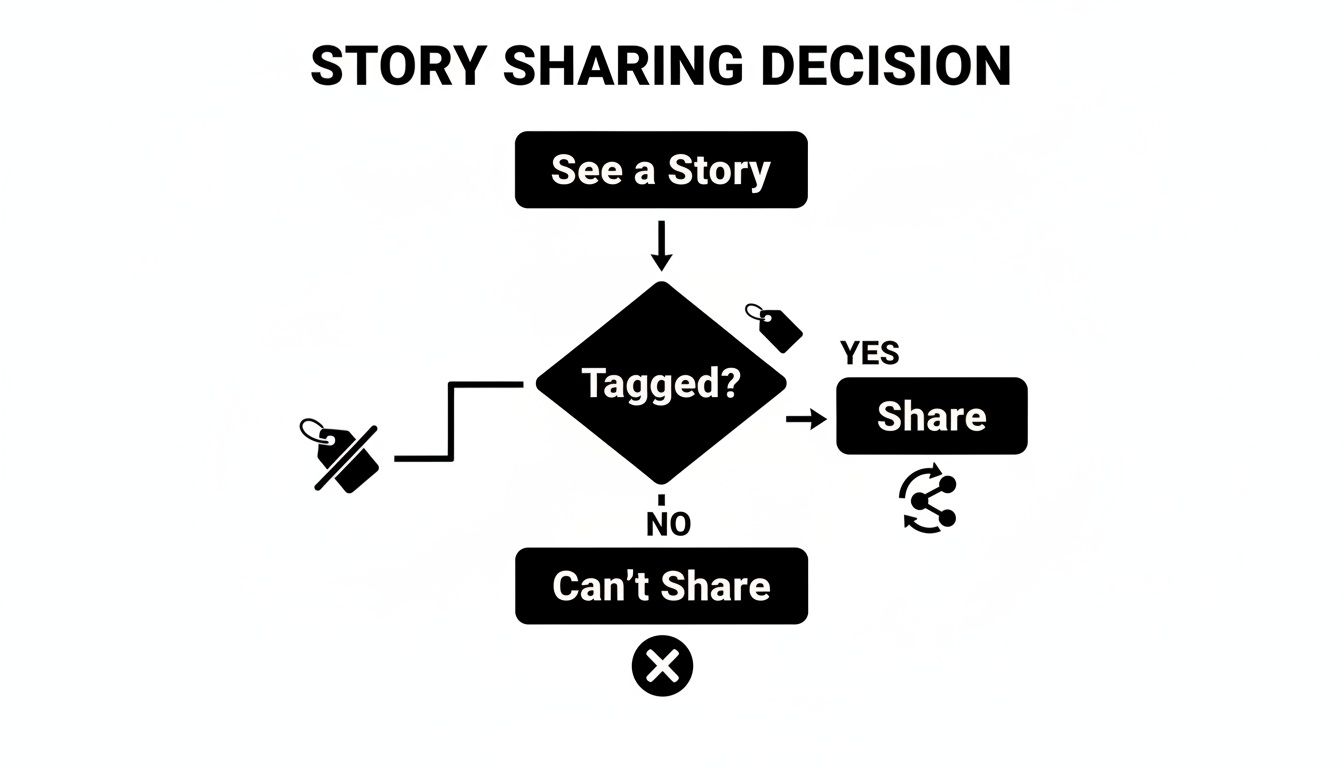
As you can see, being tagged is the only official, built-in way Instagram lets you reshare another person’s Story directly to your own. Getting a handle on this key limitation is the first step to understanding how sharing works.
The core principle is all about user consent. If you aren’t tagged in a Story, Instagram doesn't give you a direct "reshare" button. It's a deliberate choice to protect user privacy.
Let's break down the different ways you can share content, so you know exactly what to do in any situation.
Story Sharing Methods at a Glance
Confused about which method to use? This table gives you a quick overview of your options.
Sharing Method | When It Works | Key Takeaway |
|---|---|---|
Reshare When Tagged | The original creator tagged your @username in their Story. | The easiest, most direct way. You get a DM notification to share. |
Share Post to Story | You want to share a public account's feed post, not their Story. | Great for sharing content from a public feed, but doesn't work for Stories. |
Send Story via DM | The account is public, or you follow the private account. | Perfect for sharing privately with a friend, not for public resharing. |
Screenshot/Record | You have explicit permission from the original creator. | Requires asking first to respect privacy and avoid copyright issues. |
Each of these methods has a specific use case, and knowing the difference is key to mastering Instagram engagement. We’ll explore each one in more detail next.
The Easiest Way: Resharing a Story When You’re Tagged

Getting tagged in someone's Instagram Story is basically the golden ticket. It's the only official, built-in way Instagram allows you to share another person's actual Story content right onto your own.
The best part? It's incredibly straightforward. When someone mentions your @username in their Story, you don't have to go looking for it. Instagram sends a notification straight to your Direct Messages (DMs).
Just pop into that DM, and you'll see a big, can't-miss-it "Add to your story" button sitting right on top of their content. That’s your cue. Tapping it will whisk you away to the Story editor, with their post already loaded and ready for your own spin.
Customizing the Reshare
Once you're in the editor, their original Story shows up as a movable, resizable sticker. This is where you can really make it your own and add some context before it goes live.
Think of it this way: a customer tags your business in a Story showing off a product they just bought. When you reshare it, you could add a quick text overlay saying, "So glad you love it!" or even add a poll sticker asking your followers, "Who else needs one of these?" This simple action turns a customer shoutout into valuable social proof.
This isn't just about reposting; it’s about starting a conversation. By adding your own touch, you’re not only giving a nod to the original creator but also framing the content in a way that resonates with your own audience. It transforms a simple mention into powerful user-generated content.
Here are a few quick ideas to level up your reshare:
Add Commentary: A quick thank you or a reaction using the text tool goes a long way. For example: "Honored to be featured!"
Use Interactive Stickers: Get your audience involved. Drop in a poll ("Should we stock more of this?"), a quiz, or a question sticker related to what you're sharing.
Throw in a GIF: A well-timed GIF can instantly add some personality and humor. A simple "Thank You" or "Mind Blown" GIF can enhance the message.
Making the most of this feature does more than just fill your Story feed—it amplifies positive buzz and helps build a genuine community around your account.
Sharing Someone's Feed Post to Your Story

So, what if you want to share something brilliant but you weren't tagged in the story? While you can't directly reshare their story, Instagram gives you a fantastic workaround: sharing their feed post instead. This is my go-to move for shouting out a brand I love, highlighting a collaborator's work, or just sharing something that really clicks with my audience.
It's super straightforward. Find a public photo or Reel you want to share and look for the little paper airplane icon right underneath it. Give that a tap. A menu will pop up, and you’ll see the option to “Add post to your story.”
Once you select that, Instagram pulls the post into a new story draft for you. It shows up as a neat little sticker that people can tap to go straight to the original post.
Make Your Shared Post Engaging
Just hitting "share" is fine, but it’s a missed opportunity. A plain reshare can easily get skipped over. To really make it count, you need to add your own spin to it.
The default gradient background is a bit boring. I always change it. Actionable tip: Tap the Draw tool, select a color from the post itself using the eyedropper tool, and then tap-and-hold the screen for a solid background that matches the post's aesthetic.
The real key is to add context. Don't just repost and hope for the best. Tell your followers why it’s there. Does it inspire you? Is it a product you genuinely use? A quick text overlay can turn a simple share into something your audience actually cares about.
Here are a few easy ways I boost interaction when I share a post:
Ask a Question: Slap on a question sticker and ask something like, "What do you all think of this?" or "Anyone tried this before?"
Add a Poll: A quick poll is an effortless way for people to engage. Think "Love this! Yes or No?"
Provide Commentary: Add your own two cents. For example, if sharing an artist's work, you could add: "The use of color in this piece by @artist is just incredible! 🎨" This gives your share a purpose.
By using these interactive elements, you're not just amplifying someone else's content—you're creating a new conversation with your own followers. If you want to dive deeper into this, check out our guide on how to increase engagement on Instagram.
Sharing Stories Privately and With Permission
So, what do you do when you see an incredible story but you're not tagged in it? Instagram doesn't give you a simple "reshare" button for these, but don't worry. You've still got a couple of great options that are respectful of the original creator. It all comes down to either sharing it privately or getting the green light to post it publicly.

The easiest way to share a story is directly with another person. Just look for the paper airplane icon in the bottom-right corner of the story. Tapping it lets you send the story as a Direct Message to a friend. This is perfect for when you find a recipe Story you think a friend would love or a local event announcement that's relevant to a specific group chat.
Asking for Permission to Share
Your other option is to take a screenshot or screen recording. But this comes with a huge caveat: you must ask for permission first. Just grabbing someone’s content without their consent is a big no-no in digital etiquette and can feel like a serious invasion of privacy.
Respecting the original creator's ownership is non-negotiable. A quick, polite message is all it takes to turn a potential privacy issue into a positive interaction. This simple step builds trust and shows you value their work.
Getting that permission is usually pretty straightforward. The best approach is to just slide into their DMs with a friendly and direct message. For businesses or developers wanting to integrate sharing features more deeply, exploring the Instagram Graph API can open up more advanced possibilities.
Not sure what to say? Here are a couple of go-to templates that work well:
For a friend's personal story: "Hey! This is such a great photo. Would you mind if I took a screenshot and shared it on my story? I'll tag you!"
For a creator's content: "Hi, I absolutely love this story! It really resonated with me. Would it be okay if I shared it with my audience? I'll be sure to give you full credit."
Most people are more than happy to let you share their content, especially when you're polite and promise to credit them. It’s a win-win: you get to share something cool, and you maintain a positive relationship.
Understanding the Rules and Best Practices
Sharing content on Instagram is a fantastic way to build community, but it’s essential to navigate the platform’s rules. These features aren’t bugs; they’re intentionally built around user privacy and consent, which is why some actions are naturally limited.
The biggest rule to remember is this: you can’t directly reshare an Instagram Story you aren't tagged in. This is a core privacy feature, not an oversight. Likewise, you can't share any posts or Stories from a private account to your own. Instagram puts these guardrails in place to give users total control over who sees and shares their content.
The Unwritten Rules of Sharing Etiquette
Beyond Instagram's built-in features, there’s a general code of conduct for sharing someone else's content. The golden rule? Always, always give credit.
Even when you reshare a public feed post that automatically includes the original creator’s username, it’s a great practice to add your own manual tag (like, "Love this from @username!"). This small gesture makes attribution crystal clear and shows genuine respect for their work.
The whole point of sharing is to amplify and appreciate someone else’s content, not to appropriate it. Giving proper credit is how you build good relationships and a strong community on the platform.
As a practical tip, always keep the Instagram Stories maximum length in mind to make sure the content you're sharing doesn't get awkwardly cut off.
Desktop Woes and Risky Third-Party Apps
Trying to figure out how to share someone's Story from your computer? The short answer is, you can't. Instagram has kept all Story-sharing functions exclusive to its mobile app.
You'll inevitably stumble upon third-party apps and websites claiming they can get around these rules, letting you download or reshare any Story you want. Be warned: using these services is a huge gamble. They almost always violate Instagram’s terms of service, which could get your account suspended or even permanently banned.
Worse, they often ask for your login details, opening the door to serious security risks. Learning to work within the platform's intended tools is always the safer, smarter move. For more on using native features correctly, our guide on how to use hashtags effectively is a great place to start.
Common Questions and Quick Fixes
Even after walking through the steps, you might still run into a few snags. It happens. Let's tackle some of the most common questions that pop up when you're trying to share an Instagram story.
"Why isn't the 'Add to your story' button showing up?"
This is easily the number one issue people face. That button only appears if you've been personally tagged (@mentioned) in the story. If the creator didn't tag your specific username, Instagram simply doesn't give you the option to reshare it directly.
There are a couple of other culprits, too. The person might have a private account, or they could have disabled story resharing in their settings. Actionable Step: If you know the person, send them a quick DM: "Hey, love your Story! Would you mind tagging me in it so I can share it?" Often, they're happy to help.
"What’s the right way to credit someone when I share?"
Giving credit where it's due is non-negotiable. Luckily, when you share a public feed post to your story, Instagram automatically creates a tappable sticker that links right back to the original.
But don't stop there. As a best practice, I always add a visible text tag as well (e.g., "Love this from @username!"). It gives the creator immediate, obvious credit without someone needing to tap through.
If you're sharing a screenshot (which you should only do after getting permission!), the responsibility is all on you. You'll need to manually add a text box and type their @username to tag their account. Pro Tip: Make sure the tag is readable and not hidden behind other elements.
"Should I use one of those third-party apps to reshare stories?"
My advice? Steer clear. Using third-party apps to download and repost stories is a risky game. Many of them violate Instagram's Terms of Service, which could get your account flagged, suspended, or worse, banned.
Besides the risk to your account, these apps can be a security nightmare, often asking for your login details. It’s always safer—and more respectful to the original creator—to stick with Instagram's built-in features and the simple act of asking for permission.
Ready to take your social media strategy beyond just sharing stories? NicheTrafficKit uses AI to automate your content creation, scheduling, and publishing across all major platforms. Reduce your workload from hours to minutes and watch your engagement grow. Discover how at https://nichetraffickit.com.
