How to Go Viral on Pinterest: A Practical Guide
Discover how to go viral on Pinterest with actionable strategies. Learn to master pin design, SEO, scheduling, and analytics to make your content explode.
Let's be clear: going viral on Pinterest isn't about luck. It's a skill you can learn and a strategy you can execute.
The simplest way I can put it is this: you need discoverability through SEO, a scroll-stopping design, and a consistent publishing schedule that tells the Pinterest algorithm you’re a serious player. When those three things click, you've got a repeatable system for growth.
The Framework for Going Viral on Pinterest
The biggest myth I see is that viral success is just a random lightning strike. It’s not. Behind every pin that seems to explode overnight is a deliberate framework that gives the audience and the algorithm exactly what they want.
The goal isn't to chase a single viral hit. It’s to build a system that predictably drives growth, engagement, and most importantly, traffic back to your site. This is how you turn your Pinterest profile from a digital mood board into a genuine growth engine for your business.
Understand the Pinterest Mindset
Before you do anything else, you have to get inside the head of a Pinterest user. This isn't like other social media platforms where people are just killing time. Pinterest is a discovery tool. A planning tool. A decision-making engine.
This is a huge advantage for us because the audience comes with intent. They aren't just scrolling—they're actively searching for ideas, solutions, and products. The stats back this up: a staggering 85% of weekly users have bought something based on a brand's pin they saw.
Even better, shoppers on Pinterest spend twice as much each month compared to users on other platforms. This means when your content goes viral, it often leads directly to real business results. If you want to dive deeper, you can find more Pinterest statistics that highlight the incredible buying power of this audience.
Your Path to Pinterest Success
To really make this work, you need a workflow that weaves together SEO, design, and scheduling into one cohesive process. This isn't about doing one thing well; it's about doing all three consistently.
This diagram breaks down the fundamental process I use.
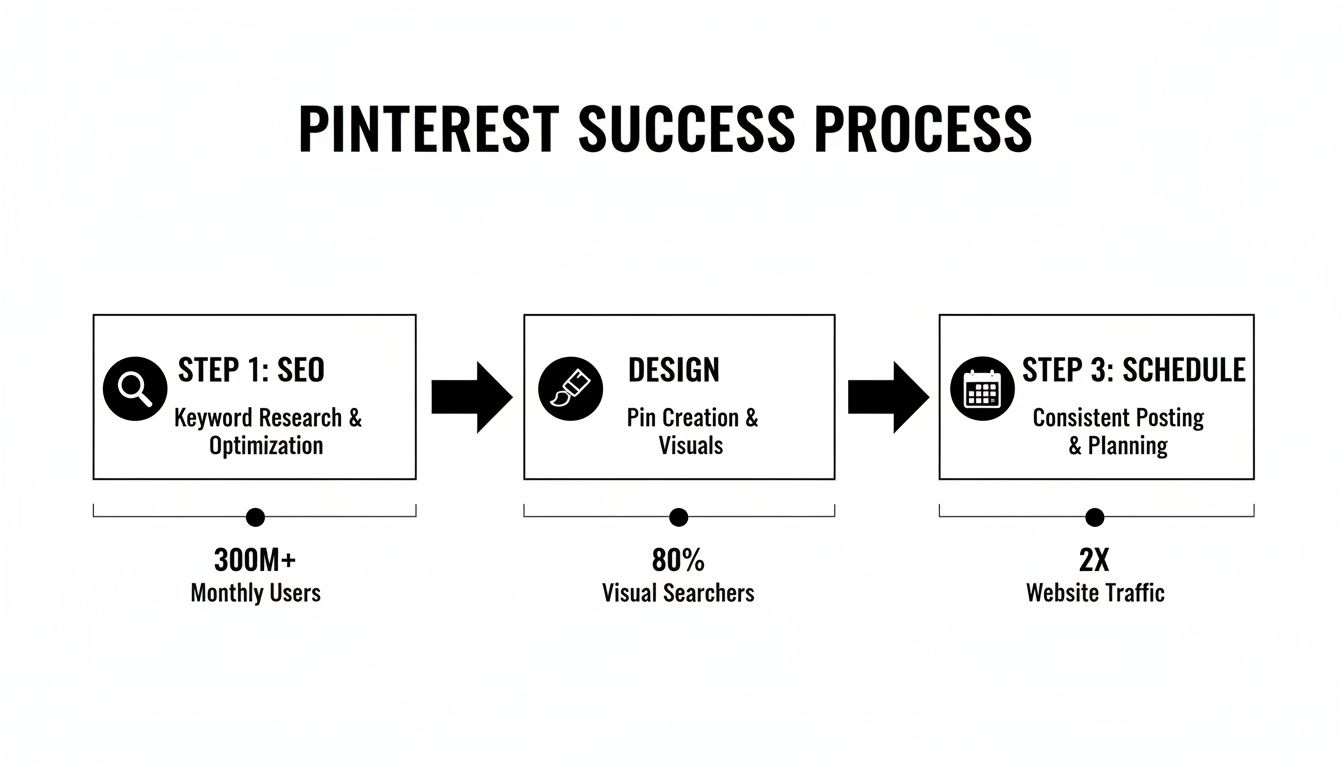
As you can see, everything starts with discoverability (SEO). From there, you need compelling creative (Design), and it's all held together by consistent activity (Scheduling).
To make it even simpler, I've summarized these core components into a quick-reference table.
Core Pillars of Pinterest Viral Success
This table outlines the strategic areas you absolutely must focus on to get traction on Pinterest. Think of it as your high-level checklist.
Pillar | Why It Matters | Key Action |
|---|---|---|
Audience & SEO | Your pins can't go viral if no one sees them. Understanding what users are searching for is the foundation of all visibility. | Actionable Example: Use Pinterest search to turn "gardening" into specific, high-intent keywords like "small space vegetable gardening ideas" or "beginner-friendly perennial flowers." |
Pin Design | In a sea of visual content, your pin needs to grab attention instantly. A weak design gets scrolled past, no matter how good the SEO is. | Actionable Example: Create 5-10 branded pin templates in Canva. For each new piece of content, simply swap the background image and update the headline text, saving hours of work. |
Scheduling | Consistency signals to the Pinterest algorithm that you're a reliable source of fresh content, boosting your profile's authority and reach over time. | Actionable Example: Use a scheduling tool to plan 5-10 pins per day for the next two weeks. Batch your work to maintain a consistent presence without daily manual effort. |
Ultimately, each pillar supports the others. Great SEO without a great design is a waste, and a great design without consistency will never get seen.
A pin can't go viral if it isn't found. A beautiful design is worthless if it never gets in front of the right eyes, and visibility requires a consistent presence. Each step builds on the last, creating the solid foundation you need for viral reach.
Mastering Keyword Research and Pinterest SEO
Let's be real: your most beautiful pin in the world is useless if nobody ever sees it. The secret to getting your content noticed on Pinterest isn't just about pretty pictures; it's about treating the platform for what it truly is—a massive visual search engine. Building a rock-solid SEO foundation is the one thing you can't skip if you want your pins to land in front of an audience that's actively searching for them.
Think about it. Almost every single action a user takes on Pinterest starts with the search bar. They’re typing in "boho living room ideas," "healthy weeknight dinners," or "DIY craft projects for kids." They're using words to find inspiration. Your job is to figure out what those words are and strategically place them where Pinterest can find them.
Finding the Exact Phrases Your Audience is Using
Before you even think about designing a pin, you need to crawl inside your audience's mind. The absolute best place to start this treasure hunt is right on Pinterest itself.
Pop over to the Pinterest search bar and type in a broad topic related to your niche, like "home organization." Now, watch what happens. The auto-suggested phrases that drop down aren't just random guesses; they are the most popular, real-time searches people are making right now.
For instance, typing "home organization" might show you:
home organization hacks
home organization for small spaces
home organization on a budget
home organization pantry ideas
These longer, more specific phrases are what we call long-tail keywords, and they are pure gold. They show exactly what a user wants, and because they're so specific, they're usually way less competitive than a generic term. To really dig deep and find the best opportunities, using a few of the best keyword research tools can give you a serious edge.
Pro Tip: Don't stop at the search bar. Actually click on one of those suggested searches. See those colorful bubbles that appear right below the search bar? Those are related searches. Clicking through them can lead you down a rabbit hole of even more specific, niche topics to target.
Where to Weave in Your Keywords
Okay, you've got a solid list of keywords. Now what? It's time to put them to work. Good Pinterest SEO isn't just about one pin; it's about sending consistent signals to the algorithm about what your entire profile is all about.
You'll want to naturally sprinkle your main and related keywords into a few key places:
Your Profile Bio: In just a couple of sentences, tell people who you are and what you do, using your most important keywords. Example: A food blogger might write: "Sharing simple, healthy recipes for busy families. Find easy weeknight meals, meal prep ideas, and gluten-free desserts."
Board Titles: Get specific. A board named "Recipes" is a missed opportunity. Instead, create targeted boards like "Quick 30-Minute Dinners" or "Vegan Breakfast Ideas." This helps both users and the algorithm instantly understand what's inside.
Board Descriptions: Don't leave this blank! Every board has a spot for a description, so use it. Write a sentence or two for each board describing its contents and include a few relevant keywords. Example for "Quick 30-Minute Dinners": "Find easy weeknight meals that are ready in 30 minutes or less. Perfect for busy families looking for healthy dinner recipes and simple meal prep solutions."
Pin Descriptions: This is where everything comes together. You need to write a compelling description that includes your target keywords from top to bottom.
Writing the Perfect Pin Description
A killer pin description has to do two jobs at once. It needs to grab a human's attention and convince them to click, but it also has to be packed with the right terms so the Pinterest algorithm knows how to categorize and show your content.
Let's say you created a pin for a DIY coffee table.
A weak description: "My new coffee table." (This helps no one.)
An optimized description: "Learn how to build this beautiful DIY farmhouse coffee table with our easy, step-by-step tutorial. This woodworking project is perfect for beginners and can be completed on a budget. Get all the plans and tips for your next home decor project."
See the difference? The second one is loaded with keywords like "DIY farmhouse coffee table," "step-by-step tutorial," "woodworking project for beginners," and "home decor project." It's not just more descriptive; it's infinitely more discoverable. This is how you lay the groundwork that gets your pins seen, saved, and eventually, going viral.
Designing Pins That Capture Attention and Drive Clicks
Once you’ve nailed your keyword research, the next battle is won right in the Pinterest feed. This is a platform overflowing with visual inspiration, and your pin design is the one thing that will make someone stop their scroll. A weak design gets ignored, no matter how perfect your SEO is.
Think of your pin as a tiny billboard. You have less than a second to grab attention, show your value, and make someone curious. This is your practical guide to creating pins that don't just get seen—they get saved and, most importantly, clicked.
The Anatomy of a High-Performing Pin
Viral pins are no accident. They almost always follow a proven formula built for clarity and immediate impact. When you break down the top-performing pins, you start to see a consistent structure you can use for your own content.
The foundation is the 2:3 aspect ratio. A vertical format like 1000x1500 pixels simply takes up more screen real estate, especially on mobile, making your pin impossible to miss. This isn't just a friendly suggestion; the entire Pinterest feed is built around it.
From there, every element has to work together:
High-Quality Imagery: Use crisp, clear, and relevant visuals. Ditch the generic stock photos. Actionable Insight: For a recipe pin, show the final, plated dish. For a DIY project, show the finished product in a real setting.
A Bold Text Overlay: Your headline has to be readable at a glance. Use a bold, easy-to-read font that pops. Actionable Insight: Use a contrasting color for your text. If your image is dark, use white text. If it's light, use black or a dark brand color.
Subtle Branding: Add your logo or website URL at the bottom. Actionable Insight: Keep it small and consistent. The goal is brand recognition over time, not shouting in their face.
The whole point of a pin's design is to make the value proposition instantly obvious. If someone has to squint, guess, or think too hard about what you're offering, they’re already gone. Clarity is everything.
Crafting Headlines That Compel Action
Your pin’s headline is the hook. It can't just describe the content; it has to create an "information gap" or promise a real outcome that makes a user feel like they have to click. Vague headlines are a recipe for being ignored.
For instance, "Easy Dinner Recipe" is okay, but "5-Ingredient Chicken Dinner Ready in 20 Minutes" is a hundred times better. It’s specific, highlights the benefits (easy, fast), and sets a clear expectation. Numbers, solutions, and intriguing questions are your best friends here.
Just look at these "before and after" examples:
Before: "Gardening Tips"
After: "The #1 Mistake Killing Your Tomato Plants"
Before: "How to Save Money"
After: "7 Simple Swaps That Saved Us $300 Last Month"
See the difference? The "after" examples create a sense of urgency and promise specific, valuable information. That’s what gets the click.
The Undeniable Power of Video Pins
Static pins still work, but let's be real: video is a powerhouse on Pinterest. It has quickly become the top format for engagement. In fact, video pins have a 2x higher completion rate than videos on any other social platform.
And it gets better. Vertical videos (using that 2:3 aspect ratio or shorter) make up a whopping 76% of viral pins. This isn't a fluke; it's proof that users are actively watching, not just scrolling past. You can check out more of these powerful Pinterest video trends and statistics to see for yourself.
To make your Video Pins work:
Start with a strong visual hook. The first 1-3 seconds have to be captivating. Actionable Example: For a recipe video, show cheese being pulled or sauce being drizzled. For a craft, show the beautiful finished product first.
Keep it short and sweet. Aim for 15-60 seconds. Get straight to the point and deliver value fast.
Design for sound-off viewing. Most people watch without sound, so use text overlays to explain the steps or highlight the key takeaways.
If you’re serious about going viral on Pinterest, you can't ignore video. And if you want to get even deeper into what makes an audience tick, check out our guide on how to increase engagement on social media.
Accelerating Your Design Workflow
Creating one-of-a-kind, high-quality pins over and over again is a huge time suck. This is where templates and smart tools become your secret weapon for scaling up.
Instead of starting from a blank canvas every single time, create a set of branded templates you can quickly customize with new text and images. Tools like NicheTrafficKit can take this to the next level by providing pre-optimized templates built for virality, letting you generate dozens of pin variations in minutes. To keep up with a consistent posting schedule and expand your reach, you could even use a bulk social media image generator to efficiently create a high volume of visual content.
When you systemize your design process, you free yourself up to focus on strategy instead of getting bogged down in the manual work.
Strategic Pinning for Maximum Reach
If great SEO and beautiful pin designs are the fuel for your Pinterest strategy, then consistency is the engine that actually makes it go. The Pinterest algorithm absolutely loves active, reliable accounts. But let's be real—manually pinning multiple times a day, every single day, is a fast track to burnout.
A sustainable, strategic pinning schedule is what separates the accounts that fizzle out from the ones that hit viral growth. It’s all about working smarter, not just harder, to show Pinterest you're a valuable creator and keep your content in front of your audience.
The Fresh Content Rule
One of the most common questions I get is about repinning versus creating new pins. For years, repinning was a huge part of the game, but things have changed. Today, Pinterest heavily, heavily prioritizes fresh pins.
So, what’s a “fresh pin”? It’s simply a new image or video that has never appeared on Pinterest before. This doesn't mean you need a brand-new blog post every day. You can—and should—create a bunch of unique pin designs that all point back to the same URL.
For example, a single blog post on "ketogenic diet recipes" could easily fuel a month's worth of pins:
A pin with the text overlay: "7 Easy Keto Dinners for Beginners"
A quick Video Pin showing you making one of the recipes.
An infographic titled "Your Ultimate Keto Food List"
Another static pin with a different photo and headline: "Low-Carb Meal Prep Ideas"
To the algorithm, each of these is a brand-new piece of content, even though they all lead to the same article. This is how you stay consistent without the pressure of constantly churning out new long-form content.
Here's the ratio I stick to: 80% fresh pins and 20% repins. Pour your energy into creating new, valuable visuals. Save repinning for filling small gaps in your schedule or giving your best seasonal content a little bump.
Finding Your Pinning Frequency (Without Being Spammy)
Alright, so how many pins should you actually post a day? There’s no single magic number, but there is a strategic range. The goal is to be consistent without overwhelming your followers or tripping the algorithm’s spam filters.
Through trial and error, I’ve found that posting between 3 to 10 fresh pins per day is the sweet spot for most accounts that are serious about growth. This volume is enough to signal that you're active but not so high that you look like a bot. And spacing these pins out throughout the day is key.
The hard truth is that a tiny fraction of content dominates the platform. Research shows the top 1% of viral pins get half of all impressions and clicks, while the bottom 80% of new pins receive less than 10%. Consistent pinning is your way of buying more lottery tickets—it dramatically ups your chances of creating one of those breakout pins.
Nailing Your Timing
Posting when your audience is scrolling is the best way to give your pins that initial burst of engagement they need to gain momentum. Generally speaking, evenings and weekends are often peak times for Pinterest users.
But you have to go deeper than general advice. You need to find your audience's peak hours. This is where Pinterest Analytics becomes your best friend. Actionable Insight: Go to Analytics > Audience Insights. Look at the "Affinity" section to see what your audience loves, then check your top-performing pins to see when they were published and gained traction. For a more detailed breakdown, our guide on the best times to post on social media offers platform-specific timing strategies you might find helpful.
Putting Consistency on Autopilot
Trying to execute this strategy manually is nearly impossible. This is where automation becomes your secret weapon in going viral on Pinterest. A tool like NicheTrafficKit can turn this daily grind into a simple, set-it-and-forget-it system.
Instead of logging in multiple times a day, you can bulk-schedule hundreds of pins weeks or even months in advance. You just upload your designs, plug in your optimized descriptions, and set a schedule that automatically publishes your pins at the perfect times. This keeps your account consistently active, feeding the algorithm a steady diet of fresh content and seriously boosting your chances for a pin to take off.
Analyzing Performance to Replicate Success
Going viral on Pinterest is a huge win, but the real goal is making it happen again and again. A single viral pin can feel like a lucky fluke. A system for creating them consistently? That’s a powerful business strategy.
This is where you stop just making pins and start thinking like a data-driven marketer. Without looking at your analytics, you're just guessing. By digging into your numbers, you create a feedback loop where every single pin—good or bad—teaches you something, sharpening your strategy for the next one.
Demystifying Your Key Pinterest Metrics
Pinterest Analytics can look like a lot at first glance, but you really only need to zero in on a few core metrics to see what’s working. These numbers tell a story.
Let's cut through the noise and focus on what really moves the needle for viral growth.
To help you understand what to track, I've put together a table breaking down the most important metrics you'll find inside Pinterest Analytics.
Key Pinterest Metrics and Their Meaning
Understanding what to track in Pinterest Analytics to measure and replicate viral success.
Metric | What It Measures | Why It's Important for Virality |
|---|---|---|
Impressions | The total number of times your pin was shown on screen. | This is your top-of-funnel reach. It shows how many eyeballs saw your pin but doesn't measure actual interest. |
Saves | The number of times users saved your pin to one of their boards. | This is a huge signal to Pinterest. It tells the algorithm your content is valuable, which encourages it to show your pin to more people. |
Outbound Clicks | The number of people who clicked through your pin to your website. | This is your direct line to traffic, leads, and sales. It measures how well your pin inspires immediate action. |
Looking at these metrics together is where the insights hide. High impressions but low clicks might mean your design is eye-catching, but the headline isn't compelling enough to make someone act. High saves but low clicks could mean your content is great for inspiration, but it isn't creating enough urgency to visit your site right now.
A pin with 1,000 saves is often far more valuable than one with 100,000 impressions and no engagement. Saves tell Pinterest your content is high-quality, and that's the key to getting more organic distribution.
Identifying Your Top-Performing Content
Now, it's time to put on your detective hat. Head over to your analytics and filter your pins to find the top performers based on Saves and Outbound Clicks.
Don't just look at what's at the top of the list. Look for the patterns.
Ask yourself these questions about your winners:
What's the topic? Is there a specific sub-niche that always pops off?
What's the design? Is there a common color palette, font style, or type of image (photos vs. graphics) they all share?
What kind of headline is it? Are listicles like "7 Ways to..." or "How to..." guides getting all the love?
Which keywords are in the descriptions? Spot the common phrases across your best pins.
Maybe you'll find that all your top pins are about "small bathroom organization," use bright and airy photos, and have numbers in the headline. That isn't a coincidence—it's your roadmap for what to create next.
A Simple Framework for A/B Testing
Once you've spotted some patterns, you can start running simple A/B tests to refine your approach. It sounds technical, but it’s really just about changing one thing at a time to see what works better.
Start by creating two pins for the same blog post, but with a different headline:
Test A: "5 Genius Hacks for a Tidy Kitchen"
Test B: "How to Organize Your Kitchen on a Budget"
Publish them both and let them run for a couple of weeks. Then, check your analytics. Which one got more saves? More clicks? The winner tells you which angle resonates most with your audience. You can test anything—images, calls-to-action, colors, you name it. For a deeper dive into connecting your Pinterest activity to business results, you can learn how to measure social media ROI.
Scaling Your Wins with Automation
The final piece of the puzzle is scaling what works. Once you’ve found a proven formula—a topic, design, and headline style that consistently performs—it’s time to lean into it. Hard.
Manually creating dozens of variations can be a massive time sink. This is where automation tools change the game completely.
A platform like NicheTrafficKit, for example, can take one of your winning pin designs and instantly generate dozens of fresh variations. You just swap out the text and background images, and in minutes, you have a month's worth of content based on a proven winner. This creates a powerful growth loop: you analyze, find a winner, scale it with automation, then analyze the new results to sharpen your strategy even more.
This is how you stop chasing virality and start building a system that produces it on demand.
Common Questions About Going Viral on Pinterest
Even with a killer playbook, you're bound to have questions. Let's dig into some of the most common ones I hear from creators trying to crack the Pinterest code and build a real, lasting presence.
How Long Does It Really Take for a Pin to Go Viral?
This is the big one, and the answer is usually longer than you think. You have to unlearn what you know from platforms like Instagram or Twitter, where content has a shelf life of maybe 24 hours. A pin is a slow burn.
I've had pins do absolutely nothing for weeks—sometimes months—and then suddenly, they just explode. This happens because Pinterest is fundamentally a search engine. Your pin is just waiting for the right moment.
For instance, a pin about "DIY Christmas decor" published in September might sit dormant until the holiday search frenzy kicks in around November. It’s not dead; it's just early to the party. The biggest mistake you can make is deleting pins that don't get immediate traction. Trust the process and let the Pinterest algorithm work its magic over time.
Are Group Boards Still a Thing for Growth?
They used to be the strategy. Now? Not so much. A few years back, Pinterest shifted its focus heavily towards creators building their own authority on their own boards.
While a few high-quality, super-niche group boards won't necessarily hurt you, they shouldn't be where you spend your energy. Your time is far better invested in creating your own meticulously organized, keyword-rich boards and populating them with incredible content.
Here's my rule of thumb: Pour 95% of your effort into your own profile and boards. Pinterest rewards creators who are subject matter experts, not just contributors to other people's collections.
What's the Single Most Important Metric for Virality?
Outbound clicks are what we all want for website traffic, but if you're chasing virality on the platform itself, the golden metric is saves.
Every time someone saves your pin to one of their boards, they're giving it a massive vote of confidence. It's a powerful signal to the Pinterest algorithm that your content is high-value, inspiring, and worth showing to more people.
Think of it this way: saves are what get you more distribution. More distribution leads to more impressions, which leads to more clicks and, you guessed it, more saves. It’s a powerful feedback loop.
Here’s how you get more people to hit that "Save" button:
Create "keeper" content: Think detailed infographics, step-by-step tutorials, ultimate guides, or comprehensive checklists. Practical Example: A pin titled "The Ultimate Kitchen Cleaning Checklist" is more save-worthy than "Kitchen Cleaning Tips."
Just ask for it: A simple text overlay saying "Save this idea for later!" is surprisingly effective.
Solve a real problem: A pin that offers a quick fix, a clever hack, or a smart solution is almost guaranteed to get saved.
Can I Go Viral on Pinterest Without a Blog?
Absolutely. A blog is a fantastic asset, but it’s definitely not a prerequisite for hitting it big on Pinterest. Many creators see massive success by linking to all sorts of destinations.
You can drive your traffic to:
A product page on your Shopify or Etsy store
A video on your YouTube channel
An affiliate product link
Your Instagram profile to grow your following there
A landing page for your email list or a free download
The core principles don't change. You still need to create beautiful, high-quality pins with smart SEO and a clear promise of value. The destination is just one piece of the puzzle. As long as you're giving users inspiration and solutions, they'll click and save.
Ready to stop guessing and start growing? NicheTrafficKit uses AI to automate your entire Pinterest workflow—from designing viral-worthy pins and optimizing descriptions to scheduling content at the perfect times. Reclaim your time and build a predictable traffic engine. Try NicheTrafficKit for free and see the difference.
