How Many Hashtags Should You Really Use on Instagram?
Learn how many hashtags instagram to use on posts, Reels, and Stories to maximize reach and engagement.
Let's settle the debate once and for all: how many hashtags should you really be using on Instagram? I'll give you the straight answer—the sweet spot is between 3 and 8 highly relevant hashtags, not the max of 30. This guide is here to bust the myth that cramming your posts with tags is a magic ticket to visibility. It’s not.
Strategic, high-quality tags will outperform a high quantity of random ones every single time. This guide will give you actionable steps and practical examples to prove it.
The Great Hashtag Debate: How Many to Use on Instagram

For years, creators and marketers have obsessed over the perfect number of hashtags. Instagram lets you use up to 30 per post, but hitting that limit is an outdated strategy that can actually hurt your reach.
Here’s why: Instagram’s algorithm has gotten a lot smarter. It now cares more about relevance and the user experience than it does about you stuffing your caption with every tag under the sun.
Think of hashtags as signposts for the algorithm. A few super-specific tags tell Instagram exactly what your content is about and who needs to see it. Piling on dozens of vague ones just creates confusion.
Shifting From Quantity to Quality
The old-school approach of maxing out your hashtags was like shouting into a crowded stadium—you’re just adding to the noise, and nobody can hear you. The modern, effective strategy is more like having a focused conversation with the right group of people.
With over two billion users, getting noticed on Instagram is tough. Research shows that the average post uses about 10.7 hashtags, but a deeper look at recent Instagram statistics reveals that engagement often starts to drop off after just six. This tells us there's a delicate balance between getting seen and staying relevant.
Actionable Insight: The core principle for a modern hashtag strategy is simple: Clarity trumps volume. Your goal is to send a precise signal to the algorithm, not a confusing one. For your next post, try using just 5 tags that are hyper-specific to the image, instead of 15 general ones.
By curating a smaller, more powerful set of hashtags, you’ll get better results. Let's walk through the data-backed strategies that are working right now, so you can pick the perfect number of hashtags for every single piece of content you create.
Understanding Instagram's Hashtag Limits and Rules

Before we can even talk about strategy, we need to know the rules of the road. Instagram has some hard-and-fast limits on how many hashtags you can use, and these aren't just suggestions. Think of them as the technical guardrails for your content.
Every type of Instagram content has its own specific cap. You can always use fewer, but trying to go over these numbers simply won't work.
Feed Posts & Reels: You get a maximum of 30 hashtags.
Stories: The limit is much lower, capped at 10 hashtags (usually added with the hashtag sticker).
Now, just because you can use 30 hashtags doesn't always mean you should. This is one of the most important things to remember. The official platform limit is one thing, but what actually performs best is often a totally different story.
Caption vs. First Comment: Where Should Your Hashtags Live?
This is one of the oldest debates in the Instagram world: should you put your hashtags in the caption or hide them away in the first comment? Here's the simple truth—from an algorithm perspective, it makes zero difference. Instagram has confirmed that hashtags are picked up equally from either spot.
So, the decision really comes down to your personal preference and brand aesthetic.
Practical Example (First Comment): A minimalist home decor brand posts a beautiful photo with a short, elegant caption. They then post their 5 hashtags (
#minimalisthome,#scandidecor, etc.) in the first comment to keep the feed looking uncluttered.Practical Example (Caption): A fitness coach posts a workout video. They put their hashtags (
#HIITworkout,#fitnessmotivation) directly in the caption so they are live the instant the post is published, ensuring immediate discoverability.
Key Takeaway: Don't lose sleep over this one. The algorithm doesn't care. Pick the location that feels right for your brand's style and workflow.
The Danger Zone: Banned and Broken Hashtags
Beyond the numbers, you absolutely have to watch out for "banned" or "broken" hashtags. These are tags that Instagram has flagged because they’ve been overrun with content that violates community guidelines. If you use even a single banned hashtag, your post could become practically invisible to anyone who doesn't already follow you.
Some tags are banned for good (think spammy or inappropriate stuff), while others might be temporarily restricted if they get spammed during a popular event (like #valentinesday, which has been flagged in the past). Using them is like a red flag to the algorithm, signaling that your content might be low-quality and tanking your reach.
Actionable Insight: Before using a new hashtag, search for it on Instagram. If you see a message saying recent posts are hidden or the "Recent" tab is missing, steer clear. It's a simple, two-second check that can save your post from getting buried. For example, search #newyears right after January 1st; you'll often see it's temporarily restricted due to spam.
Why Fewer Hashtags Often Mean More Engagement
Remember the old days of cramming the maximum 30 hashtags into every Instagram post? Well, that strategy is officially dead. Today, it’s all about precision, not volume. The big question is why this shift happened and, more importantly, how you can make it work for you. The answer is all about how Instagram’s algorithm has grown up.
It's no longer a simple search engine that just matches tags. Instead, it’s a sophisticated system that cares deeply about relevance and real, human interaction. When you use fewer, laser-focused hashtags, you’re sending a crystal-clear signal to the algorithm about what your content is about. This helps Instagram put your post in front of the right people—the ones who are genuinely going to like it, comment on it, and share it.
Think of it like this: using 30 generic hashtags is like shouting into a crowded stadium. Sure, you’re making noise, but your message is completely lost. On the other hand, using 5-8 carefully chosen niche hashtags is like having an intimate, meaningful conversation with a small group of people who are leaning in, eager to hear what you have to say.
The Algorithm Prefers Clarity Over Clutter
Instagram has one main goal: to keep people on the app as long as possible by showing them stuff they actually love. When you bombard a post with dozens of vaguely related tags, you’re just confusing the algorithm. It can't figure out who your ideal audience is, which means your content might get shown to people who couldn't care less, tanking your engagement.
A tight, relevant set of hashtags does the exact opposite. It tells Instagram, "Hey, show this to people interested in this specific thing." Practical Example:
Bad: A post about a vegan chocolate cake uses
#dessert,#food,#yummy,#sweet,#instagood,#foodie,#chocolate, and 23 other broad tags. The algorithm has no idea who to show it to.Good: The same post uses
#vegancake,#veganchocolaterecipe,#dairyfreebaking,#plantbaseddessert, and#glutenfreechocolatecake. Now the algorithm knows exactly who will love this content: vegans, gluten-free bakers, and plant-based foodies.
While you still see hashtags everywhere, 2025 marks a huge shift in how they actually affect your content. Even Instagram's CEO, Adam Mosseri, has gone on record saying that hashtags don't have the same impact on reach and engagement that they used to. Recent studies back this up, showing there's no major statistical jump in reach for posts with hashtags versus those without.
But that doesn't mean hashtags are useless. Far from it. They still offer a huge advantage when you use them strategically. The game has just changed from "how many can I use?" to "how relevant can I be?".
Building Trust with Your Audience and the Algorithm
Using targeted hashtags isn’t just about pleasing the algorithm; it’s about building trust with your followers. When someone finds your content by searching a specific niche tag like #handmadepotterylove, they get exactly what they were looking for. That creates a great user experience and makes them much more likely to engage with your post and maybe even hit that follow button.
Ultimately, a focused hashtag strategy is a key part of growing your account for the long haul. And while getting your hashtags right is a big piece of the puzzle, you can really supercharge your results by exploring broader strategies for improving social media engagement. For more tips tailored specifically to this platform, don't miss our complete guide on how to increase engagement on Instagram. This will give you the confidence to use hashtags with purpose and precision, leading to much better results.
How Many Hashtags to Use on Posts, Reels, and Stories
So, what's the magic number of hashtags? The honest answer is: it depends. The best hashtag strategy isn't a one-size-fits-all formula; it changes based on where you're posting your content.
Think of it like adjusting the volume of your voice. A Reel is designed to be a shout to grab the attention of a massive, scrolling audience. A Feed Post is more like a focused conversation with your community. And a Story? That's often just a quick whisper to your most loyal followers. Matching your hashtag count to the format is the secret to getting real results.
Hashtag Strategy by Content Type
To make this crystal clear, let's break down how your approach should change for each content type. This table gives you a quick at-a-glance reference for building your strategy.
Content Type | Optimal Count | Hashtag Type Focus | Primary Goal |
|---|---|---|---|
Feed Post | 3-5 | Highly specific, niche, community-focused | Deep engagement, authority |
Reels | 5-8 | Mix of broad, niche, and trending | Maximum reach, discovery |
Stories | 1-3 | Branded, event, or location-specific (stickers) | Context, short-term visibility |
This framework helps you move from just guessing to making intentional, strategic choices with every piece of content you publish.
Feed Posts: The 3-5 Hashtag Sweet Spot
For your regular grid posts, it’s all about quality over quantity. Stick to a tight, focused group of 3-5 highly specific, niche hashtags. The goal here isn't to blast your content out to everyone, but to precisely target the right people—those who are genuinely looking for what you offer.
This laser-focused approach sends a super clear signal to the Instagram algorithm about what your post is about, helping it find your ideal audience.
Practical Example: A local bakery in San Diego posts a photo of its sourdough bread. Instead of
#baking, they use#SourdoughSanDiego,#ArtisanBreadBaker, and#NorthParkEats. These tags attract local customers who are actually looking for bread to buy.
Reels: Go Broader with 5-8 Hashtags
Reels are built for discovery, so this is where you can (and should) expand your reach. For Reels, a slightly larger set of 5-8 hashtags works beautifully. Your strategy here is to create a powerful cocktail of hashtag types.
Mix in a few of those specific, niche tags with some broader, more popular ones that relate to your topic or a trending sound. This gives the algorithm multiple avenues to serve your content to people who don't follow you yet, dramatically increasing your chances of going viral.
Practical Example: A travel creator posts a Reel of a hiking trip in Banff using a trending audio. Their hashtags could be:
#BanffNationalPark(broad),#HikingAdventures(community),#CanadianRockies(niche),#TravelReel(format-specific), and#MountainViews(descriptive). This mix covers multiple discovery paths.
A great way to think about your hashtags is as different levels of communication. Broad tags shout to a huge audience, niche tags talk to an engaged community, and branded tags whisper to your core followers.
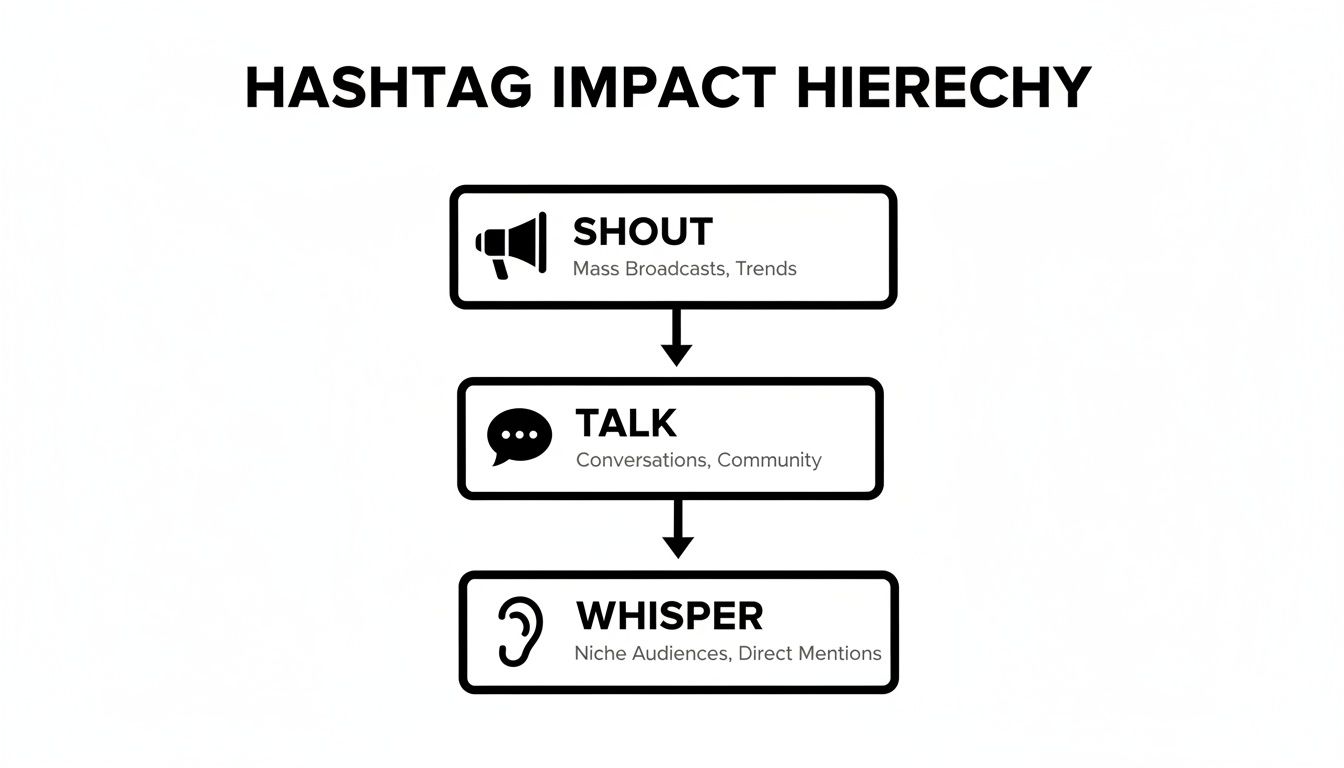
As you can see, a smart strategy uses all three levels to cover all your bases.
Stories: Keep it Simple with 1-3 Hashtags
When it comes to Instagram Stories, less is definitely more. Aim for just 1-3 relevant hashtags, usually added via the hashtag sticker. Stories are fleeting by nature, and the primary audience is already following you. The main job of a hashtag here is to add a bit of context or get your Story pulled into a specific hashtag feed for a little extra, short-term exposure.
Practical Example: A coffee shop posts a Story showing a live music event. They use the hashtag sticker for
#LiveMusicNYCand their branded tag#TheDailyGrindLive. This gives context and allows non-followers interested in local live music to find them.
Juggling these different strategies can feel like a lot, which is why planning ahead is a game-changer. You can get way more organized by learning how to create a content calendar where you can map out your hashtag sets for each post ahead of time.
How to Find and Test the Right Hashtags for Your Brand
Knowing the number of hashtags to use is one thing, but finding the right ones? That’s where the real magic happens. Turning theory into practice means having a solid process for discovering, organizing, and testing hashtags to see what actually moves the needle for your brand.
This isn’t about throwing spaghetti at the wall to see what sticks. It's about building a smart, repeatable workflow that starts with simple observation and ends with data-backed decisions. Let's break down how you can create a powerful hashtag library that consistently gets your content in front of the right people.
Step 1: Start With Smart Research
Your first stop should always be Instagram itself. Don't underestimate the native search bar—it’s a surprisingly powerful tool for getting started.
Actionable Tip: Type a core keyword like "pottery" into the search bar and tap "Tags." Instagram will show you
#pottery(15M posts),#potterylove(2M posts), and#potterywheel(600k posts). Your goal is to find tags with a healthy but not overwhelming number of posts (e.g., under 500k) where your content won't get instantly buried.
Next up, do a little recon on your competitors and the big players in your industry. What tags are they using that seem to be working? Look for patterns, but resist the urge to just copy and paste their entire list. The goal is to spot the niche, community-focused hashtags that spark real conversations, not just the massive, generic ones with millions of posts.
For a deeper dive, there are entire strategies dedicated to how to find trending hashtags on Instagram that can give you an extra edge.
Step 2: Create Strategic Hashtag Sets
Once you’ve got a solid list of potential hashtags, it’s time to organize them into strategic "sets" or groups. This is a game-changer because it stops you from dropping the same block of 30 tags on every single post—a habit the algorithm can view as spammy.
Practical Example: A pet photographer could create sets in a notes app:
Set 1 (Dogs):
#dogphotography,#petportrait,#dogsofinstagram,#cutedogsofig,#dogphotographerSet 2 (Cats):
#catphotography,#catportraits,#catsofinstagram,#felinefriends,#catphotographerSet 3 (Studio):
#petphotostudio,#studiopetphotography,#yourcitypetphotographer
This structure makes it easy to grab the most relevant group for any post. Many creators rely on social media automation tools to manage and schedule posts with their pre-approved hashtag groups, which keeps everything consistent without the daily grind.
Step 3: Test and Analyze With Instagram Insights
This is the most important step of all: measuring what works. Don't just post and pray. Use your own data to sharpen your strategy. Luckily, Instagram Insights gives you everything you need to know.
Actionable Insight: To see how your hashtags are performing, go to a specific post, tap "View Insights," and scroll down. You'll find a breakdown of your post's impressions, including the exact number that came from your hashtags.
That little number is your north star.
Practical Test: For one week, use a set of 5 niche hashtags on your posts. The next week, use a different set of 8 broader hashtags. Compare the "Impressions from Hashtags" in your insights to see which strategy delivered better reach for your specific account. This data-driven approach is how you truly master your Instagram hashtag game.
Common Hashtag Mistakes and How to Avoid Them
Knowing how many hashtags to use is a great first step, but even a perfect number won't save you if you're making a few common mistakes. Some of these slip-ups can seriously harm your visibility, making it almost impossible for new audiences to find you.
Let's break down the biggest blunders I see people make and, more importantly, how you can sidestep them.
The Copy-Paste Catastrophe
The single biggest mistake? Pasting the exact same block of 30 hashtags on every single post. It feels efficient, I get it. But to the Instagram algorithm, it looks like spam.
When the platform sees the same set of tags over and over, it can flag your content as low-effort or even bot-like, which often leads to your posts being hidden or "shadowbanned."
Actionable Fix: Create 3-5 different "hashtag sets" related to your core content pillars. Rotate between these sets and customize 1-2 tags for each individual post to ensure it's unique. For example, if you're a food blogger, you could have sets for "Breakfast," "Baking," and "Healthy Dinners."
Chasing Goliaths: The Problem with Huge Hashtags
It's tempting to use massive hashtags like #explorepage or #viral, hoping to tap into their giant audiences. The reality is that these tags are so flooded with content that your post gets buried in a matter of seconds.
Practical Example: A small artist selling watercolor paintings uses
#art(1.3 billion posts). Their work is gone from the "Recent" tab in less than a second. A better strategy is to use#watercolorlandscape(2M posts) and#emergingartistsofinstagram(200k posts), where they can stay visible for hours or even days and connect with actual buyers.
Actionable Insight: Aim for a mix. Use 1-2 larger tags (1M+ posts) for broad reach, but focus the majority of your 3-8 tags on niche communities with 10k-500k posts. This is where you'll find your most engaged audience.
The Hidden Danger of Banned Hashtags
Finally, a sneaky mistake that can completely torpedo your reach is using a banned or "broken" hashtag. These are tags that Instagram has flagged for community guideline violations—sometimes for obvious reasons, but other times for seemingly innocent tags that got hijacked by spammers.
Using just one of these in your post can prevent it from showing up on any hashtag pages, effectively making it invisible to non-followers.
Actionable Check: Before using a new hashtag, search for it on Instagram. Tap the "Tags" tab. If you click on the hashtag and see a message like, "Recent posts from #exampletag are hidden because some posts may not follow Instagram's Community Guidelines," do not use it. This two-second check is one of the best things you can do to protect your account's health.
Got Questions About Instagram Hashtags? We've Got Answers.
When you're trying to master Instagram, hashtags always seem to be the source of a million little questions. Getting the details right can be the difference between a post that soars and one that sinks. Let's clear up some of the most common head-scratchers once and for all.
Hashtags in the Caption or in the First Comment?
Ah, the great debate. The good news? Instagram has officially gone on record saying there’s no difference in performance whether your hashtags live in the caption or the first comment. Their algorithm sees them just the same.
So, it really comes down to what you prefer.
Practical Use Case (Comment): If your caption is long and tells a story, putting hashtags in the first comment prevents them from distracting the reader.
Practical Use Case (Caption): If your caption is very short, or if you want to weave a hashtag into a sentence naturally (e.g., "Loving this #FallDecor season!"), keep it in the caption.
Can I Just Copy and Paste the Same Hashtags on Every Post?
Please don't. This is one of the most common mistakes people make. Using the exact same block of 30 hashtags on post after post looks lazy to your audience and, more importantly, it can look like spam to Instagram's algorithm. It's a quick way to get your reach throttled.
Actionable Insight: The smarter move is to create a few different "pools" of relevant hashtags for each of your main content topics. For every new post, pull from the right pool and then mix in a few unique, hyper-specific tags that describe that specific photo or video. This shows the algorithm you're being thoughtful and relevant every single time.
How Can I Tell If a Hashtag Is Banned?
This is a crucial check that too many people skip. A "banned" or "broken" hashtag can kill your post's visibility.
The check is simple: just type the hashtag into Instagram's search bar and tap on it. If you land on the hashtag's page and see a message saying "Recent posts are currently hidden..." or if the "Recent" tab is completely gone, that tag has been flagged.
Using even one of these can stop your post from showing up on any hashtag pages, not just the banned one. It’s always worth taking 10 seconds to check any new tags before you use them. It’s a simple habit that protects your account.
Ready to stop guessing and start growing? NicheTrafficKit uses AI to research viral trends and generate perfectly optimized posts—including captions and hashtags—for all your social platforms. Start your free trial today and automate your content strategy.
