

Finding the Best Time to Upload a YouTube Video for More Views
Unlock your channel's potential by finding the best time to upload a YouTube video. This guide uses data, analytics, and testing to maximize your views.
When's the best time to upload a YouTube video? It's a question every creator asks. The short answer: generally between 2-4 PM on weekdays and 9-11 AM on weekends.
Think of these time slots as your strategic launchpad. The goal isn't just to catch everyone online the second you hit "publish." Instead, you're giving the YouTube algorithm a head start to index your video, understand its content, and get it ready for primetime viewing.
Your Quick Guide to Peak YouTube Upload Times
Figuring out the perfect upload time can feel like a guessing game. While your own channel's analytics will always be the most accurate guide, you need a smart place to start. These general windows give your content an immediate advantage by working with the algorithm, not against it.
The logic is simple but incredibly effective. When you upload mid-afternoon on a weekday, you're building a crucial runway for your video.
Indexing and Processing: First, YouTube needs to process your video in all its glorious resolutions (from 480p to 4K). It also needs time to understand the content and categorize it correctly so it can find the right audience. For a 15-minute 4K video, this can take a significant amount of time.
Initial Audience Test: The algorithm then shows your new video to a small group of your most engaged subscribers. It’s watching closely, measuring things like click-through rates and early watch time. A practical example: if your core fans immediately click and watch 70% of the video, that's a huge positive signal.
Primetime Push: If that initial test goes well, it signals to YouTube that you have a winner. The algorithm is then far more likely to promote your video heavily during the peak viewing block, which is usually between 6 PM and 9 PM when people are home from work and school, ready to unwind.
A solid performance during this "runway" period is what gets you recommended to a wider audience right when they're most active.
Here’s a breakdown of the most common high-performing windows to start testing for your own channel.
General Recommended YouTube Upload Times
Day of the Week | Optimal Upload Window (Your Local Time) | Reasoning |
|---|---|---|
Monday | 2 PM - 4 PM | Viewership is often lower as people start their work week. An afternoon upload prepares the video for evening relaxation time. |
Tuesday | 2 PM - 4 PM | Similar to Monday, an afternoon upload gets your video indexed and ready for viewers who are settling into their weekly routine. |
Wednesday | 2 PM - 4 PM | Mid-week often sees an uptick in engagement. This window is a sweet spot for building momentum before the weekend. |
Thursday | 2 PM - 4 PM | Viewers are starting to think about the weekend. An upload here can capture their attention as they look for content to watch later. |
Friday | 2 PM - 4 PM | This is a prime slot. Uploading now positions your video perfectly for Friday evening and the start of the weekend, when viewership is high. |
Saturday | 9 AM - 11 AM | Weekend viewing habits are different. People are online earlier, so a morning upload catches them as they start their day, looking for entertainment or tutorials for projects. |
Sunday | 9 AM - 11 AM | Similar to Saturday, an early upload is key. This window helps your video build views throughout the day before the Sunday evening peak, which is often the biggest of the week. |
These times are your baseline—a fantastic starting point before you dive into your own analytics to refine your schedule.
Weekday vs. Weekend Strategy
From my experience, uploading between 2 PM and 4 PM from Wednesday to Friday almost always delivers the strongest results. We're talking about a potential 20-30% higher engagement rate compared to publishing at off-peak times.
Why? Because it gives your content the ideal two-to-three-hour window to build momentum right before viewers settle in for the evening. This isn't just a hunch; one analysis of over 2 million social media posts found this timeframe consistently performed well. For example, a cooking channel uploading a "Quick Friday Night Dinner" recipe at 3 PM on Friday will see it gain traction just as people are leaving work and planning their evening meal.
Weekends, however, play by different rules. People are up and about earlier, so a morning upload between 9 AM and 11 AM is far more effective. You're catching them as they grab their coffee and look for something to watch. This approach aligns with the broader principles of finding the best time to post on social media, where timing is always tailored to your specific audience's daily habits.
Using YouTube Analytics for Precision Timing
While general recommendations are a great starting point, the real secret to timing your uploads lies within your channel's own data. To find the best time to upload a YouTube video for your specific audience, you need to dive into YouTube Studio. This is where you swap broad advice for personalized insights that can give your initial viewership a serious boost.
The most powerful tool you have is the 'When your viewers are on YouTube' report. You'll find this gem in the 'Audience' tab of your analytics. It shows you the exact days and hours your audience was active on the platform over the last 28 days.
This is all about giving your video a running start. You want to upload before peak viewing times, not right at them.
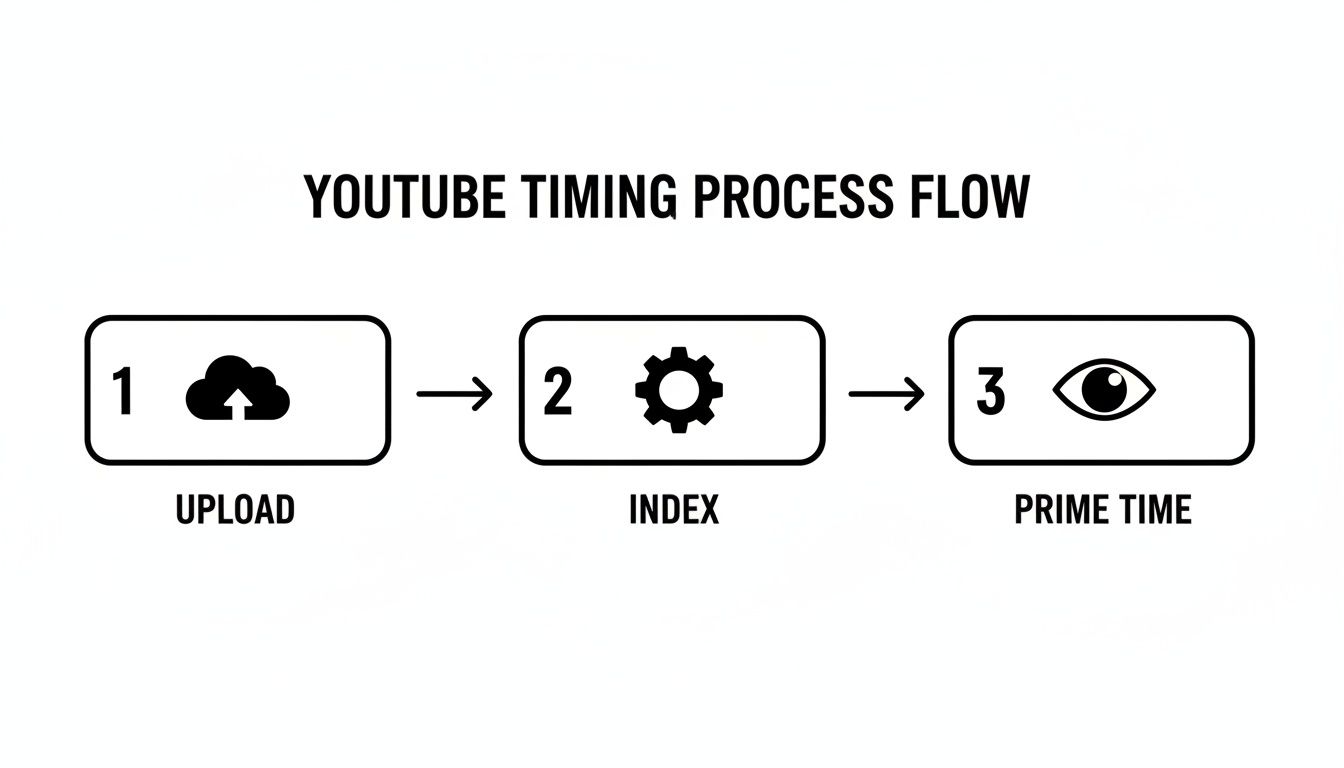
The idea is simple: upload a few hours ahead of "prime time." This gives the YouTube algorithm time to index your video, so it’s ready to be served up to viewers the moment they log on.
How to Read the Audience Activity Report
When you pull up this report, you'll see a simple chart mapping out the days of the week and times of the day. The color-coding makes it incredibly easy to understand at a glance.
Light purple bars mean very few of your viewers are online.
Dark purple bars show you when a large number of your viewers are actively watching videos.
Your mission is to pinpoint those darkest purple blocks. These are your channel's unique primetime windows.
This data gives you a clear roadmap. Notice the obvious patterns? This channel’s audience, for instance, is most active on weekday evenings. That’s a crystal-clear target for scheduling uploads.
Pro Tip: Avoid publishing at the peak moment. Instead, schedule your video to go live two to four hours before those dark purple bars appear. This creates a "runway" for the algorithm to process your video and start pushing it to subscribers just as audience activity starts ramping up.
So, if your report shows a peak at 7 PM on a Thursday, aim to schedule your upload somewhere between 3 PM and 5 PM that day. Understanding what is social media analytics is all about turning raw data into strategic moves like this.
Applying This Data to Your Niche
This data becomes even more valuable when you filter it through the lens of your channel's niche. A "one-size-fits-all" upload time rarely works because every audience has a different daily rhythm.
Let's look at a couple of practical examples:
A Gaming Channel: Their analytics will likely show peak activity late at night, maybe from 9 PM to 1 AM. The audience—often students or adults with late-night gaming sessions—is most active after dinner. Actionable Insight: An upload around 6 PM would be perfectly timed to catch them as they finish their day and settle in for a long gaming session.
A DIY Home Improvement Channel: This channel’s report will probably have its darkest purple blocks on Saturday and Sunday mornings, from 9 AM to noon. Their audience is waking up and looking for weekend project ideas. Actionable Insight: An upload on Friday afternoon or early Saturday morning would be ideal to meet that demand head-on.
By digging into your own analytics, you stop guessing and start making informed decisions. Make it a habit to check this report regularly, as your audience's behavior can and will change over time. This is hands-down the most reliable way to ensure every video you create gets the launch it truly deserves.
Solving the Time Zone Puzzle for a Global Audience
So what happens when your audience is scattered all over the globe? A perfectly timed 3 PM upload in New York is the middle of the night for your fans in Sydney, which can seriously kill your video's crucial first-hour momentum. This is a super common growing pain for channels, but it’s totally manageable if you get a little strategic.
The first move is to figure out where your viewers actually live. Pop back over to your YouTube Analytics, click on the 'Audience' tab, and find the 'Top Geographies' report. This little gem shows you exactly which countries are racking up the most watch time on your channel.
You might be surprised to find a heavy split between two or three key regions. For instance, I've seen tech tutorial channels with an audience that's 40% in the United States and 30% in India. Those are two places with wildly different time zones.

Finding the Sweet Spot Time
Once you know your top audience locations, the goal is to find a "best-fit" time that hits your biggest segments without leaving everyone else in the dark. It’s an art of compromise. You’re essentially hunting for a time slot that catches one audience in their evening and another in their morning.
Let's stick with that tech channel example with a US and Indian audience. A smart play would be to schedule the upload for around 11 AM Eastern Time (ET).
Here’s why that works so well:
For the US Audience: This lands late morning or early afternoon. It gives YouTube's algorithm plenty of time to get the video indexed and ready to serve up during the evening prime-time viewing hours.
For the Indian Audience: An 11 AM ET upload translates to roughly 8:30 PM Indian Standard Time (IST). That’s a perfect evening slot, catching viewers right as they're winding down and looking for something to watch.
This "overlap" strategy gives you a powerful one-two punch, serving both of your largest viewer groups right when they’re active.
A common mistake is to average the time zones, which often results in a time that's bad for everyone. Don't do that. Instead, focus on finding a single upload time that strategically aligns with the peak viewing habits of your most important audience segments.
When your audience is spread across several key time zones, you have a few ways to approach your scheduling. Each has its pros and cons depending on your channel's needs.
Time Zone Upload Strategy Comparison
Strategy | Best For | Example Scenario | Potential Drawback |
|---|---|---|---|
Overlap Scheduling | Channels with 2-3 dominant audience regions (e.g., North America & Europe). | A gaming channel uploads at 2 PM ET, which is prime evening time in the UK and late afternoon in the US. | May not be ideal for smaller audience segments in completely different time zones (like Asia or Australia). |
Primary Audience Focus | Channels where one region accounts for over 60% of viewership. | A US-based lifestyle vlogger with 75% of viewers in North America uploads at 5 PM ET, prioritizing their largest group. | Can alienate and slow growth in other promising international markets. |
Rotating Upload Times | Content that isn't time-sensitive and appeals to a very diverse global audience. | A documentary channel rotates uploads between mornings, afternoons, and evenings (PST) to give every region a chance. | Inconsistent schedule can make it harder for loyal fans to know when to expect new content. |
Choosing the right strategy comes down to knowing your numbers and your content. An overlap schedule is usually the most effective for channels with a clear bimodal audience distribution.
To truly serve an international viewership, think beyond just timing. Exploring things like AI-driven subtitle and translation workflows can make your content accessible to everyone, regardless of language.
Getting all these details right requires a bit of organization. You can see how we map this out in our guide on how to create a content calendar. It ensures every video is not just well-timed but also fully prepped for a global launch. By analyzing your geographies and picking a smart compromise, you can find the best time to upload a YouTube video, no matter where your viewers are.
How to A/B Test Your Upload Times for Better Data
Your YouTube Analytics report gives you a powerful hypothesis, but it's still just an educated guess. To find the absolute best time to upload, you need to prove it. The only way to turn that guess into a bulletproof, data-driven strategy is through rigorous, methodical testing.
Think of it like a science experiment for your channel. Instead of throwing videos up at random times and just hoping for the best, we're going to isolate the upload time as the key variable. This approach ensures you're comparing apples to apples, so you can be confident that any difference in performance is due to when you published, not what you published.
Setting Up a Simple Upload Experiment
For an A/B test to give you clean results, consistency is everything. The whole point is to keep every other factor the same—the content style, the topic, the thumbnail design—so that the only thing changing is the upload time.
Here’s a simple, practical protocol you can run over one month:
Pick One Day: Choose a single day of the week for your experiment. Let's say your analytics point to Wednesday as a high-traffic day for your audience.
Select Two Times: Now, pick two different time slots to test. For example, your report might show a big viewer spike around 5 PM. A great test would be to compare 2 PM EST (the "runway" time leading up to the peak) against 5 PM EST (the "peak" time itself).
Alternate Consistently: Over the next four Wednesdays, upload videos that are very similar in format and topic. Post the first one at 2 PM, the next week's at 5 PM, the third at 2 PM, and the fourth at 5 PM.
This method gives you two data points for each time slot, which is a much more reliable baseline than just a one-off test. By keeping the content similar, you avoid a situation where one video on a super-hot topic accidentally skews your results.
Tracking the Right Performance Metrics
Once the videos go live, it's time to gather the data. You need to track specific Key Performance Indicators (KPIs) at set intervals to see which time slot gave your video a stronger launch. The goal here isn't to look at total views after a month; we're focused on that critical early momentum.
Grab a simple spreadsheet and log these key metrics for each video:
Views in the first 60 minutes: This number shows you the immediate reaction from your most loyal subscribers.
Views in the first 24 hours: This is a crucial indicator of how well the YouTube algorithm is picking up and recommending your video.
Click-Through Rate (CTR) in the first 24 hours: How well did your thumbnail and title combo grab attention?
Average View Duration in the first 24 hours: Did the people who clicked actually stick around to watch?
After four weeks, you should have a clear winner. If the two videos uploaded at 2 PM consistently pulled in 25% higher 24-hour views and a better CTR, you’ve found your sweet spot. It's no longer a guess—it's a proven launch strategy for your channel.
Going through this process moves you from being reactive to proactive. You're not just following generic advice anymore. You're building a publishing schedule based on your channel's unique data, giving every single video the strongest possible start.
Automating Your Schedule for Consistent Channel Growth
You've done the hard work of digging through your analytics and running tests. You now know the prime time to upload for your audience. But knowing is only half the battle. The real trick is turning that knowledge into a consistent, unbreakable habit, and let's be honest—doing it manually is a surefire way to burn out.
True channel growth hinges on reliability. When your subscribers know to expect a video from you at the same time, on the same days, they start showing up for it. That consistency builds a loyal community that jumps on your content the second it drops, giving you that initial surge of views and engagement that the YouTube algorithm absolutely loves.
This is where scheduling becomes a creator's secret weapon. Forget setting alarms or frantically trying to hit "publish" at the perfect moment. You can batch-produce your content and let technology handle the launch.
Using YouTube's Native Scheduler
YouTube’s own scheduling tool is straightforward but powerful. It lets you upload a fully polished video—title, description, tags, thumbnail, and all—and set it to go public at a specific date and time in the future. This one feature can completely change your workflow from a last-minute scramble to a calm, organized system.
Imagine you have a Monday, Wednesday, Friday publishing schedule. Instead of that being a source of midweek stress, you could film and edit all three videos over the weekend. Then, in one sitting, upload and schedule them all for their optimal 3 PM slots. Your entire week is suddenly free to focus on creating your next videos or actually talking to your community. This simple change means you never miss a peak upload window because you had a dentist appointment or just a busy day.
The real power of scheduling is that it turns your publishing strategy from a reactive chore into a proactive system. It removes the daily pressure, ensuring your channel keeps its momentum even when life inevitably gets in the way.
By getting your content queued up ahead of time, you create a buffer that protects your channel's consistency. This is the bedrock of sustainable, long-term growth.
Advanced Scheduling and Automation Tools
For most creators, YouTube's built-in scheduler is all you'll ever need. But if you're managing a more complex operation, like multiple channels or coordinating posts across different social media platforms, you might need more firepower. To really lock in your upload times, it’s worth exploring advanced scheduling features that can manage everything from a single command center.
Here are a few situations where an advanced tool really shines:
Bulk Uploads: If you create content in large batches, some tools let you schedule dozens of videos in one go, saving a massive amount of time.
Recurring Time Slots: You can set a recurring slot—say, every Tuesday at 4 PM—and the tool will automatically assign it to your next video in the queue.
Cross-Platform Coordination: Imagine scheduling your YouTube video, an Instagram Reel teasing it, and a Facebook post announcing it—all timed to launch in perfect sequence.
Automating your upload schedule is the final piece of the timing puzzle. It's what makes sure all your research and testing actually pays off, week after week, turning your data-driven insights into a reliable engine for growing your channel.
Got Questions About YouTube Upload Times? Let's Clear Them Up.
Even after you've nailed down a basic strategy, some specific questions always seem to pop up when you're trying to pinpoint the absolute best time to upload to YouTube. Getting these details right can seriously impact your video's initial launch, so let's tackle some of the most common ones I hear.
How Long Does YouTube Actually Take to Process a Video?
This is a classic "it depends" situation. The processing time can swing wildly depending on your video's length and resolution. A quick five-minute clip in 1080p might be ready in a few minutes, but a beefy 30-minute 4K video? That could easily take an hour or even longer.
This is precisely why I always recommend uploading 2-4 hours before your target publish time. That buffer isn't just for getting the HD and 4K versions ready. It gives YouTube’s algorithm time to chew on your content, index its metadata for search, and start showing it to a small test audience. Essentially, you're warming it up so it's ready to fly the moment you hit "publish."
Does Timing Even Matter for YouTube Shorts?
It does, but you need to think about it differently. Long-form videos benefit from that pre-launch runway, but Shorts are all about quick, viral bursts of discovery in the Shorts feed.
That said, timing is still a factor. I've seen a lot of creators hit gold by dropping Shorts during those little moments in the day when people are mindlessly scrolling on their phones.
Lunch Break: Right around noon.
The Afternoon Slump: Think 4 PM when focus starts to wane.
Evening Wind-Down: From 8 PM onward when people are relaxing.
The whole idea is to catch viewers during their peak scrolling sessions. A great approach is to experiment by posting a few Shorts throughout the day in these windows and see which ones take off the fastest.
Should I Really Upload at the Exact Same Time Every Week?
Yes, one hundred percent. Consistency is one of your most powerful assets on YouTube. When you publish at the same time on the same day, week in and week out, you're conditioning your audience. They start to anticipate your content, and that builds a loyal core of viewers who show up the minute your video goes live.
That initial flood of views and engagement from your subscribers sends a massive positive signal to the YouTube algorithm. Once you've done your testing and found that sweet spot, locking it in helps build incredible momentum for your channel.
What Do I Do if My Analytics Report Is Blank?
First off, don't panic. This is completely normal for new channels. The "When your viewers are on YouTube" report needs a good chunk of data to work with. If you're seeing a blank slate, it just means you haven't racked up enough watch time yet.
Your game plan here is to fall back on the general best-practice windows we talked about earlier.
Weekdays: Start by experimenting with uploads between 2 PM and 4 PM.
Weekends: Try publishing a bit earlier, somewhere between 9 AM and 11 AM.
Choose a consistent day and time within one of these ranges and commit to it for at least a month. That consistency will generate the data YouTube needs to populate your report, and from there, you can start making more informed decisions based on your own audience's unique habits.
Finding the best upload time is just one piece of the puzzle. NicheTrafficKit automates your entire content strategy, from researching viral trends to auto-publishing at peak times across every platform. Let our AI handle the scheduling, creation, and analytics so you can focus on what you do best—creating amazing content. Start your free trial today and see the difference.
