The 12 Best Social Media Scheduling Tools for Growth in 2026
Discover the best social media scheduling tools for creators, agencies, and e-commerce. Compare features, pricing, and find your perfect fit today.
Choosing the right social media scheduling tool can be the difference between a streamlined, high-growth social strategy and a chaotic, time-consuming one. The core problem these platforms solve is simple yet critical: they reclaim your time. Instead of manually posting across multiple channels day after day, a scheduler lets you plan, create, and publish weeks or even months of content in a single session. This shift frees you up to focus on what truly matters: engaging with your audience, analyzing performance, and growing your brand.
This guide is designed to cut through the noise and help you find the best social media scheduling tools for your specific needs. Whether you're a solo creator managing a handful of profiles, an e-commerce brand driving sales, or a digital agency juggling dozens of client accounts, the perfect solution for you is here. We'll move beyond generic feature lists and provide a detailed, practical breakdown of each tool.
Inside, you'll find an in-depth analysis of 12 top-tier platforms, including established players like Hootsuite and Sprout Social, alongside innovative newcomers like the AI-driven NicheTrafficKit. For each tool, we provide:
A clear "Best For" recommendation to match the tool to your role (e.g., creators, agencies, B2B).
A detailed breakdown of key features, platform integrations, and pricing.
Honest pros and cons based on real-world usage scenarios.
Direct links and screenshots so you can see the platform in action.
Our goal is to give you a comprehensive resource to make a confident, informed decision. To truly leverage these tools, it helps to first understand the foundational strategies. Learning how to effectively automate your social media posts is the key to saving valuable time and boosting your overall efficiency. Let’s dive in and find the tool that will transform your social media workflow.
1. NicheTrafficKit
NicheTrafficKit moves beyond traditional social media scheduling tools by offering a complete, AI-driven automation engine. Instead of just queuing up content you've already created, the platform handles the entire workflow from ideation and trend research to multi-platform content creation and optimized publishing. It effectively replaces the manual labor involved in running a comprehensive social media strategy, positioning it as a powerful end-to-end solution for growth-focused users.
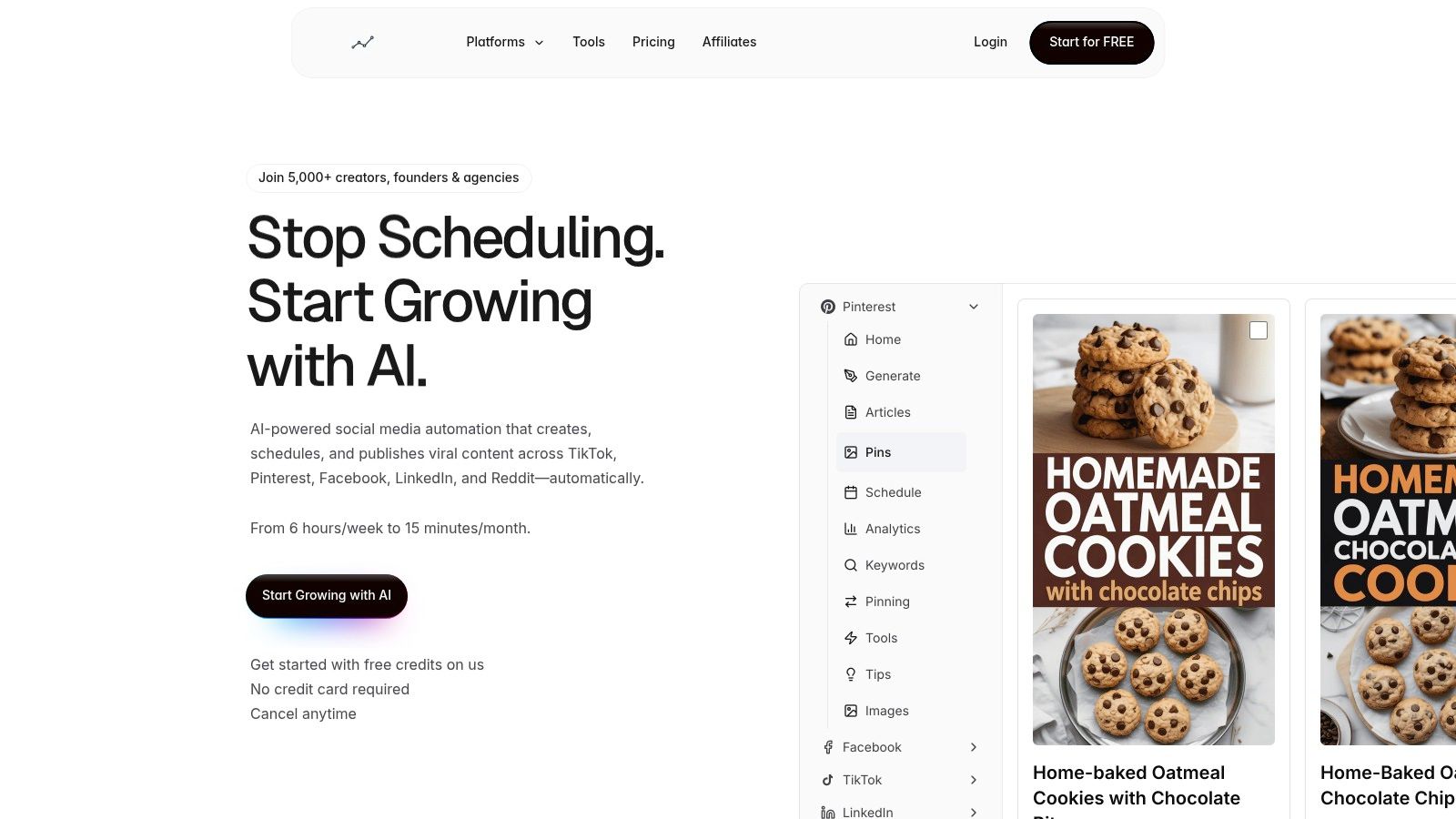
The platform’s core strength lies in its algorithm-aware content generation. The AI learns your brand voice and then produces unique, platform-specific content tailored for TikTok, Pinterest, LinkedIn, Instagram, Reddit, Facebook, and even creates faceless YouTube videos. This isn't just generic content repurposing; it’s intelligent adaptation designed to maximize engagement on each network. For instance, it can generate viral-style pin designs with SEO-optimized descriptions for Pinterest while simultaneously drafting professional, thought-leadership posts for LinkedIn.
Key Features and Use Cases
End-to-End Automation: The AI researches viral trends, generates posts (including carousels and videos), writes captions with optimized hashtags, and schedules them for peak engagement times across time zones. This makes it ideal for agencies scaling client management or solo creators aiming for omnipresence without burnout.
Intelligent Content Recycling: NicheTrafficKit identifies your top-performing posts and automatically re-queues them for future publication, ensuring your best content continues to drive traffic and engagement long after its initial post.
Platform-Specific Optimization: It generates content formatted for each platform's unique algorithm. A practical example is transforming a single blog post into a LinkedIn article, an Instagram carousel, a series of Pinterest pins, and a short-form TikTok video script, all from one central command.
Unified Analytics Dashboard: The system provides clear insights into what content is driving growth, allowing you to refine your strategy without manual data compilation.
Pricing and Onboarding
NicheTrafficKit offers a transparent, scalable pricing model based on usage. A free trial is available without requiring a credit card.
Creator: $39/month for up to 3 social accounts and 200 tokens.
Pro: $89/month for up to 10 accounts, 500 tokens, and priority onboarding.
Ultimate: $499/month for up to 20 accounts and 3000 tokens.
Annual plans provide a significant discount (equivalent to 4 months free).
Pros and Cons
Pros | Cons |
|---|---|
Massive Time Savings: Automates the full content lifecycle, drastically reducing weekly management time. | Token-Based System: Monitoring token usage is necessary; high-volume users may need to upgrade plans to avoid interruptions. |
True Multi-Platform Optimization: Creates unique, algorithm-friendly content for each specific social network. | Human Review Recommended: While powerful, the AI-generated content may still require a quick human check for brand-specific nuance. |
Built-in Growth Tools: Features like trend research and content recycling are designed to maximize ROI. | |
Strong Social Proof: Trusted by over 5,000 users with a 4.9-star rating and numerous high-impact testimonials. |
Best for: Creators, small businesses, and agencies looking to automate multi-platform growth with an AI-powered system while retaining the option for manual oversight.
Website: https://nichetraffickit.com
2. Hootsuite
Hootsuite is one of the original and most established players in social media management, making it a go-to for large teams and enterprises that need a robust, all-in-one solution. It moves beyond simple scheduling to offer a full suite of tools for content planning, engagement, analytics, and team collaboration. Its comprehensive nature is what makes it one of the best social media scheduling tools for organizations requiring governance and extensive integrations.
A key differentiator is its powerful unified calendar and centralized inbox, which allows teams to manage all conversations and DMs from one place. For example, a customer support agent can handle a Twitter DM while a community manager responds to an Instagram comment, all within the same dashboard. This streamlines workflows and ensures no customer interaction is missed.
Key Features & Use Cases
Unified Content Calendar: Plan, create, and schedule posts for all major networks in one view. A practical use case is planning an entire product launch campaign across Instagram, Facebook, and Twitter, ensuring consistent messaging and timing from a single dashboard.
"Best Time to Post" Recommendations: Hootsuite's AI analyzes your past performance to suggest optimal posting times for maximum engagement. For more details on this strategy, you can explore the best times to post on social media.
Centralized Inbox: Manage all comments, DMs, and mentions from a single stream. For example, you can assign a negative comment to a customer service rep for follow-up, ensuring a timely and coordinated response.
Extensive App Integrations: Connect with over 150 apps like Canva, Slack, and Adobe. An actionable insight is to integrate Canva to create visuals directly within the Hootsuite composer, eliminating the need to download and re-upload graphics.
Pricing: Hootsuite's plans start with a Professional tier at $99/month for one user and 10 social accounts, scaling up to Business and Enterprise plans for larger teams needing advanced analytics, team assignments, and content approvals.
Pros:
Mature, feature-rich platform trusted by major brands.
Excellent for team collaboration with detailed permission levels.
Strong analytics and custom reporting capabilities.
Cons:
Can be expensive, especially for solo users or small businesses.
The interface has a steeper learning curve compared to newer tools.
Website: https://www.hootsuite.com/plans
3. Sprout Social
Sprout Social is a premium, all-in-one social media management platform designed for mid-market to enterprise-level businesses. It excels in areas beyond basic scheduling, offering powerful tools for engagement, in-depth analytics, and team collaboration. For organizations that require sophisticated reporting, governance, and a streamlined workflow, Sprout Social stands out as one of the best social media scheduling tools available.
A core differentiator is its unified Smart Inbox, which turns incoming messages into manageable tasks. For example, a support-related tweet can be tagged and assigned to a customer service agent as a case, complete with an audit trail. This case-style workflow ensures accountability and is invaluable for teams in regulated industries or those with high-volume customer interactions.
Key Features & Use Cases
Smart Inbox: Consolidates messages from all networks into a single feed with tasking and filtering. An actionable insight is to set up a keyword filter for "outage" or "not working" to immediately flag and assign urgent customer support issues.
Advanced Analytics & Reporting: Generate detailed, presentation-ready reports on post performance and competitor activity. For example, you can create a report comparing your Instagram engagement rate against three key competitors to identify content gaps and opportunities.
AI Assist: Leverage AI tools to brainstorm content ideas and refine post copy. A practical use is to take a customer testimonial and use AI Assist to quickly generate five different caption variations for A/B testing.
Social Listening & Review Management: Monitor brand mentions and manage reviews from sites like Glassdoor and TripAdvisor. This allows a PR team to track brand sentiment in real-time and quickly address negative press before it escalates.
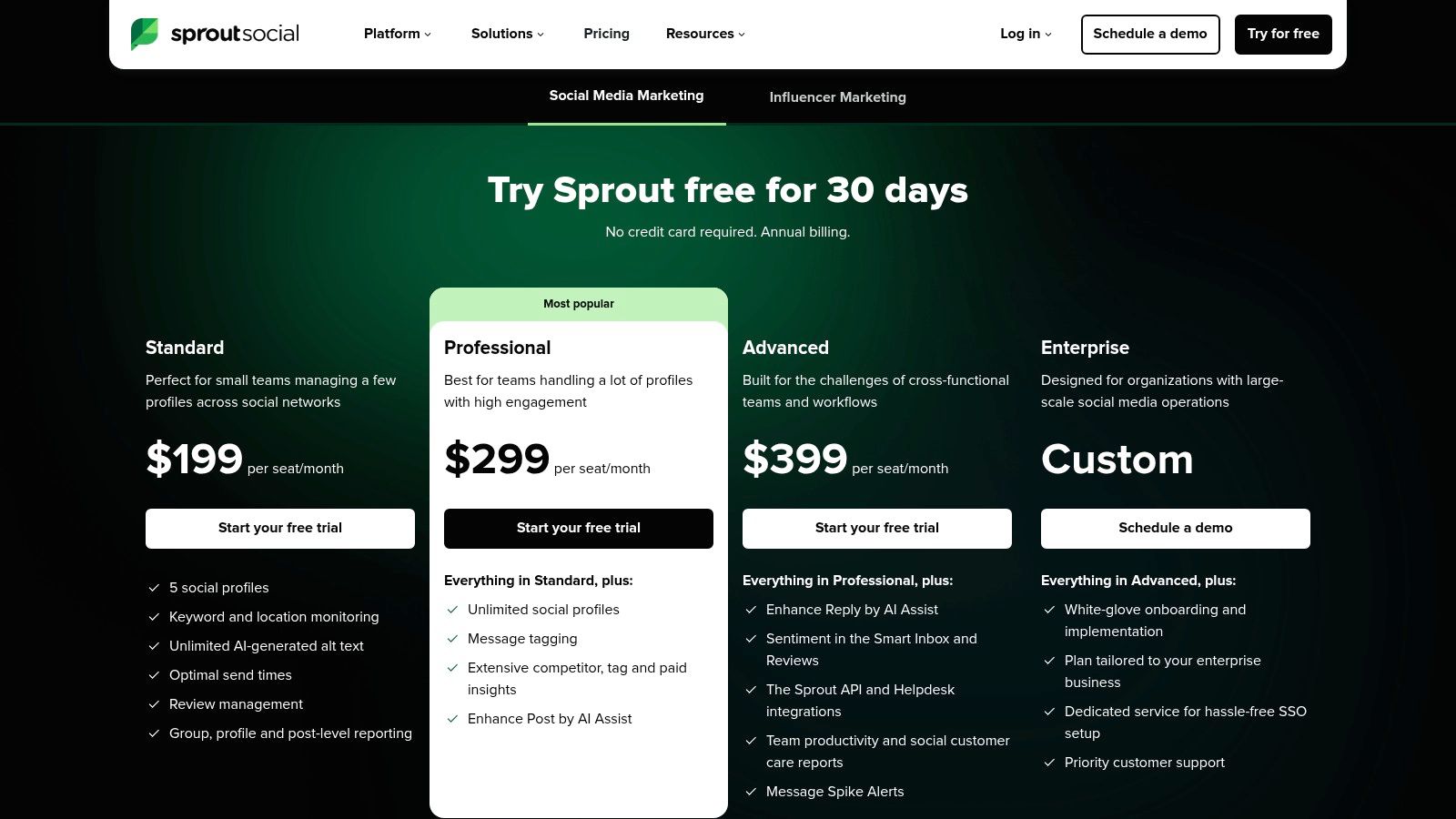
Pricing: Sprout Social's plans start with the Standard tier at $249/month per user, which includes 5 social profiles. The Professional and Advanced plans add more robust features like competitive reports, custom workflows, and advanced listening.
Pros:
Exceptional reporting and analytics capabilities.
Intuitive user interface that simplifies complex workflows.
Consistently receives high marks for customer satisfaction and support.
Cons:
Premium pricing, especially the per-seat model, can be costly for smaller teams.
Some of the most powerful features are reserved for higher-tier plans.
Website: https://sproutsocial.com/pricing/
4. Buffer
Buffer is a long-standing favorite known for its clean, intuitive interface and streamlined approach to social media scheduling. It’s an ideal choice for creators, small businesses, and lean teams who prioritize simplicity and affordability without needing enterprise-level complexity. Its queue-based system makes it incredibly easy to maintain a consistent posting schedule across multiple platforms with minimal effort.
A key differentiator for Buffer is its user-friendly design and transparent pricing model, which removes much of the guesswork for new users. For example, a solo creator can set up a "queue" of evergreen content that Buffer automatically publishes at pre-set times, ensuring their channels remain active. This approach to set-it-and-forget-it scheduling makes it one of the best social media scheduling tools for those just starting to build an online presence.
Key Features & Use Cases
Queue-Based Scheduling: Add posts to your queue, set a posting schedule, and Buffer will automatically publish them. A practical example is a blogger loading 20 of their best articles into the queue, set to publish one every Monday, ensuring consistent traffic generation with a one-time setup.
AI Assistant: Helps generate post ideas and rewrite copy. An actionable tip is to use the AI assistant to rephrase a single announcement in three different tones—professional for LinkedIn, casual for Twitter, and enthusiastic for Instagram.
First-Comment & Hashtag Manager: Schedule the first comment on Instagram to keep captions clean, and create saved groups of hashtags. For example, create hashtag groups like "#MarketingTips" and "#StartupLife" to add to relevant posts with a single click. For a deeper dive into automation, see how you can automate your social media posting.
Basic Analytics and Inbox: Track key performance metrics and engage with comments. A practical use is to quickly identify your most-clicked post from the past month and add it back to the top of your queue to recycle your best content.
Pricing: Buffer offers a generous free plan for up to 3 channels. Paid plans start with the Essentials tier at $6/month per channel, with options to add team members and more advanced analytics.
Pros:
Very easy to learn and use with a minimal learning curve.
Affordable entry point with flexible per-channel billing.
Transparent, simple plans without hidden fees.
Cons:
Analytics and collaboration features are less robust than enterprise-focused tools.
Per-channel costs can add up if you manage many social profiles.
Website: https://buffer.com/pricing
5. Later
Later started as an Instagram-first scheduling tool and has evolved into a comprehensive platform for brands and creators whose strategy is driven by visual content. It excels at planning the look and feel of your grid, making it one of the best social media scheduling tools for visually-focused platforms like Instagram, TikTok, and Pinterest. Its design philosophy is built around a visual-first workflow, from the media library to the calendar.
The platform’s standout feature is its Visual Planner, which allows you to drag and drop media to see exactly how your Instagram grid will look before you post. This is invaluable for maintaining a consistent brand aesthetic. For example, an e-commerce fashion brand can plan a week of content, ensuring that product shots, lifestyle images, and user-generated content create a cohesive and appealing feed.
Key Features & Use Cases
Visual Planner: Drag-and-drop posts on a calendar to preview your Instagram grid. An actionable insight is to use this planner to create a "checkerboard" pattern with alternating quotes and photos, creating a visually striking and professional-looking grid.
Stories and Reels Scheduling: Prepare and schedule multi-photo/video stories and Reels content. For a product launch, you could schedule a sequence of five Instagram Stories to build anticipation, all from the Later dashboard.
Link in Bio: Create a customizable, clickable landing page for your bio link. A practical example is a food blogger using their Link in Bio page to feature links to their latest recipe, their cookbook, and their YouTube channel simultaneously.
AI Content Assistant: Generate captions and content ideas. Use this feature to overcome writer's block by inputting a simple keyword like "healthy breakfast" and getting five different caption ideas instantly.
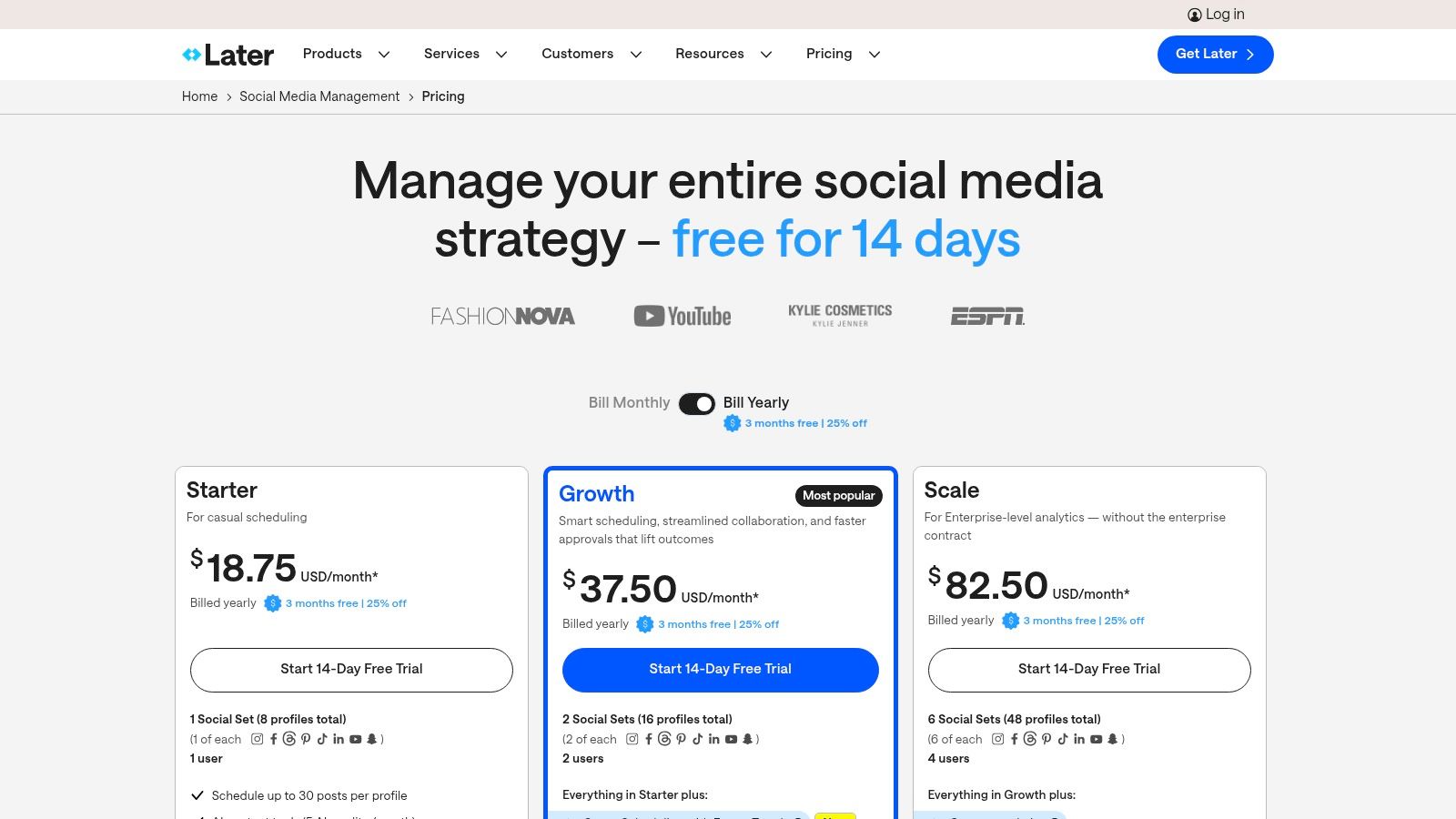
Pricing: Later offers a free plan for one user and one social set. Paid plans start at $25/month for the Starter tier, scaling to Growth at $45/month and Advanced at $80/month, each offering more posts, users, and features.
Pros:
Exceptional for visual planning and maintaining a curated Instagram aesthetic.
Intuitive mobile and desktop interfaces make scheduling easy.
Clear, predictable pricing plans with defined post limits.
Cons:
Advanced features like a social inbox and listening are limited to higher-tier plans.
Post caps on lower-tier plans can be restrictive for high-volume creators.
Website: https://later.com/pricing
6. Loomly
Loomly is a calendar-centric collaboration platform that excels in streamlining team workflows and brand governance. It's built for teams that prioritize an approval-first process, making it one of the best social media scheduling tools for agencies, franchises, and small to medium-sized businesses that need structured content creation without the high per-user cost of enterprise solutions. Its entire interface is designed around a clear, intuitive content calendar.
A key differentiator is Loomly's robust, multi-step approval workflow. For example, a junior marketer can draft a post, which is then automatically sent to a manager for review, and finally to a client for final sign-off, all within the platform. This structured process, combined with its library of post ideas and optimization tips, ensures brand consistency and quality control across all social channels.
Key Features & Use Cases
Approval Workflows & Version Logs: Create custom, multi-step approval chains. A practical example for an agency is setting up a workflow where a copywriter's draft automatically notifies the graphic designer to add visuals before it goes to the client for final approval.
Centralized Content Calendar: Manage all social media content from a single, collaborative calendar. An actionable insight is to use calendar labels to color-code posts by campaign (e.g., "Summer Sale," "Holiday Promo") for a clear, at-a-glance overview. For guidance on building one, see this guide on how to create a content calendar.
Post Ideas & Optimization Tips: Provides inspiration and platform-specific tips. For instance, if you're writing a tweet, Loomly might suggest adding a question to increase engagement or warn you if your character count is too high.
Automated Publishing & Reporting: Schedule posts and generate reports. A useful tactic is to set up a recurring weekly performance report that is automatically emailed to key stakeholders every Monday morning, saving you from manual report creation.
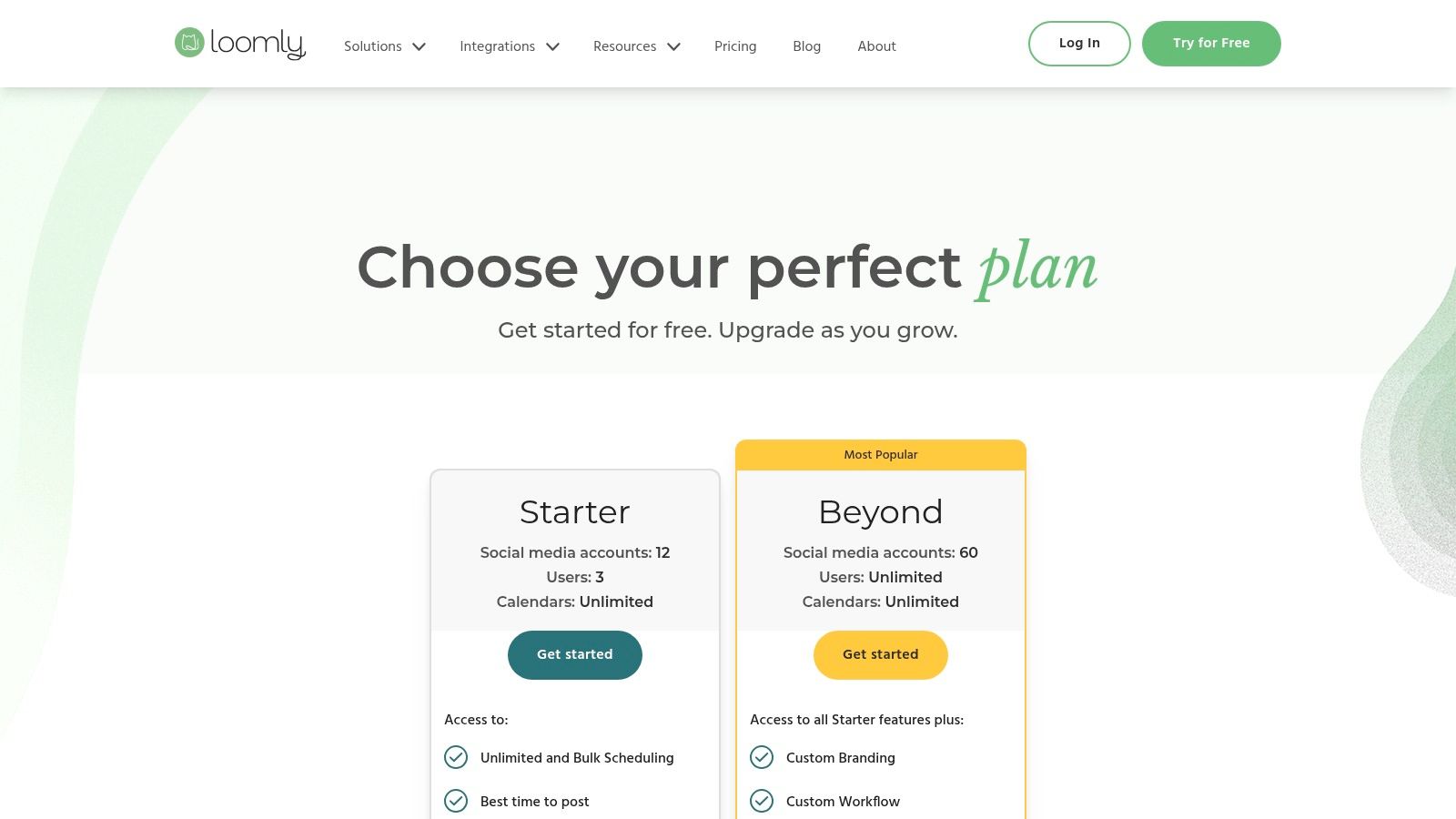
Pricing: Loomly offers a Base plan starting at $42/month for 2 users and 10 social accounts. Its pricing scales with Team and Agency plans, which support more users and accounts, all with a flat monthly fee rather than a per-seat model.
Pros:
Affordable and transparent team pricing is ideal for growing agencies.
Excellent for collaboration with strong approval and feedback features.
Simple, clean user interface that is easy to navigate.
Cons:
Lacks some of the advanced social listening and monitoring features found in enterprise-level tools.
Pricing details and plan specifics can sometimes require logging in to view the most current offerings.
Website: https://www.loomly.com/pricing
7. Agorapulse
Agorapulse is an all-in-one social media management platform that excels in engagement, reporting, and team collaboration, making it a top choice for agencies and businesses focused on ROI. It combines scheduling with a powerful social inbox and detailed analytics, providing a complete suite of tools to manage and measure a brand's social presence. Its strength lies in streamlining complex workflows, particularly for teams managing multiple clients or high-volume community interactions.
A key differentiator for Agorapulse is its robust Social Inbox, which functions like a CRM for social media. For example, an agency can set up automated rules to assign incoming messages about sales to a specific team member, while filtering out spam comments automatically. This level of organization ensures rapid response times and prevents important conversations from getting lost, cementing its reputation as one of the best social media scheduling tools for customer-centric brands.
Key Features & Use Cases
Unified Publishing Calendar: Schedule, queue, and bulk-publish content. A practical tip is to use the "queue categories" feature to ensure a balanced content mix—for example, scheduling one promotional post for every three educational posts.
Social Inbox with Automation: Manage all comments and messages with automated moderation rules. An actionable example is creating a rule that automatically hides all comments containing profanity and assigns any comment with the word "help" to the support team.
Advanced ROI Reporting: Create branded reports that tie social media to website traffic. Use this to show a client exactly how many website clicks and conversions were generated from the LinkedIn campaign you managed last month.
Team Collaboration Tools: Assign roles and approve content. This is useful for preventing errors; a junior team member can draft posts, but they won't go live until a manager with "approver" status signs off.
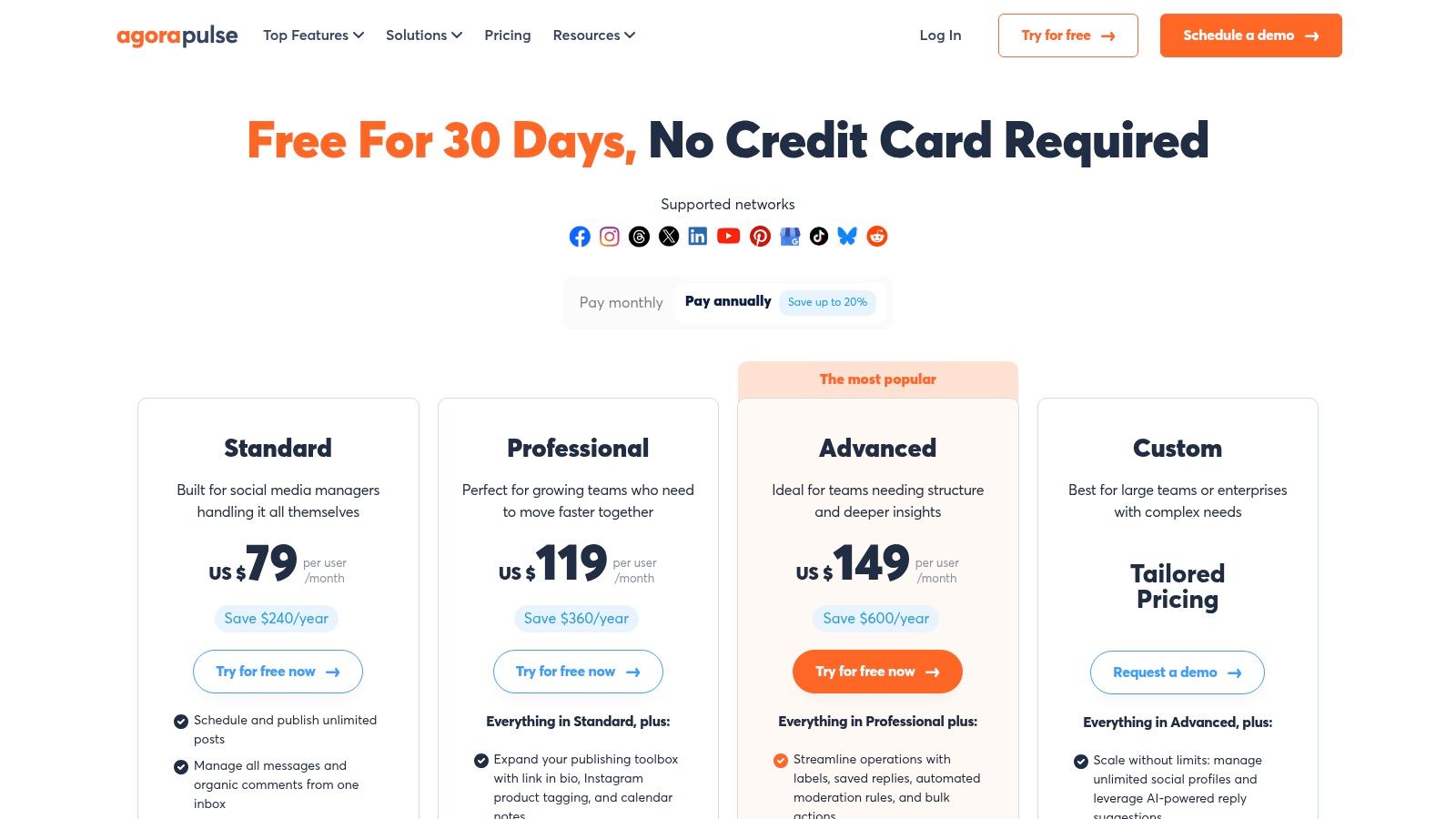
Pricing: Agorapulse offers a free plan for very small businesses. Paid plans start at $49 per user/month, with tiers scaling up to Advanced and Custom plans that offer more robust reporting, team features, and higher limits for agencies.
Pros:
Excellent reporting and inbox workflow automation.
Agency-friendly with shared calendars and approval processes.
Highly-rated customer support and a discount for nonprofits.
Cons:
Pricing is per user, which can become costly for larger teams.
Limits on monitoring ad comments vary by plan tier.
Website: https://www.agorapulse.com/pricing
8. Sendible
Sendible is engineered specifically for agencies and businesses managing multiple clients, making it a powerhouse for collaborative social media management. It excels at separating client workflows with distinct dashboards and content libraries, offering a level of organization that solo-focused tools lack. Its focus on client management and reporting makes it one of the best social media scheduling tools for teams that need to deliver professional, branded results at scale.
A key differentiator is its white-labeling capability, which allows agencies to present the entire platform as their own. For instance, an agency can give clients a branded portal to review and approve content, fostering a seamless and professional client experience. This feature, combined with its robust reporting, streamlines the entire client management lifecycle from content creation to performance review.
Key Features & Use Cases
Client Dashboards: Create dedicated, secure dashboards for each client. This means you can give a client login credentials to view only their content calendar and reports, without seeing any of your other clients' information.
Direct Publishing: Schedule a wide range of content formats directly. A practical example is scheduling an Instagram Reel with its cover image, caption, and first comment all from the Sendible desktop app, ensuring a complete and polished post.
Prebuilt & Custom Reports: Generate beautiful, easy-to-understand reports. An actionable insight is to set up an automated monthly report for each client that is branded with their logo and sent directly to their inbox, showcasing your value with zero extra effort.
White-Label Options: Customize the platform with your agency's branding. This allows you to offer "your own" social media tool to clients, enhancing your agency's perceived value and professionalism.
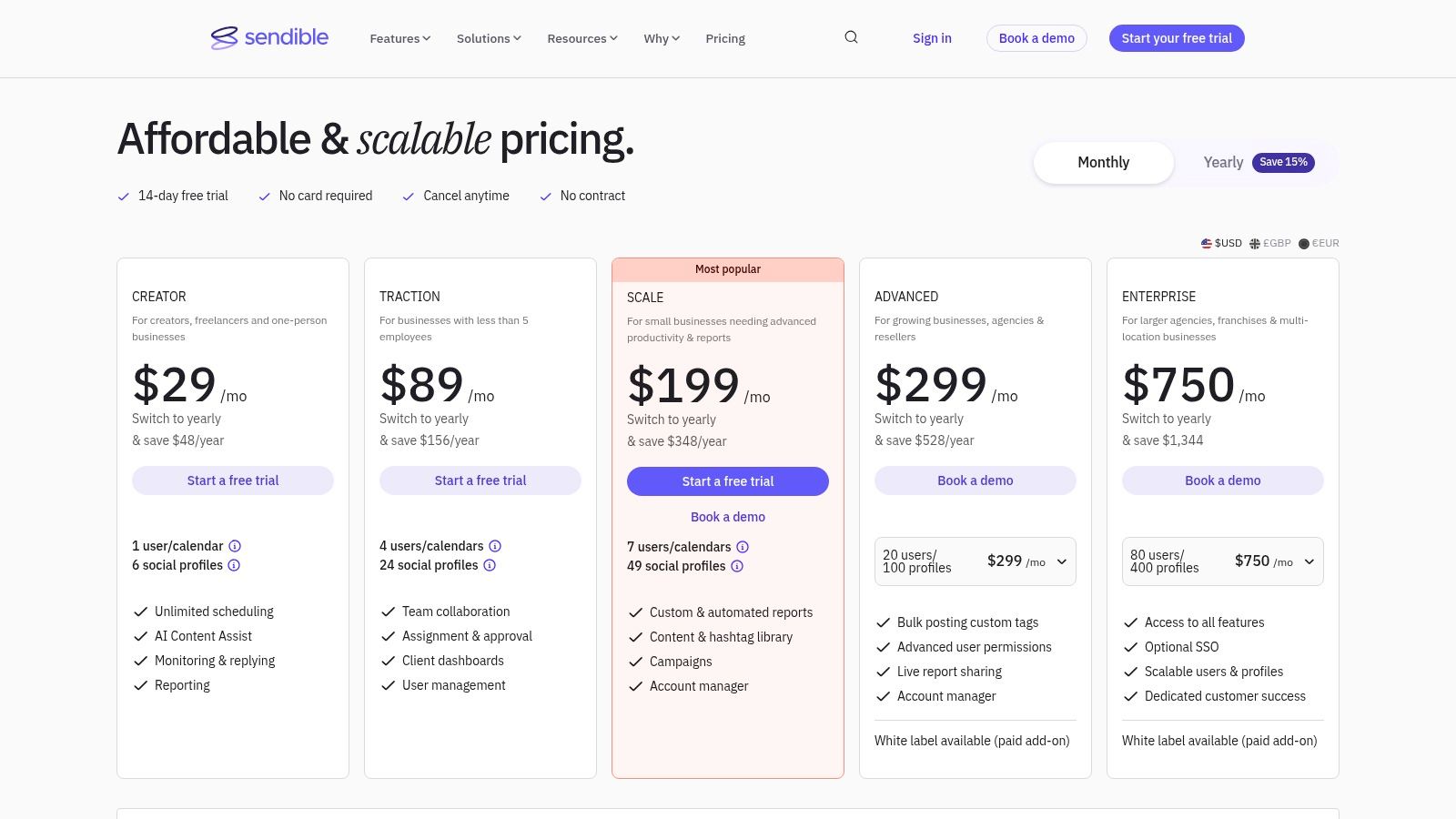
Pricing: Sendible offers a 14-day free trial. Paid plans start at $29/month for the Creator plan (1 user, 6 profiles). Agency-focused plans start with the Traction plan at $89/month for 4 users and 24 profiles, scaling up to the White Label plan.
Pros:
Excellent agency-oriented features and client management workflows.
Comprehensive reporting tools are ideal for proving value.
Scales effectively from solo managers to large agency teams.
Cons:
The user interface is more functional than visual compared to creator-first platforms.
Advanced features like white-labeling can become costly for smaller agencies.
Website: https://www.sendible.com/pricing
9. SocialBee
SocialBee excels at content automation and organization, making it one of the best social media scheduling tools for users who want to implement a category-based content strategy. Its standout feature is the ability to create content categories-like "Blog Posts," "Promotions," or "Industry News"-and automatically recycle evergreen posts from these buckets. This ensures your social media calendar remains consistently active with minimal manual effort.

A key differentiator is this evergreen recycling system. For example, a business can create a category for its top-performing blog posts and set SocialBee to re-publish one every Friday. The platform will automatically cycle through the entire list, ensuring older content continues to drive traffic without requiring you to manually reschedule it each time. This "set it and forget it" approach is a massive time-saver for busy marketers and solo entrepreneurs.
Key Features & Use Cases
Content Categories & Recycling: Organize posts into categories and set them to re-queue. A practical example is creating a "Testimonials" category; you can load 50 customer quotes and have SocialBee automatically post one every Wednesday, keeping a steady stream of social proof without manual scheduling.
AI Assistant: Generate post captions and brainstorm ideas. An actionable insight is to use the AI to create five different variations of a single promotional post. You can schedule these variations to post over several months, preventing audience fatigue from seeing the exact same ad repeatedly.
Broad Network Support: Schedule content for platforms including Google Business Profile, Threads, and Bluesky. This is perfect for a local business that wants to schedule weekly updates to its Google Business Profile to improve local SEO and attract customers.
Team Collaboration Tools: Use workspaces and post-approval workflows. An agency can create a separate workspace for each client, ensuring that the content, assets, and schedule for "Client A" are never mixed up with "Client B."
Pricing: SocialBee offers affordable plans starting at $29/month for the "Bootstrap" plan, which includes one user and 5 social accounts. The "Pro" plan at $99/month supports 5 users and 25 accounts, making it highly scalable for growing teams and agencies.
Pros:
Powerful automation for evergreen content saves significant time.
Very competitive pricing with generous account limits.
Offers a 14-day free trial and a 30-day money-back guarantee.
Cons:
The user interface is more functional and utilitarian than visually driven.
Advanced analytics and reporting are reserved for more expensive plans.
Website: https://socialbee.com/pricing/
10. Metricool
Metricool stands out by combining social media scheduling with powerful, in-depth analytics and reporting capabilities, making it a favorite for data-driven marketers and agencies. While many tools focus purely on content publishing, Metricool provides a holistic view of your performance across social media, websites, and even online ad campaigns. This makes it one of the best social media scheduling tools for users who need to connect content efforts directly to business results.
A key differentiator is its emphasis on multi-brand management and reporting. An agency, for example, can manage ten different client brands from one dashboard, generating individual performance reports for each without co-mingling data. The platform's Looker Studio (formerly Google Data Studio) connector is another major draw, allowing users to pull Metricool data into custom dashboards alongside other marketing analytics for a complete overview.
Key Features & Use Cases
Unified Scheduler: Plan and auto-publish content with best-time-to-post suggestions. A practical tip is to use the "autolists" feature to create a recurring queue of evergreen content, similar to SocialBee, ensuring your feeds are never empty.
Competitor & Multi-Brand Analytics: Track competitor performance from a single account. For example, you can add three competitors and create a report that shows their follower growth and engagement rates compared to yours over the last 30 days.
Looker Studio Connector: Integrate social media data into custom reports. An actionable insight for an agency is to create a master Looker Studio dashboard that pulls in data from Metricool (social), Google Analytics (website), and Google Ads (PPC) for a complete client performance overview.
Ad Platform Integration: Monitor your Facebook, Instagram, and Google Ads campaigns. This allows you to see how your organic social posts are performing alongside your paid ads, helping you decide which content is worth promoting with ad spend.
Pricing: Metricool offers a generous forever-free plan for one brand. Paid plans are structured per brand, starting at just $18/month, with advanced features like team roles and approval workflows available in higher tiers.
Pros:
Exceptional value, especially for agencies managing multiple brands.
Deep analytics and powerful reporting, including a Looker Studio connector.
Offers a robust and highly functional free plan.
Cons:
Some X/Twitter features may require an add-on subscription.
The user interface prioritizes analytics, which can feel less intuitive for creative-focused tasks.
Website: https://metricool.com/pricing/
11. Publer
Publer stands out in the social media scheduling landscape with its highly flexible and affordable pricing model, making it an excellent choice for freelancers, startups, and small businesses. Instead of rigid tiers, Publer allows you to pay based on the exact number of social accounts and team members you need. This granular, pay-for-what-you-use approach ensures you never overpay for features or capacity you don't use, positioning it as one of the best social media scheduling tools for those on a tight budget.
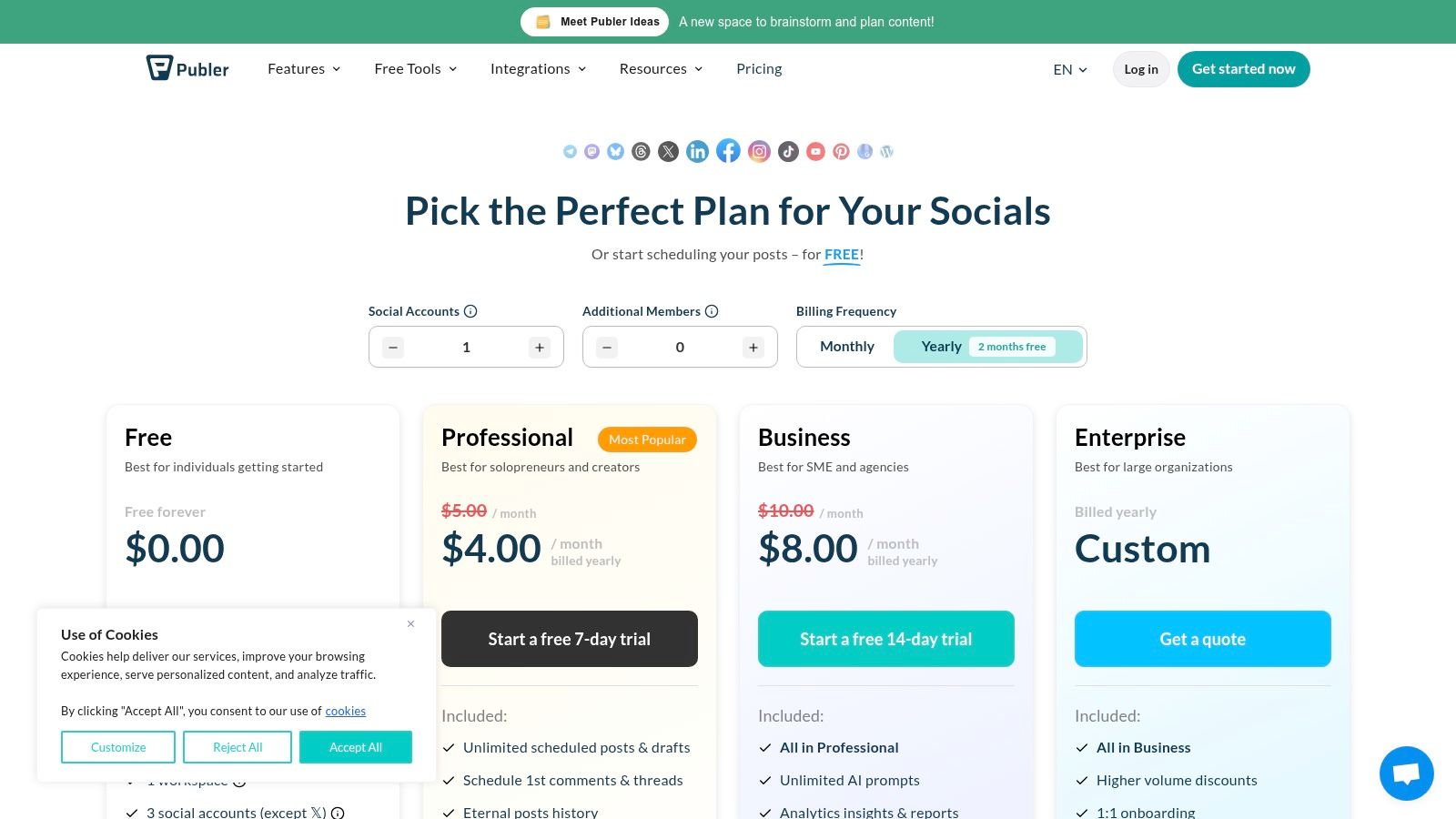
Its core strength lies in providing robust basic scheduling features without the enterprise-level price tag. For example, a small e-commerce store can use the bulk scheduling feature to upload a CSV file with a month's worth of product posts, saving countless hours of manual work. The platform's transparent pricing calculator and generous free plan make it easy to start and scale as your social media needs grow.
Key Features & Use Cases
Unlimited Scheduled Posts: All paid plans come with unlimited scheduled posts. This is ideal for a content creator who wants to batch-create and schedule 300 Pinterest pins for the next quarter without hitting a restrictive post limit.
Content Recycling Tools: Use spintax to automatically generate unique variations of the same post. For example, you can write a post like "{Hello|Hi|Hey} everyone! Check out our new blog post." Publer will randomly choose one of the greetings each time it recycles the post.
Integrated Content Tools: Features a built-in link-in-bio page and a direct Canva integration. A practical workflow is designing a graphic in Canva, then directly scheduling it to Instagram via Publer without ever leaving the Publer dashboard.
Flexible Workspaces: Organize social accounts and team members into separate workspaces. A freelance social media manager can create one workspace for their personal brand and separate, private workspaces for each of their clients to keep content organized.
Pricing: Publer offers a free plan for 3 social accounts. Paid plans start at $12/month for the Professional tier and $21/month for the Business tier, with pricing adjusting based on the number of social accounts and users you add.
Pros:
Extremely affordable entry point and granular scaling.
Transparent pricing with a generous free forever plan.
Strong core scheduling features like bulk posting and content recycling.
Cons:
Advanced analytics and reporting are reserved for the higher-tier Business plan.
The pricing calculator requires you to manually input account and member counts to see the final cost.
Website: https://publer.io/pricing
12. Zoho Social
Zoho Social stands out by deeply integrating social media management into a broader business ecosystem, making it a powerful choice for teams already invested in Zoho's suite of products like Zoho CRM or Zoho Desk. It offers a value-priced, yet comprehensive, set of tools for publishing, monitoring, and reporting, positioning it as one of the best social media scheduling tools for businesses that need to connect social interactions directly to sales and support workflows.
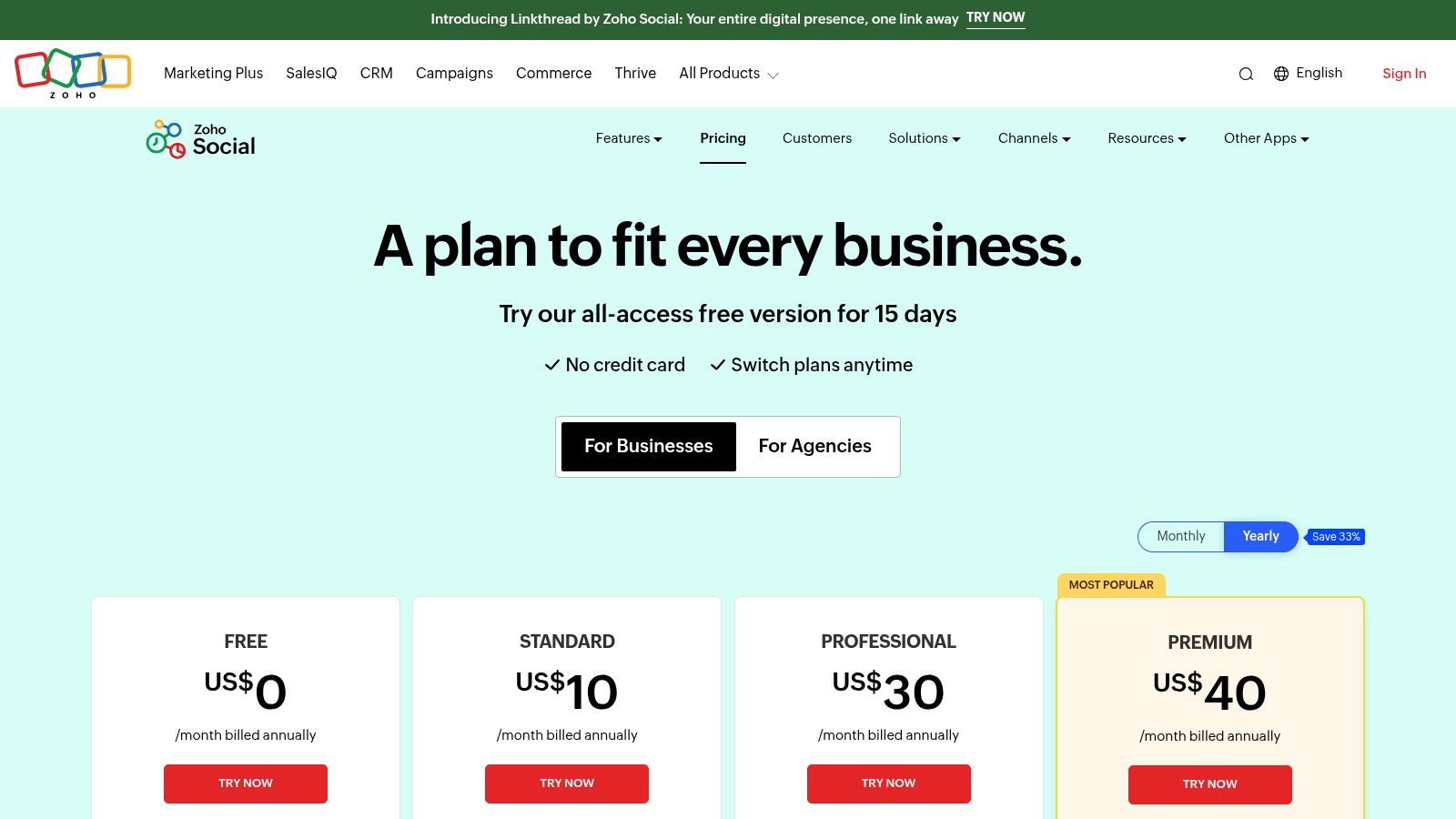
Its key differentiator is the seamless handoff between social media engagement and business operations. For example, a lead generated from a LinkedIn comment can be instantly converted into a new contact in Zoho CRM. Similarly, a customer complaint on Twitter can become a support ticket in Zoho Desk, ensuring no opportunity or issue falls through the cracks and creating a unified customer view.
Key Features & Use Cases
SmartQ Publishing: Schedules posts for when your audience is most active. A practical use is adding a high-priority announcement to the SmartQ queue, trusting that Zoho will publish it at the optimal time for maximum visibility without you needing to guess.
Comprehensive Monitoring Dashboard: Create listening columns to track keywords and mentions. A B2B company could set up a column to monitor mentions of a competitor's product, allowing their sales team to identify and engage with dissatisfied customers.
Zoho CRM & Desk Integration: The core value proposition. A sales team can see a lead's recent tweets directly within their Zoho CRM profile, giving them valuable context before a sales call. This is a powerful, actionable example of unifying marketing and sales data.
Team Collaboration: Assign custom roles and permissions. For example, you can give an intern the ability to draft posts, but require a manager to approve them before they are scheduled, providing a safe training environment.
Pricing: Zoho Social offers aggressive pricing, starting with a Standard plan at $10/month for one brand. The Professional plan at $30/month adds Livestream and SmartQ, with Premium and Agency plans available for more advanced features and client management.
Pros:
Excellent value for the feature set provided.
Unbeatable integration for existing Zoho CRM/Desk users.
Strong agency plans that include dedicated client portals.
Cons:
Many essential collaboration and advanced features are limited to higher-tier plans.
The interface can feel less modern than some newer competitors.
Website: https://www.zoho.com/social/pricing.html
Top 12 Social Media Scheduling Tools — Feature Comparison
Product | Core features | UX / Quality | Value / Pricing | Target audience | Unique selling points |
|---|---|---|---|---|---|
NicheTrafficKit 🏆 | AI end-to-end content creation, platform-specific posts, auto-publish, analytics, bulk creation | ★4.9 (1k+ reviews); massive time savings claim (6h/w → 15min/mo) | 💰 Creator $39 / Pro $89 / Ultimate $499 · token-based · free trial (no CC) | 👥 Creators, SM managers, SMBs, agencies | ✨ Algorithm-aware posts, intelligent recycling, peak-time auto-publish, Pinterest SEO |
Hootsuite | Unified calendar, scheduling, analytics, inbox & integrations | ★★★★ · mature enterprise UX | 💰 Higher per-user pricing; enterprise plans | 👥 Large teams, enterprises, agencies | ✨ Governance, training academy, broad integrations |
Sprout Social | Smart Inbox, advanced analytics, listening, AI Assist | ★★★★ · premium reporting & workflows | 💰 Per-seat pricing; higher-tier features costly | 👥 Mid-market to enterprise teams | ✨ Deep reporting, compliance & case-style workflows |
Buffer | Queue-based scheduler, AI captions, basic analytics, inbox | ★★★★ · very easy to use | 💰 Budget-friendly; free plan (3 channels); per-channel billing | 👥 Creators, solopreneurs, small teams | ✨ Simple UI, transparent plans, quick onboarding |
Later | Visual planner, Stories/Reels scheduling, link-in-bio, media library | ★★★★ · strong mobile & visual UX | 💰 Clear tier limits; visual-focused pricing | 👥 Visual brands, Instagram/TikTok/Pinterest creators | ✨ Visual planning, media library, link-in-bio tools |
Loomly | Centralized calendar, approvals, roles, integrations | ★★★★ · calendar-first collaboration | 💰 Competitive flat team pricing (not per-seat) | 👥 Agencies, SMBs needing approvals | ✨ Approval workflows, brand governance, Slack/Canva integrations |
Agorapulse | Publishing calendar, social inbox, white-label reporting | ★★★★ · agency-friendly inbox & reporting | 💰 Per-user pricing; add-ons increase cost | 👥 Agencies, social teams needing reporting | ✨ Branded reports, strong inbox automation |
Sendible | Multi-calendar, client dashboards, white-label, prebuilt reports | ★★★★ · agency-focused tools | 💰 Tiered pricing; white-label extra cost; 14-day trial | 👥 Agencies & SMBs with client workflows | ✨ Client dashboards, white-label & multi-calendar support |
SocialBee | Category-based scheduler, evergreen recycling, AI help | ★★★★ · automation-first UX | 💰 Competitive tiers; generous limits; trial/guarantee | 👥 Solos to agencies automating evergreen content | ✨ Content categories + automatic recycling |
Metricool | Scheduler + deep analytics, multi-brand reporting, Looker Studio connector | ★★★★ · analytics-forward | 💰 Scales by number of brands; forever-free for 1 brand | 👥 Multi-brand managers, analysts, agencies | ✨ Looker Studio connector, ad & competitor analytics |
Publer | Modular scheduler, pay-per-account/team, bulk scheduling | ★★★★ · very affordable & flexible | 💰 Low entry price; granular pay-for-what-you-use | 👥 Solos, SMBs needing granular scaling | ✨ Pay-per-account pricing, strong basic scheduling value |
Zoho Social | Scheduling, monitoring, inbox, CRM integrations | ★★★★ · integrated with Zoho stack | 💰 Aggressive pricing vs features; agency plans available | 👥 Teams using Zoho CRM/Desk, SMBs | ✨ Social → CRM workflows, SmartQ best-times |
Final Thoughts
Navigating the crowded landscape of social media scheduling tools can feel overwhelming, but the right platform is a powerful force multiplier for your marketing efforts. Throughout this guide, we've dissected twelve of the market's leading contenders, moving beyond generic feature lists to provide a clear framework for your decision-making process. The central takeaway is this: the "best" tool is not a one-size-fits-all solution. Instead, it's the one that aligns most precisely with your specific goals, team size, budget, and strategic priorities.
Your choice should be a direct reflection of your core business needs. A solo creator focused on visual-first platforms like Instagram and TikTok will find immense value in a tool like Later, with its intuitive visual planner and Linkin.bio feature. Conversely, a large digital agency juggling dozens of client accounts requires the robust collaboration, sophisticated reporting, and approval workflows found in platforms like Agorapulse or Sprout Social. The key is to look past the marketing hype and focus on the practical application of features to solve your unique challenges.
Making Your Final Selection: A Practical Checklist
Before you commit to a subscription, run through this final checklist. This strategic pause ensures you’re not just buying software but investing in a solution that will deliver a tangible return on investment.
Define Your "Must-Haves": What is the one core problem you need to solve? Is it streamlining content approvals, accessing deep analytics, engaging with your community, or automating content discovery? Identify your non-negotiable features and filter your options accordingly. For example, if your primary goal is to automate evergreen content recycling, SocialBee should be at the top of your list.
Audit Your Key Platforms: Don't pay for what you don't need. If your entire strategy revolves around LinkedIn and Twitter, a tool with premium Pinterest or TikTok features is unnecessary. Ensure your chosen platform offers deep, native integration with the social networks that matter most to your audience.
Evaluate Scalability: Consider where your business will be in one, three, or even five years. A tool like Buffer might be perfect for you today, but will it support a growing team, more social profiles, and increased posting volume in the future? Platforms like Hootsuite and NicheTrafficKit are built with scalability in mind, offering plans that grow with you.
Prioritize the User Experience (UX): A powerful tool is useless if your team finds it clunky and avoids using it. Take full advantage of free trials. Involve your team in the testing process. Is the interface intuitive? Can you build a workflow quickly? A smooth user experience directly translates to higher adoption rates and better results.
Beyond Scheduling: The Bigger Picture
Remember, a scheduling tool is just one component of a comprehensive social media strategy. It automates the delivery of your content, but the quality of that content remains paramount. Effective social media management also involves deep audience research, competitor analysis, and trend monitoring. For teams looking to gather this foundational data, exploring the best social media scrapers can offer a significant competitive advantage by automating the collection of public data for market analysis and strategic planning.
Ultimately, the goal is to reclaim your most valuable asset: time. By automating the repetitive tasks of posting and reporting, you free up critical hours to focus on what truly moves the needle: creating authentic content, engaging in meaningful conversations, and building a loyal community. Choosing one of the best social media scheduling tools discussed here is your first, most important step toward achieving that efficiency.
Ready to move beyond simple scheduling and embrace true end-to-end automation? NicheTrafficKit leverages advanced AI to not only schedule your posts but also discover viral content, write engaging captions, and optimize your entire workflow for maximum growth. Explore NicheTrafficKit and see how an AI-powered co-pilot can transform your social media strategy today.
