# Pinterest Marketing Guide (2026): Strategy, Boards, Pins & Scheduling

> Complete Pinterest marketing guide for 2026: Business setup, board architecture, pin creative, SEO layer, scheduling tiers, Analytics, and free NTK tools.
- **Author**: Niche Traffic Kit Team
- **Published**: 2026-03-25
- **Category**: Tutorials
- **URL**: https://nichetraffickit.com/blog/pinterest-marketing-guide

---

<h2 id="quick-answer">Quick Answer: Pinterest Marketing Guide (2026)</h2>
<p>A <strong>Pinterest marketing guide</strong> for 2026 treats Pinterest as a visual search and planning platform--not a chronological feed like Facebook. Success means Business account setup, keyword-aligned pins, organized boards, steady publishing, and Analytics-driven iteration. Traffic-focused brands optimize for <strong>saves and outbound clicks</strong>; awareness brands may add Promoted Pins once organic winners emerge.</p>
<p>Pinterest documents native scheduling limits for Business users (10 future pins, 30-day horizon per pin) in its Help Center--enough to test, tight for serious cadence. Pair this guide with <a href="/blog/pinterest-pin-scheduler-guide-2026">Pinterest pin scheduler guide (2026)</a>, <a href="/blog/pinterest-seo-tips">Pinterest SEO tips</a>, and free utilities at <a href="/tools/pinterest">/tools/pinterest</a>.</p>

<figure>
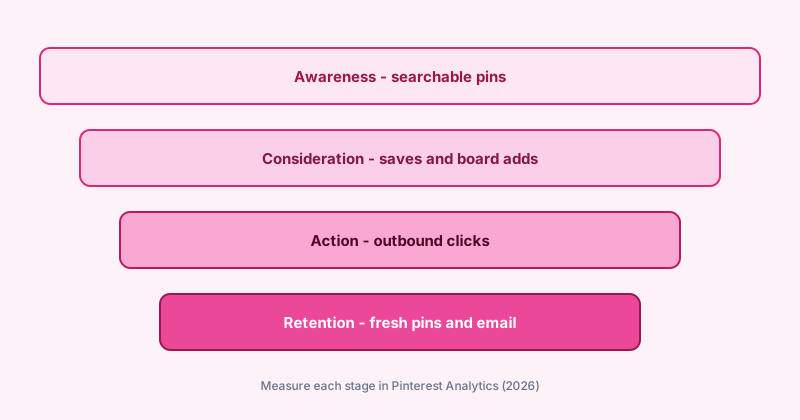
<img src="/images/blog/pinterest-marketing-funnel-2026.svg" alt="Pinterest marketing funnel diagram: awareness pins, consideration saves, action clicks, retention" width="800" height="420" loading="lazy" />
<figcaption>Pinterest marketing funnel: optimize each stage in Analytics, not just top-of-funnel impressions.</figcaption>
</figure>

<h2 id="strategy">Pinterest Marketing Strategy: Goals and Audience</h2>
<p>Start with one measurable goal: email signups, affiliate clicks, product sales, or ad-supported page views. Pinterest users often plan weeks ahead (recipes, home projects, fashion)--match creative to <strong>future intent</strong>, not breaking news.</p>
<h3>Audience signals to research</h3>
<ul>
<li>Search Pinterest for your seed keywords; note auto-complete phrases and dominant pin formats (listicles, step photos, infographics).</li>
<li>Review competitor boards: which boards earn consistent saves on similar pins?</li>
<li>Align pin promises with landing pages--Pinterest penalizes misleading clickbait through low save rates and quick bounces.</li>
</ul>
<table>
<thead><tr><th>Business type</th><th>Primary Pinterest goal</th><th>Board focus</th></tr></thead>
<tbody>
<tr><td>Niche blog / affiliate</td><td>Outbound clicks</td><td>Topic clusters -> money posts</td></tr>
<tr><td>Ecommerce / Etsy</td><td>Product saves + site visits</td><td>Seasonal + gift + problem-solution</td></tr>
<tr><td>Local service</td><td>Brand awareness + leads</td><td>Before/after, tips, local keywords</td></tr>
<tr><td>Creator / course</td><td>Email list growth</td><td>Freebie pins -> landing pages</td></tr>
</tbody>
</table>
<p>Pinterest's <a href="https://business.pinterest.com/en-us/blog/" rel="noopener noreferrer">Business Blog</a> and <a href="https://help.pinterest.com/en/business/article/get-started-on-pinterest" rel="noopener noreferrer">Get started on Pinterest</a> articles remain the authoritative baseline when interfaces shift.</p>

<h2 id="account-setup">Business Account, Profile, and Brand Trust</h2>
<ol>
<li>Convert to a Business account and claim your website (meta tag or DNS) so Analytics attributes outbound clicks correctly.</li>
<li>Write a keyword-rich bio (160 characters) with a clear outcome--use our free bio generator at /tools/pinterest/ai-pinterest-bio-generator.</li>
<li>Use a recognizable profile image; keep username short and on-brand.</li>
<li>Enable Rich Pins where eligible (recipes, articles, products) per Pinterest developer docs--verify markup on your domain.</li>
</ol>

<h2 id="boards">Board Architecture That Supports SEO</h2>
<p>Boards are category pages in Pinterest search. Create <strong>3-12 core boards</strong> per property--not hundreds of thin boards.</p>
<ul>
<li>One board per major keyword cluster (e.g., "Small kitchen storage ideas").</li>
<li>Board titles front-load search phrases; descriptions explain who the board helps (2-3 sentences).</li>
<li>Use board sections when a topic has sub-themes (budget vs luxury, beginner vs advanced).</li>
</ul>
<p>Generate names and descriptions quickly with <a href="/tools/pinterest/ai-pinterest-board-name-generator">board name</a> and <a href="/tools/pinterest/ai-pinterest-board-description-generator">board description</a> tools, then edit for your voice.</p>

<h2 id="pin-creative">Pin Creative: Formats That Earn Saves</h2>
<p>Standard pins (1000x1500 px or 2:3 ratio) still dominate; video pins and Idea Pins add reach when you can produce short motion. Every pin needs:</p>
<ul>
<li><strong>Readable overlay text</strong> (benefit + curiosity) without cluttering the image.</li>
<li><strong>Brand consistency</strong>--fonts and colors recognizable in the home feed.</li>
<li><strong>One clear outbound URL</strong> per pin to a page that matches the pin headline.</li>
</ul>
<p>Batch titles and descriptions before design sprints so keyword coverage stays even across the week.</p>

<h2 id="scheduling">Publishing Cadence and Scheduling</h2>
<p>Consistency beats sporadic bursts. Workflow:</p>
<ol>
<li>Research keywords and draft metadata (NTK free tools).</li>
<li>Design pins in Canva or your template stack.</li>
<li>Queue via native scheduler or partner tool--see comparison table in <a href="/blog/pinterest-pin-scheduler-guide-2026">pin scheduler guide</a>.</li>
</ol>
<table>
<thead><tr><th>Volume</th><th>Scheduler choice</th><th>Notes</th></tr></thead>
<tbody>
<tr><td>&lt; 5 pins/week</td><td>Pinterest native</td><td>Free; 10-pin queue cap</td></tr>
<tr><td>5-25 pins/week</td><td>Tailwind or Buffer</td><td>Verify pricing on vendor sites</td></tr>
<tr><td>Multi-platform</td><td>Buffer, Later, Publer</td><td>Pinterest as one channel in queue</td></tr>
</tbody>
</table>

<h2 id="seo-layer">Pinterest SEO Inside Your Marketing Plan</h2>
<p>SEO is not optional--most sustainable traffic comes from search and related pins. Prioritize:</p>
<ul>
<li>Primary keyword in the first 40 characters of the pin title.</li>
<li>Natural keyword variants in the description (no stuffing).</li>
<li>Alt text that describes the image for accessibility.</li>
<li>Fresh pins to the same URL over time (new creative, same landing page).</li>
</ul>
<p>Deep dive: <a href="/blog/pinterest-seo-tips">Pinterest SEO tips (2026)</a>. For monetization paths after traffic arrives, see <a href="/blog/make-money-with-pinterest-2026">make money with Pinterest</a>.</p>

<h2 id="analytics">Measure, Iterate, and Scale</h2>
<p>Monthly review checklist:</p>
<ul>
<li>Top 10 pins by outbound clicks--what headline and image pattern do they share?</li>
<li>Boards with rising impressions but low saves--fix creative mismatch.</li>
<li>Underperforming pins older than 90 days--pause or refresh metadata.</li>
<li>Compare posting windows using <a href="/blog/best-time-to-post-on-pinterest-2026">best time to post on Pinterest</a> against your Analytics peaks.</li>
</ul>

<h2 id="ntk-stack">Where Niche Traffic Kit Fits</h2>
<p>NTK is built for operators running niche sites and Facebook Pages at scale. Use free Pinterest tools to remove metadata bottlenecks; use the dashboard when Facebook automation justifies Creator ($39/mo), Pro ($89/mo), or Ultimate ($499/mo) per <a href="/pricing">/pricing</a>. Pinterest stays free--treat it as top-of-funnel traffic into pages you monetize.</p>
<p>Next steps: open <a href="/tools/pinterest">Pinterest tools hub</a>, schedule your first week of pins, and subscribe to the NTK newsletter on the homepage for Page automation tips (optional).</p>
---
- [More Tutorials articles](https://nichetraffickit.com/blog/category/tutorials)
- [All articles](https://nichetraffickit.com/blog)