# Pinterest Pin Scheduler Guide (2026): Native Limits vs Tailwind & Buffer

> Compare Pinterest's free native scheduler (10-pin cap) with Tailwind, Buffer, and Canva partners--plus an NTK metadata workflow before you queue pins.
- **Author**: Niche Traffic Kit Team
- **Published**: 2026-10-08
- **Category**: Tutorials
- **URL**: https://nichetraffickit.com/blog/pinterest-pin-scheduler-guide-2026

---

<h2 id="quick-answer">Quick Answer: Best Pinterest Pin Scheduler in 2026</h2>
<p>A <strong>Pinterest pin scheduler</strong> lets you design pins when you have creative focus and publish when your audience is searching and saving. In 2026 you have three practical tiers: <strong>Pinterest native scheduling</strong> (free on Business accounts, strict caps), <strong>Pinterest API partners</strong> such as Tailwind and Buffer (bulk queues and calendars), and <strong>metadata batching with NTK free tools</strong> (titles, descriptions, boards before anything hits a queue).</p>
<p>Pinterest documents native limits clearly: schedule up to <strong>10 pins</strong> for the future, each up to <strong>30 days</strong> ahead, one pin per creation flow, on Business accounts (<a href="https://help.pinterest.com/en/business/article/schedule-pins" rel="noopener noreferrer">Pinterest Business Help Center</a>). Creators in the <a href="https://community.pinterest.biz/t/five-tools-to-make-pin-scheduling-easier/42535" rel="noopener noreferrer">Pinterest Business Community</a> also highlight bulk CSV upload (up to 200 pins) and RSS auto-publish--features you reach through approved partners, not the bare native form.</p>
<p>If Pinterest traffic pays your bills, plan to outgrow the native cap. If Pinterest is experimental, native scheduling plus free <a href="/tools/pinterest">NTK Pinterest tools</a> keeps cost at $0 while you validate niches. For timing depth, pair this guide with <a href="/blog/best-time-to-post-on-pinterest-2026">best time to post on Pinterest</a> and monetization paths in <a href="/blog/make-money-with-pinterest-2026">make money with Pinterest</a>.</p>

<figure>
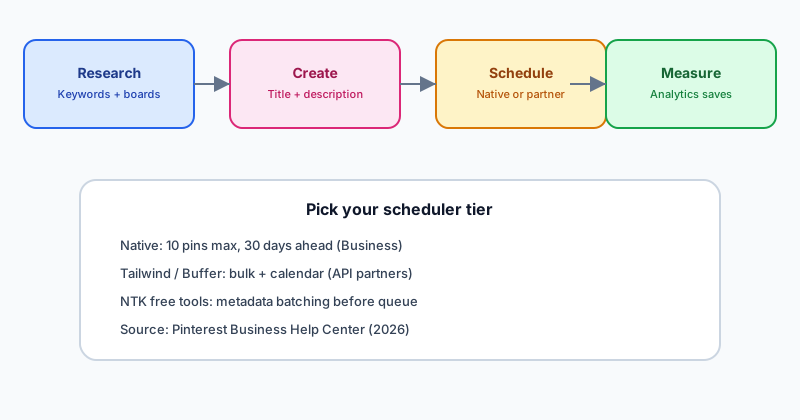
<img src="/images/blog/pinterest-pin-scheduler-workflow-2026.svg" alt="Diagram: Pinterest pin scheduler workflow from keyword research to native or partner scheduling and Analytics measurement" width="800" height="420" loading="lazy" />
<figcaption>Workflow: research and metadata first, then choose native scheduling or an API partner queue.</figcaption>
</figure>

<h2 id="native-scheduler">How Pinterest's Native Pin Scheduler Works (Free)</h2>
<p>Convert to a <strong>Pinterest Business account</strong> (free) if you still publish from a personal profile--native scheduling does not appear on personal accounts per Pinterest's help docs.</p>
<h3>Desktop steps (Business account)</h3>
<ol>
<li>Log in at pinterest.com and open <strong>Create -> Create Pin</strong>.</li>
<li>Upload an image or video; multi-image uploads create separate pins.</li>
<li>Fill title, description, outbound link, and board.</li>
<li>Choose <strong>Publish at a later date</strong>, pick day and time (within 30 days).</li>
<li>Confirm; view queued pins on your profile (may take minutes to appear).</li>
</ol>
<h3>Native limits worth planning around</h3>
<table>
<thead><tr><th>Rule</th><th>Native scheduler</th><th>Why it matters</th></tr></thead>
<tbody>
<tr><td>Queue depth</td><td>Up to 10 scheduled pins</td><td>Weekly bloggers hit the cap fast</td></tr>
<tr><td>Horizon</td><td>30 days ahead max</td><td>Seasonal campaigns need partner tools</td></tr>
<tr><td>Bulk create</td><td>One pin per pass</td><td>No CSV import natively</td></tr>
<tr><td>Edit media after schedule</td><td>Image/video locked</td><td>Fix typos in text fields only</td></tr>
<tr><td>Calendar view</td><td>Not provided</td><td>Hard to visualize gaps</td></tr>
</tbody>
</table>
<p>Independent guides such as <a href="https://www.crowbert.com/how-to-schedule-pinterest-pins" rel="noopener noreferrer">Crowbert's 2026 native walkthrough</a> echo the same caps--use them as a checklist, but trust Pinterest Help Center when interfaces change.</p>

<h2 id="partner-schedulers">Pinterest API Partner Schedulers Compared</h2>
<p>Pinterest's community post lists <strong>Tailwind, Buffer, Canva, and Picsart</strong> among tools connected through approved APIs for plan, schedule, and analyze workflows. Below is a buyer-oriented comparison--verify pricing and limits on each site before purchase.</p>
<table>
<thead><tr><th>Tool</th><th>Best for</th><th>Pinterest depth</th><th>Typical price signal</th><th>Standing free tier?</th></tr></thead>
<tbody>
<tr><td><strong>Pinterest native</strong></td><td>Testing, &lt;5 pins/day</td><td>Basic queue</td><td>$0</td><td>Yes (Business)</td></tr>
<tr><td><strong>Tailwind</strong></td><td>Pinterest-first shops &amp; bloggers</td><td>Bulk CSV, SmartSchedule, keyword research</td><td>From ~$15/mo annual (Tailwindapp.com)</td><td>Trial--verify site</td></tr>
<tr><td><strong>Buffer</strong></td><td>Multi-platform queues</td><td>Pinterest channel in shared calendar</td><td>Free: 3 channels, 10 posts/channel (Buffer.com/pricing)</td><td>Yes (limited)</td></tr>
<tr><td><strong>Canva</strong></td><td>Design-first creators</td><td>Publish from designs + schedule on paid tiers</td><td>Free design; scheduling on Pro (Canva.com/pricing)</td><td>Partial</td></tr>
<tr><td><strong>NTK free tools</strong></td><td>Metadata before queue</td><td>15 generators, no publish API</td><td>$0 at /tools/pinterest</td><td>Yes</td></tr>
</tbody>
</table>
<p>Roundups like <a href="https://pinpress.io/blog/how-to-schedule-pins-on-pinterest/" rel="noopener noreferrer">Pinpress's three-method comparison</a> align with this split: native for thrift, Tailwind for Pinterest volume, Buffer when Pinterest is one of several channels. For Buffer-specific migration, read <a href="/blog/buffer-alternatives-2026">Buffer alternatives</a> and <a href="/compare/later-alternatives">Later alternatives</a> when visual planning tools overlap your stack.</p>

<h3>When Tailwind wins</h3>
<p>Tailwind markets official Pinterest partnership since 2012, CSV and bulk uploads, and SmartSchedule windows based on when your audience engages (<a href="https://get.tailwindapp.com/pinterest-pin-creator/" rel="noopener noreferrer">Tailwind Pin Creator</a>). Choose it when:</p>
<ul>
<li>You publish more than 10 pins per week and feel the native cap weekly.</li>
<li>You want keyword volume and resonance scores beside the calendar (<a href="https://support.tailwindapp.com/en/articles/14021575-getting-started-with-keyword-research-in-tailwind" rel="noopener noreferrer">Tailwind Keyword Research</a>).</li>
<li>Pinterest SEO compounding matters more than Instagram grid aesthetics.</li>
</ul>

<h3>When Buffer wins</h3>
<p>Buffer fits creators who already queue Facebook or LinkedIn posts and want Pinterest in the same calendar without a Pinterest-only subscription. Free-tier caps are documented on Buffer.com/pricing--treat them as hard limits when planning a month of pins. Pair Buffer with NTK generators so each queued pin carries keyword-rich copy.</p>

<h2 id="metadata-first">Schedule Metadata Before You Schedule Pins</h2>
<p>Schedulers publish what you give them. Weak titles and thin descriptions cap long-tail Pinterest search regardless of timing. Batch metadata in one sitting:</p>
<ul>
<li><a href="/tools/pinterest/ai-pinterest-pin-title-generator">Pin title generator</a> -- test keyword-forward titles.</li>
<li><a href="/tools/pinterest/ai-pinterest-description-generator">Description generator</a> -- add context and links naturally.</li>
<li><a href="/tools/pinterest/pinterest-title-length-checker">Title length checker</a> -- avoid truncation in feed previews.</li>
<li><a href="/tools/pinterest/pinterest-board-ideas-generator">Board ideas generator</a> -- align pins with searchable board clusters.</li>
<li><a href="/tools/pinterest/pinterest-hashtag-generator">Hashtag generator</a> -- optional topical tags where they fit your niche.</li>
</ul>
<p>Then import finished copy into Tailwind, Buffer, or native scheduling. This mirrors the Facebook workflow in our <a href="/blog/facebook-post-scheduler-guide-2026">Facebook post scheduler guide</a>--plan content in NTK, execute in the platform-owned queue.</p>

<h2 id="workflow">Weekly Pinterest Scheduling Workflow (Template)</h2>
<ol>
<li><strong>Monday -- research</strong> -- Pull 5-10 keyword ideas from Pinterest Trends or partner keyword tools; map each to a board.</li>
<li><strong>Tuesday -- create</strong> -- Design pins in Canva or your template stack; run titles/descriptions through NTK tools.</li>
<li><strong>Wednesday -- queue</strong> -- Upload to Tailwind/Buffer or schedule natively; space pins to avoid spam signals.</li>
<li><strong>Thursday -- distribute</strong> -- Save pins to relevant boards and sections; community posts note board-level distribution affects reach.</li>
<li><strong>Friday -- measure</strong> -- Review Pinterest Analytics for saves and outbound clicks; adjust next week's time slots.</li>
</ol>
<p>Document results in a simple spreadsheet: pin URL, keyword theme, publish time, saves in 7 days, clicks in 7 days. After 30 days, double down on two winning slots--see the testing protocol in <a href="/blog/best-time-to-post-on-pinterest-2026">Pinterest timing guide</a>.</p>

<h2 id="mistakes">Common Pinterest Scheduler Mistakes</h2>
<ul>
<li><strong>Scheduling before SEO is done</strong> -- Fix metadata with free tools first.</li>
<li><strong>Identical pins to every board</strong> -- Pinterest treats spammy duplication harshly; vary descriptions and boards.</li>
<li><strong>Ignoring the 10-pin native cap</strong> -- Upgrade to a partner before you silently stop publishing.</li>
<li><strong>Copying other niches' timing</strong> -- Replace charts with your Analytics after 14-30 days.</li>
<li><strong>Expecting NTK to publish pins</strong> -- NTK automates Facebook pages on paid tiers; Pinterest scheduling stays in Pinterest or partners.</li>
</ul>

<h2 id="pricing-context">Where NTK Paid Plans Fit</h2>
<p>Pinterest schedulers solve timing and volume. NTK paid dashboard tiers (Creator $39 / Pro $89 / Ultimate $499 per <a href="/pricing">/pricing</a>) focus on <strong>Facebook niche page automation</strong>--research, captions, and publishing--while Pinterest utilities remain free. Many creators run Pinterest discovery (Tailwind or native) plus Facebook community monetization (NTK). Compare social suites on <a href="/compare/free-social-media-schedulers">free social media schedulers compared</a> and <a href="/decision-pages/comparison/ntk-vs-buffer">NTK vs Buffer</a>.</p>

<blockquote cite="https://help.pinterest.com/en/business/article/schedule-pins">
<p>"You can schedule a Pin up to 30 days in advance... you can have up to 10 Pins scheduled for the future." -- Pinterest Business Help Center</p>
</blockquote>

<h2 id="cta">Next Steps</h2>
<p>Start free: batch your next 10 pins with the <a href="/tools/pinterest">Pinterest tools hub</a>, queue them in Pinterest's native scheduler, and measure for 30 days. When the cap bites, add Tailwind or Buffer--not another generic AI writer. Ready to automate Facebook pages that monetize the traffic Pinterest sends? <a href="https://dashboard.nichetraffickit.com/login">Log in to Niche Traffic Kit</a> or review <a href="/pricing">pricing</a> when content volume on Facebook--not pin metadata--is the bottleneck.</p>
<p>Related: <a href="/blog/free-social-media-scheduler-2026">Free social media schedulers</a> - <a href="/compare/buffer-alternatives">Buffer alternatives compare page</a> - <a href="/decision-pages/comparison/ntk-vs-later">NTK vs Later</a> - <a href="/tools/pinterest/pinterest-title-length-checker">Title length checker</a></p>
---
- [More Tutorials articles](https://nichetraffickit.com/blog/category/tutorials)
- [All articles](https://nichetraffickit.com/blog)