# How to Automate Facebook Posts in 2026 (Pages, APIs & Workflows)

> Automate Facebook Page posts with Meta Business Suite, schedulers, Graph API workflows, and NTK research-to-publish automation--without risky Group bots.
- **Author**: NTK SEO Automation
- **Published**: 2026-10-05
- **Category**: Tutorials
- **URL**: https://nichetraffickit.com/blog/how-to-automate-facebook-posts-2026

---

<h2 id="quick-answer">Quick Answer: How to Automate Facebook Posts in 2026</h2>
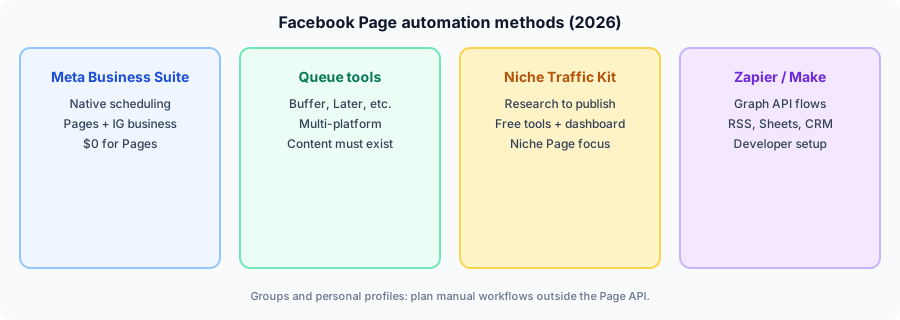
<p><strong>How to automate Facebook posts</strong> depends on what you are automating. For most buyers, the goal is a <strong>Facebook Page</strong> that publishes consistently without opening the Facebook app ten times a day. In 2026 that breaks into four realistic methods: <strong>Meta Business Suite</strong> (free native scheduling), <strong>third-party schedulers</strong> (multi-platform queues), <strong>Niche Traffic Kit</strong> (research -> AI captions -> scheduling for niche Pages), and <strong>Zapier/Make plus the Graph API</strong> (custom data triggers).</p>
<p>Automation is <em>not</em> the same as scheduling. Scheduling assumes the caption, link, and creative already exist. Full <strong>facebook page automation</strong> also covers where ideas come from, how you batch drafts, and whether publishing requires copy-paste into Meta. If you only need a calendar for finished posts, read our <a href="/blog/facebook-post-scheduler-guide-2026">Facebook post scheduler guide</a>--it targets the keyword <em>scheduler</em>, not this end-to-end automation map.</p>
<p>Meta removed broad Group publishing from third-party APIs in <strong>April 2024</strong> (<code>publish_to_groups</code> deprecation). Cloud tools cannot replace that path. Personal friend profiles are outside Page automation workflows--build or convert to a Page for Insights, scheduling, and monetization tools.</p>
<p><strong>Start free:</strong> plan posts in the <a href="/tools/facebook/facebook-post-scheduler">Facebook Post Scheduler</a>, draft copy with the <a href="/tools/facebook/facebook-post-generator">post generator</a>, and paste into Meta Business Suite. When volume grows, review <a href="/pricing">NTK pricing</a> (Creator $39 / Pro $89 / Ultimate $499) or <a href="https://dashboard.nichetraffickit.com/login">log in to the dashboard</a>.</p>

<figure>
<img src="/images/blog/photo-1551288049-bebda4e38f71.jpg" alt="Social media manager reviewing an automated Facebook Page content calendar on a laptop in 2026" width="1200" height="630" loading="lazy" />
<figcaption>Facebook Page automation starts with clear rules: Pages via Meta-approved tools; Groups and personal profiles follow different, stricter paths.</figcaption>
</figure>

<h2 id="what-automation-means">What "Facebook Automation" Means (and What Meta Allows)</h2>
<p>Competitors in Google's top results (Conbersa, Apaya, MultipleGroupPoster, and legacy Buffer tutorials) agree on one boundary: <strong>Meta supports Page publishing through official surfaces</strong>--Business Suite, Marketing API, and partners--while restricting unsanctioned bots on personal accounts and member Group spam.</p>
<p>As Meta's <a href="https://developers.facebook.com/docs/pages-api/getting-started/" rel="noopener noreferrer">Pages API getting started</a> documentation states, publishing requires a Page access token and permissions such as <code>pages_manage_posts</code> for content you create on a Page you control. That is the legal automation lane for software products.</p>
<p>What responsible operators automate in 2026:</p>
<ul>
<li><strong>Timing</strong> -- Queue posts for audience-active hours using Suite or a scheduler.</li>
<li><strong>Formatting</strong> -- RSS or blog URLs become link posts with consistent UTM tags via Zapier.</li>
<li><strong>Drafting</strong> -- AI suggests captions you edit before publish (never raw spam).</li>
<li><strong>Research</strong> -- Tools analyze niche winners before you write (NTK's differentiation).</li>
<li><strong>Cross-channel handoff</strong> -- Pinterest or Reddit discovery feeds Facebook community posts manually or via approved links.</li>
</ul>
<p>What to avoid: buying "auto post to any Group" cloud software that ignores the 2024 API removal, running engagement pods, or posting identical links across dozens of Pages in the same minute--Meta treats that as inauthentic behavior.</p>

<h2 id="methods-table">Facebook Automation Methods Compared</h2>
<p>Use this table to pick a lane before paying for another subscription.</p>
<table>
<thead>
<tr><th>Method</th><th>Best for</th><th>Typical cost</th><th>Auto-publish Page?</th><th>Content creation</th><th>Multi-platform</th></tr>
</thead>
<tbody>
<tr><td><strong>Meta Business Suite</strong></td><td>Single-brand Page + IG business</td><td>$0</td><td>Yes (scheduled)</td><td>Manual in Composer</td><td>Meta only</td></tr>
<tr><td><strong>Third-party schedulers</strong> (Buffer, Later, Publer, SocialBee, etc.)</td><td>Teams with ready-made assets</td><td>Free tiers + paid from ~$5-$99+/mo (verify vendor sites)</td><td>Yes for Pages via API</td><td>AI assist on some tiers; no niche research</td><td>Yes</td></tr>
<tr><td><strong>Niche Traffic Kit</strong></td><td>Niche Facebook Page operators</td><td>Free tools; dashboard Creator $39 / Pro $89 / Ultimate $499 per <a href="/pricing">/pricing</a></td><td>Yes on dashboard plans</td><td>Research + AI captions (core)</td><td>Free Pinterest/Reddit tools; FB automation focus</td></tr>
<tr><td><strong>Zapier / Make + Graph API</strong></td><td>Developers, RSS-heavy blogs</td><td>Automation platform fees + Meta app review time</td><td>Yes when built correctly</td><td>You template messages</td><td>Any trigger Zap supports</td></tr>
</tbody>
</table>
<p><em>Sources: Meta Business Help Center scheduling docs; Meta Pages API documentation; vendor pricing pages as of 2026. Re-verify caps before switching tools.</em></p>

<figure>
<img src="/images/facebook/facebook-automation-methods.svg" alt="Diagram comparing Meta Business Suite, queue schedulers, Niche Traffic Kit, and Zapier API workflows for Facebook Page automation" width="900" height="320" loading="lazy" />
<figcaption>Four automation layers: native Suite, queue schedulers, NTK research-to-publish, and custom API workflows.</figcaption>
</figure>

<h2 id="method-suite">Method 1: Meta Business Suite (Native Facebook Page Automation)</h2>
<p>Meta's <a href="https://www.facebook.com/business/help/2223502627919449" rel="noopener noreferrer">Save, Schedule and Reschedule Posts in Meta Business Suite</a> article walks through Composer -> Scheduling options -> date/time -> Schedule. Scheduled items appear in Planner or Content -> Posts &amp; reels -> Scheduled.</p>
<p>For Page posts, Meta's consumer Help Center (<a href="https://www.facebook.com/help/389849807718635" rel="noopener noreferrer">Schedule a post for your Facebook Page</a>) documents that you can schedule posts to publish <strong>between 20 minutes and 29 days away</strong>, using your current time zone. Use <strong>Active times</strong> in Composer when Meta surfaces recommended publication times from your Page data.</p>
<p>Strengths: zero subscription, direct tie-in to Page Insights, official support for supported post types in your region. Limits: no Pinterest/Reddit queues, no automated niche research, account switching friction when you manage many Pages manually.</p>
<p>Pair Suite with the free <a href="/tools/facebook/facebook-posting-time-optimizer">posting time optimizer</a> and <a href="/tools/facebook/facebook-post-scheduler">post scheduler</a> so you arrive in Composer with a planned week--not a blank box.</p>

<h2 id="method-schedulers">Method 2: Third-Party Schedulers (Buffer, Later, Publer, and Alternatives)</h2>
<p>When you already create captions and creative elsewhere, queue tools automate <em>timing and cross-posting</em>. Buffer's 2026 Publish documentation describes auto-publishing for Facebook Pages through its API integration, with customizable posting schedules per channel.</p>
<p>Compare category fit on NTK compare pages--each emphasizes different math:</p>
<ul>
<li><a href="/compare/buffer-alternatives">Buffer alternatives</a> -- standing-free caps vs flat paid channels.</li>
<li><a href="/compare/publer-alternatives">Publer alternatives</a> -- bulk scheduling and account limits.</li>
<li><a href="/compare/meta-business-suite-alternatives">Meta Business Suite alternatives</a> -- when Meta-only scheduling is not enough.</li>
<li><a href="/compare/socialbee-alternatives">SocialBee alternatives</a> -- category-based evergreen recycling.</li>
<li><a href="/compare/planable-alternatives">Planable alternatives</a> -- approval-heavy agency workflows.</li>
</ul>
<p>Schedulers do not fix an empty content pipeline. If your team spends hours wondering what to post, upgrading from Buffer Free to Buffer Paid does not solve the research bottleneck--see Method 3.</p>

<h2 id="method-ntk">Method 3: Niche Traffic Kit (Research -> Generate -> Auto Post to Facebook Page)</h2>
<p>NTK targets operators running <strong>niche Facebook Pages</strong>--hobby communities, local services, affiliate review Pages--where the hard part is deciding <em>what</em> to publish. That is distinct from picking among schedulers in our <a href="/blog/free-social-media-scheduler-2026">free social media scheduler</a> roundup.</p>
<p>A practical automation stack on NTK:</p>
<ol>
<li><strong>Research</strong> -- Dashboard analyzes top posts/Reels patterns in your niche (paid plans).</li>
<li><strong>Draft</strong> -- Free <a href="/tools/facebook/facebook-post-generator">AI post generator</a> and <a href="/tools/facebook/facebook-caption-generator">caption generator</a> for client-side drafts.</li>
<li><strong>Validate</strong> -- <a href="/tools/facebook/facebook-engagement-predictor">Engagement predictor</a> and <a href="/tools/facebook/facebook-page-health-checker">page health checker</a> before publish.</li>
<li><strong>Time</strong> -- <a href="/tools/facebook/facebook-posting-time-optimizer">Posting time optimizer</a> plus guidance in <a href="/blog/best-time-to-post-on-facebook-2026">best time to post on Facebook</a>.</li>
<li><strong>Publish</strong> -- Paste into Meta Business Suite for $0 scheduling, or connect the dashboard for hands-off publishing when Creator $39/mo saves more labor than it costs.</li>
</ol>
<p>Monetization note: consistent automation supports every revenue path in our <a href="/blog/how-to-monetize-facebook-page-2026">how to monetize a Facebook page</a> guide--Meta's invite-only Content Monetization still rewards sustained original output, not one-off viral posts.</p>

<h2 id="method-api">Method 4: Zapier, Make, and the Graph API</h2>
<p>Developers and RSS-heavy publishers automate Facebook Pages by calling <code>POST /{page-id}/feed</code> with a Page access token, as documented in Meta's <a href="https://developers.facebook.com/docs/graph-api/reference/page/feed/" rel="noopener noreferrer">Page feed reference</a> and <a href="https://developers.facebook.com/docs/pages-api/getting-started/" rel="noopener noreferrer">Pages API getting started</a> guide. Scheduled API posts use <code>published=false</code> and <code>scheduled_publish_time</code> per Meta's parameter definitions.</p>
<p>Typical Zapier/Make patterns:</p>
<ul>
<li>New WordPress post -> format message + link -> publish or schedule to Page.</li>
<li>New row in Google Sheets -> approval column checked -> post to Page.</li>
<li>E-commerce product update -> single link post with UTM parameters.</li>
</ul>
<p>Trade-offs: app review, token rotation, breaking changes when Meta updates permissions, and no built-in niche research. Use this method when you already own the content source and need plumbing--not when you need creative strategy.</p>
<blockquote cite="https://developers.facebook.com/docs/pages-api/getting-started/">
<p>Meta documents that publishing requires a Page access token and permissions including <code>pages_manage_posts</code>, with the <code>CREATE_CONTENT</code> task on the Page--verify tokens in Graph API Explorer before building production Zaps.</p>
</blockquote>

<h2 id="groups-profiles">Groups, Personal Profiles, and Other Dead Ends</h2>
<p>Multiple 2026 explainers (including MultipleGroupPoster and Conbersa) document the same constraint: after Meta removed <code>publish_to_groups</code> in April 2024, cloud schedulers lost sanctioned Group auto-publishing. Buffer's help center now describes notification-based publishing for some formats that APIs cannot complete automatically.</p>
<p>Operational guidance:</p>
<ul>
<li><strong>Pages you admin</strong> -- Use Suite or API automation in this guide.</li>
<li><strong>Groups you admin</strong> -- Use native Group scheduling where available; batch drafts with <a href="/tools/facebook/facebook-group-post-optimizer">group post optimizer</a>.</li>
<li><strong>Groups you merely belong to</strong> -- Manual sharing only; do not buy bot tools.</li>
<li><strong>Personal profiles</strong> -- Not supported for Page API automation; use a Page for brand workflows.</li>
</ul>

<h2 id="seven-day-workflow">7-Day Facebook Page Automation Workflow (Copy This)</h2>
<ol>
<li><strong>Monday -- Research</strong> -- Export Insights winners; note hooks and formats. Use dashboard research or manual competitor review.</li>
<li><strong>Tuesday -- Draft batch</strong> -- Generate five captions with the free post generator; edit for voice and FTC disclosure on commercial posts (<a href="/blog/ai-facebook-post-generator-2026">AI generator guide</a>).</li>
<li><strong>Wednesday -- Creative</strong> -- Pair captions with images or short Reels; check <a href="/tools/facebook/facebook-image-text-overlay-checker">text overlay rules</a> on ads-style graphics.</li>
<li><strong>Thursday -- Queue</strong> -- Load the <a href="/tools/facebook/facebook-post-scheduler">scheduler tool</a>; assign slots from the posting time optimizer.</li>
<li><strong>Friday -- Publish path</strong> -- Import to Meta Business Suite or connect dashboard automation; confirm scheduled times fall inside Meta's documented 20-minute to 29-day Suite window.</li>
<li><strong>Saturday -- Light engagement</strong> -- Reply to comments on auto-published posts within the first hour.</li>
<li><strong>Sunday -- Review</strong> -- Log reach by format; feed winners into next Monday's prompts.</li>
</ol>

<h2 id="permissions-troubleshooting">Permissions and Troubleshooting</h2>
<p>If scheduled posts fail to publish, Meta's troubleshooting pattern applies: confirm Page role (admin/editor with content access), post format support, time zone, and whether the Page hit quality restrictions. Third-party tools additionally require valid OAuth connections--revoke and reconnect in Business Settings -> Integrations.</p>
<p>Common mistakes:</p>
<ul>
<li><strong>Automating before strategy exists</strong> -- Tools amplify consistency, not a bad niche.</li>
<li><strong>Identical cross-Page spam</strong> -- Stagger times; customize copy per Page.</li>
<li><strong>Ignoring Graph API vs Suite limits</strong> -- API scheduling windows and Suite UI windows are documented separately; test both.</li>
<li><strong>Paying for Zapier when Suite suffices</strong> -- Simple weekly posts rarely need custom apps.</li>
</ul>

<h2 id="faq">Frequently Asked Questions</h2>
<h3>How do you automate Facebook posts?</h3>
<p>Use Meta Business Suite for free Page scheduling, add a third-party scheduler for multi-platform queues, add NTK when research and AI drafting are the bottleneck, or build Graph API workflows for custom triggers.</p>
<h3>Scheduling vs automation?</h3>
<p>Scheduling moves finished posts to a calendar; automation includes how those posts are created and routed. Match the tool to your bottleneck.</p>
<h3>Can you auto post to a Facebook Page for free?</h3>
<p>Yes--Suite schedules finished Page posts at $0; NTK free tools plan and draft but require Suite or a paid dashboard for hands-off publishing.</p>
<h3>Can Buffer automate Groups?</h3>
<p>Not with the same auto-publish path as Pages; Meta's 2024 Groups API removal limits cloud Group automation--verify Buffer's current Group documentation.</p>
<h3>What API permissions are required?</h3>
<p>Typically pages_manage_posts and related Page permissions with a Page access token--see Meta Pages API docs.</p>
<h3>How far ahead can you schedule?</h3>
<p>Meta Help Center cites 20 minutes to 29 days for Page scheduling in Suite; API scheduling uses scheduled_publish_time rules on developers.facebook.com.</p>
<h3>Does NTK automate posting?</h3>
<p>Dashboard plans automate publishing; free tools automate planning and drafting. See <a href="/pricing">pricing</a> for Creator $39 / Pro $89 / Ultimate $499.</p>

<h2 id="bottom-line">Bottom Line</h2>
<p>Learn <strong>how to automate facebook posts</strong> by separating Page scheduling (Meta Business Suite and queue tools) from full <strong>facebook automation</strong> (research, AI drafting, and dashboard publishing). Stay on official APIs for Pages; do not chase deprecated Group bot promises. Start with free NTK utilities, compare schedulers on <a href="/compare/free-social-media-schedulers">free social media schedulers</a>, and upgrade to dashboard plans only when automation saves real hours.</p>
<p><a href="https://dashboard.nichetraffickit.com/login">Try NicheTrafficKit</a> for research-driven Page automation--or explore <a href="/tools">34+ free tools</a> with no signup required.</p>
---
- [More Tutorials articles](https://nichetraffickit.com/blog/category/tutorials)
- [All articles](https://nichetraffickit.com/blog)