Mastering Hashtags on Facebook for Maximum Reach and Engagement
Unlock the true power of hashtags on Facebook. Our guide provides actionable strategies for finding, using, and measuring hashtags to grow your audience.
Yes, you should absolutely be using hashtags on Facebook, but maybe not for the reasons you think. They’re more than just a trendy add-on to your posts. Think of them as signposts for the Facebook algorithm, helping it understand your content and deliver it to people who actually want to see it. It's less about going viral and more about smart, targeted discovery.
Why Hashtags on Facebook Actually Matter

Let's debunk a common myth right away: hashtags on Facebook are not useless. While they don't have the same high-speed discovery power as on platforms like Instagram or TikTok, they play a crucial, strategic role. Their real power is in giving the algorithm context and making your posts searchable well beyond your current followers.
Facebook actually rolled out clickable hashtags way back in 2013. The goal was to group conversations and let users find public posts by topic. Smart brands quickly learned that a light touch worked best—often using just 1-3 relevant tags, a best practice that still rings true today.
The Strategic Value of Facebook Hashtags
When used correctly, hashtags become a cornerstone of any solid Facebook marketing plan. Here’s what they really do for you, with practical examples:
Categorize Your Content: Hashtags are like labels that tell Facebook’s discovery engine what your post is about. A post tagged with
#HomeWorkoutinstantly gets filed under "fitness," making it more likely to pop up for people who engage with that kind of content. Actionable Insight: If you're a real estate agent, using#FirstTimeHomeBuyertells Facebook to show your post to users who have shown interest in property listings and mortgage information.Boost Searchability: If someone searches for a specific hashtag, your public post can show up in their results. This is a simple, organic way for people who don't even know your Page exists to find you. Actionable Insight: A local restaurant sharing a picture of their daily special should use
#YourCityEats(e.g.,#NYCEats). This makes them discoverable to locals and tourists actively searching for where to eat.Join Broader Conversations: They let you tap into existing trends and community discussions. For instance, a local coffee shop using
#ShopLocalSupportconnects its post to a bigger movement, reaching an audience that's already engaged with that idea.
Key Takeaway: The main job of Facebook hashtags is to help the algorithm classify and distribute your content. They signal relevance, which is far more valuable than just chasing trends.
At the end of the day, a smart hashtag strategy is a simple way to increase your reach on Facebook, making every post work harder. Understanding their role is also a key part of building effective social media lead generation strategies. By telling Facebook what your content is about, you open up new doors for discovery and engagement.
Finding Hashtags That Actually Connect With Your Audience
Picking the right hashtags for your Facebook posts isn’t just about grabbing what’s popular; it’s about strategic discovery. The whole point is to find tags that your specific audience is already using and following. Forget the generic stuff for a moment—your best starting point is Facebook itself.
The Facebook search bar is your most direct tool for this initial legwork. Start typing in a potential hashtag, like #HealthyRecipes, and watch what the autocomplete suggests. Those suggestions are a goldmine, often revealing more specific, long-tail variations that active communities are using, like #HealthyRecipesForKids or #HealthyRecipesOnABudget.
Once you search for a tag, take a look at the results page. How many people are talking about this? What kind of content—videos, images, text posts—is getting the most love? This simple check gives you a feel for whether the conversation is lively and if your content will even fit in.
Uncover What Already Works
Your competitors and other leaders in your space have already done a lot of the heavy lifting. They've invested time and money figuring out what resonates with the very people you're trying to reach. The key here isn't to just copy and paste their tags but to analyze their strategy.
Actionable Insight: Spend 15 minutes scrolling through the Facebook pages of three direct competitors. Look at their five best-performing posts from the last two months.
Are they using the same handful of hashtags on repeat? (e.g., A marketing agency consistently uses
#SEOStrategy).Do they blend broad, popular tags with smaller, niche ones? (e.g.,
#DigitalMarketingpaired with#LocalSEO).Have they created any unique, branded hashtags for their campaigns? (e.g.,
#BufferChat).
For instance, a local coffee shop might see a rival successfully using #ShopLocalSupport alongside a more targeted tag like #DowntownCoffeeCrawl. This tells you they’re combining a broad appeal with a super-local, community-focused tag. That kind of insight is way more valuable than grabbing a generic list of popular coffee hashtags.
Listen to Your Community
Often, the most powerful hashtags come straight from the mouths (or keyboards) of your audience. Facebook Groups in your industry are the perfect listening posts to discover this organic language.
Actionable Insight: Join two or three relevant Facebook Groups where your ideal customers hang out. For a week, just observe. Don't post or sell. Note the exact phrases people use. A fitness coach might be using #FitnessMotivation, but find that their target audience in a parenting group is actually talking about their #PostpartumFitnessJourney. Using the community’s own language makes your content feel instantly familiar and relevant.
Pro Tip: Keep a simple spreadsheet or a running document to build out your own "hashtag library." It’ll save you a ton of time down the road, so you're not starting from scratch with every post.
To make your library truly useful, organize it into a few key categories:
Broad/Topic Hashtags: Think of these as high-level descriptors for your industry (e.g.,
#DigitalMarketing,#HomeCooking). You’ll probably only need one of these per post to give Facebook the general context.Community/Niche Hashtags: These are the tags that connect you to a highly engaged, specific audience (e.g.,
#CreativeEntrepreneur,#PlantBasedFood). This is where the real engagement magic happens.Branded Hashtags: These are unique to you or a specific campaign (e.g.,
#NicheTrafficKitTips). They’re fantastic for tracking brand mentions and collecting user-generated content.
Using Hashtags Correctly for Better Engagement
Knowing which hashtags to use is a great start, but knowing how to use them on Facebook is what really moves the needle. This platform is a bit different. It’s not about spraying a bunch of tags and hoping for the best; it’s about being precise and thoughtful.
The golden rule here is simple: less is more. Jamming a post full of hashtags looks spammy and can actually distract from the message you’re trying to send. The trick is to make them feel like a natural part of the conversation, not a tacked-on afterthought.
Quality Over Quantity
I’ve seen it time and time again—brands think casting a wider net with more hashtags is the way to go, but the data just doesn't back that up on Facebook. In fact, it often hurts performance by making your post seem unfocused.
Recent industry data consistently shows that posts with just one well-chosen hashtag get the most love, averaging around 590–600 engagements. As you add more, the numbers start to drop off. Once you get into the 6–10 hashtag range, engagement can plummet by nearly 50%, down to about 300–310 engagements.
This really drives home the point: a few highly relevant tags will always beat a long list of generic ones. If you want to dig into the numbers yourself, this data is well-documented in research from platforms like Sprout Social.
To put this in perspective, here’s a quick look at how the numbers stack up.
Hashtag Count vs. Average Post Engagement
This table illustrates the correlation between the number of hashtags used on a Facebook post and the average engagement it receives, based on industry data.
Number of Hashtags | Average Engagements Per Post |
|---|---|
1 | 590–600 |
2 | 550–560 |
3–5 | 410–420 |
6–10 | 300–310 |
The takeaway is crystal clear: adding more hashtags doesn't lead to more engagement on Facebook. It actually does the opposite. Stick to a small, curated set for the best results.
Placement and Integration Best Practices
Where you put your hashtags is just as important as which ones you choose. The best approach is to either weave them right into your sentence or place them neatly at the very end of your caption. Don’t fall into the trap of burying them in the comments—that’s an Instagram tactic that does absolutely nothing for you on Facebook.
Here are a few practical examples of what this looks like in the wild:
For a local bakery: "Our fresh sourdough is ready! Come grab a loaf and support your neighborhood businesses. We love being part of this community. #ShopLocalSupport #ArtisanBread"
For a fitness coach: "Crushed today's morning session! It's all about finding that inner drive. What's your favorite #HomeWorkout to start the day?"
For a tech startup: "We just rolled out a new feature designed to make your workflow even smoother. Big thanks to our dev team for their hard work on this! #TechInnovations #SaaS"
Key Takeaway: Treat hashtags as a way to give your post context and join a specific conversation. Each tag should serve a distinct purpose—if you can't explain why a hashtag is there, you probably don't need it.
When you combine this focused hashtag strategy with perfect timing, your results can really take off. For more on that, take a look at our guide on the best times to post on social media.
Visualizing Your Discovery Channels
So where do the best hashtags actually come from? It helps to visualize the sources that yield the most impactful tags for your brand.
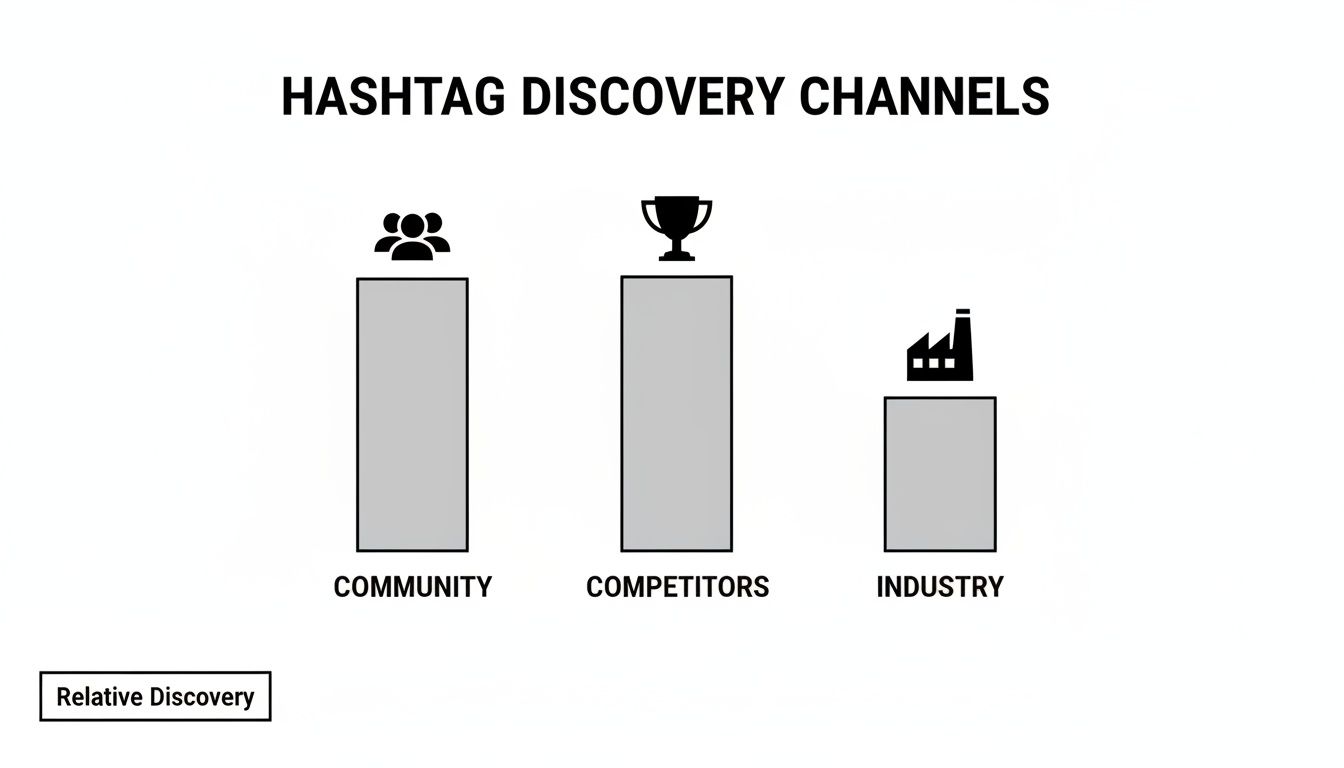
As you can see, keeping an eye on your competitors and listening to your community are far more effective than just pulling from generic industry lists. This just reinforces the core idea: on Facebook, relevance and genuine connection with your audience are everything.
Common Hashtag Mistakes to Avoid on Facebook
Even with the best intentions, your Facebook hashtag strategy can hit a wall if you fall into a few common traps. And let's be clear: getting hashtags wrong isn't just a missed opportunity. It can actively hurt your post's performance.
I've seen so many brands shoot themselves in the foot with simple, fixable errors. The good news? Once you know what to look out for, you can sidestep these pitfalls and make sure your hashtags are actually helping your content get seen.
Using Overly Broad Hashtags
This is probably the biggest mistake I see. People throw in massive, generic hashtags like #marketing, #business, or #food, thinking it will get them more eyeballs. It won't.
Sure, those tags have millions of posts, but that's the whole problem. Your post becomes a tiny speck of dust in a hurricane of content, disappearing from the feed in a blink. You're competing with everyone and reaching no one.
These giant tags also attract a completely unfocused audience and a ton of spam. They don’t give the algorithm any specific clues about your content, so it has no idea who to show it to.
Actionable Insight: Instead of
#marketing, try a specific tag like#ContentMarketingTipsor#SocialMediaForRealtors. Instead of#food, get specific with#PlantBasedFoodor#HealthyRecipesForKids. The more targeted you are, the better your chances of connecting with people who genuinely care.
Ignoring Hashtag Relevance
Next up is "hashtag stuffing"—the desperate act of cramming in popular but totally unrelated tags just to ride a trend. If you’re a local bakery posting about your new sourdough loaf, adding #TaylorSwift just because she's in the news is a terrible idea.
This tactic only confuses the algorithm and irritates users. Imagine someone clicking a hashtag to see concert photos and getting hit with your bread post. It's a bad experience, which leads to low engagement and could even get your content flagged as spam.
Key Takeaway: Every single hashtag should be directly tied to your post's content. Actionable Insight: Before publishing, ask yourself, "If a user searched for this hashtag, would my post be exactly what they hoped to find?" If the answer is no, delete the tag.
Forgetting to Create a Branded Hashtag
Not creating a unique, branded hashtag is a massive missed opportunity for community building. A good branded tag acts as a digital filing cabinet for your brand, letting your followers find all your content in one spot. It's also the easiest way to collect user-generated content (UGC).
Without one, you're missing out on a simple yet powerful tool for tracking your brand's footprint and fostering a real community around your business.
Actionable Insight: Come up with a simple, memorable hashtag that's unique to you. Think
#NicheTrafficKitTipsor#MyBrandCampaign2025. Then, actively encourage your audience to use it. Example: Add a line to your posts like, "Share your results with us using #YourBrandedTag for a chance to be featured on our page!" This incentivizes use and builds a library of UGC.
Measuring the Impact of Your Hashtag Strategy
As the old saying goes, if you can't measure it, you can't improve it. Throwing hashtags at your posts without checking the data is just guesswork. We need to turn that guesswork into a real, repeatable strategy to see if your hashtags on Facebook are actually pulling their weight.
The good news? You don't need a pricey, complex analytics suite to start. Your most powerful tool is already waiting for you inside your Facebook Page Insights. It's the perfect spot to run some simple A/B tests and see what truly clicks with your audience.
Actionable Insight: This week, run a simple test. Post two similar pieces of content at the same time on two different days.
Post A: Use one broad hashtag (e.g.,
#DigitalMarketing).Post B: Use two niche hashtags (e.g.,
#ContentMarketingTipsand#SEOTools). After 48 hours, go into your Page Insights and compare the "Reach" and "Engagement" for both posts. This simple test will give you real data on what works for your audience.
Key Metrics to Monitor
When you dive into your Page Insights, it's easy to get distracted by vanity metrics like likes. Instead, you need to zero in on the numbers that show your hashtags are actually expanding your audience, not just preaching to the choir.
These are the metrics that really matter:
Reach vs. Impressions: Look for the breakdown between followers and non-followers. A significant jump in impressions from non-followers is a tell-tale sign that your hashtags are doing their job and helping new people discover your content.
Engagement Rate: Are people doing more than just scrolling by? A higher engagement rate (comments, shares, and even saves) means your hashtags are connecting you with the right kind of audience—the ones who are genuinely interested.
By comparing these data points across different posts, you'll quickly spot patterns. You'll see which types of hashtags are moving the needle for your specific goals. This isn't just data; it's the foundation of a smarter hashtag strategy.
A successful hashtag strategy isn't just about reach; it's about reaching the right people. Tracking engagement from non-followers tells you if you're attracting a genuinely interested audience that could convert into loyal followers.
Tracking Branded and Campaign Hashtags
What about your unique hashtags, like a launch tag such as #NicheTrafficKitLaunch? These require a different kind of monitoring. Here, the goal is to track user-generated content and get a feel for the conversation volume your brand is sparking.
The most direct way to do this is by searching your branded hashtag right on Facebook. See who’s using it and what they're saying. It’s a great way to find authentic content and engage with your community.
Of course, manually searching can get tedious fast, especially if your campaign takes off. To really understand the performance and reach of your Facebook hashtags at scale, it's worth looking into some of the best social media monitoring tools. These platforms can put the tracking on autopilot, giving you a much clearer picture of your hashtag's true impact.
Ultimately, you need to connect these metrics back to your larger business objectives. For a deeper dive into that, check out our guide on how to measure social media ROI. By consistently testing, learning, and tweaking your approach, you'll turn hashtags from an afterthought into a powerful engine for growth.
Common Questions About Facebook Hashtags Answered
Even with a solid plan, you're bound to have a few nagging questions about the specifics of using hashtags on Facebook. Let's tackle some of the most common ones I hear so you can fine-tune your approach.
Getting these details sorted out can make a surprisingly big difference.
Should I Put Hashtags in the First Comment?
In a word: no. This is a classic Instagram strategy that just doesn't translate to Facebook. For a hashtag to do its job and get your post seen, it has to be in the original caption.
Hashtags in the comments on Facebook are completely ignored by the algorithm for search and discovery. Plain and simple, they won't help your post reach a single new person. Keep them in the main post text.
How Many Hashtags Should I Actually Use?
The research on this is pretty consistent: on Facebook, less is definitely more. The sweet spot is 1 to 3 super-relevant hashtags.
Time and again, studies show that posts with a handful of focused tags perform better than those crammed with a dozen. Once you start adding more than five or six, your post can start to look spammy, which can hurt your engagement with both your audience and the algorithm.
Actionable Insight: For your next post, pick just ONE perfect hashtag that describes the core topic. Then add a second one that describes your target audience or community (e.g.,
#LeadGenerationfor the topic,#SmallBusinessOwnersfor the community). This combination is often more powerful than five generic tags.
Do Hashtags Even Work on a Private Facebook Profile?
They do, but only for people who can already see your post. If your personal profile is locked down to "Friends Only," your hashtags will only be clickable and searchable for your existing friends.
They won't get your post into public hashtag feeds or help strangers find you. The real power of hashtags for expanding your reach is reserved for public content from Facebook Pages, Groups, and public personal profiles. For private accounts, think of them more as a way to organize content for your inner circle.
Can I Edit Hashtags After I've Already Posted?
Yep, you absolutely can. Facebook lets you edit any post after it's live. Just hit the three-dot menu on the post, choose "Edit post," and you can add, remove, or change your hashtags.
But there's a catch. A post's initial momentum in the first few hours is critical. The algorithm pushes your content most aggressively right after you publish it.
So, while you can add hashtags later, you might miss that crucial initial discovery window. It’s always best to have your chosen hashtags ready to go from the start.
Ready to stop guessing and start growing? NicheTrafficKit is an AI-powered tool that handles the heavy lifting—researching trends, writing platform-specific posts with the right hashtags, and scheduling everything for peak engagement. Try it for free and see how much time you can save.
